
GPT Image 2Prompt AI
Dr. Otter's AI Benchmark Presentation — Sora 2 Prompt
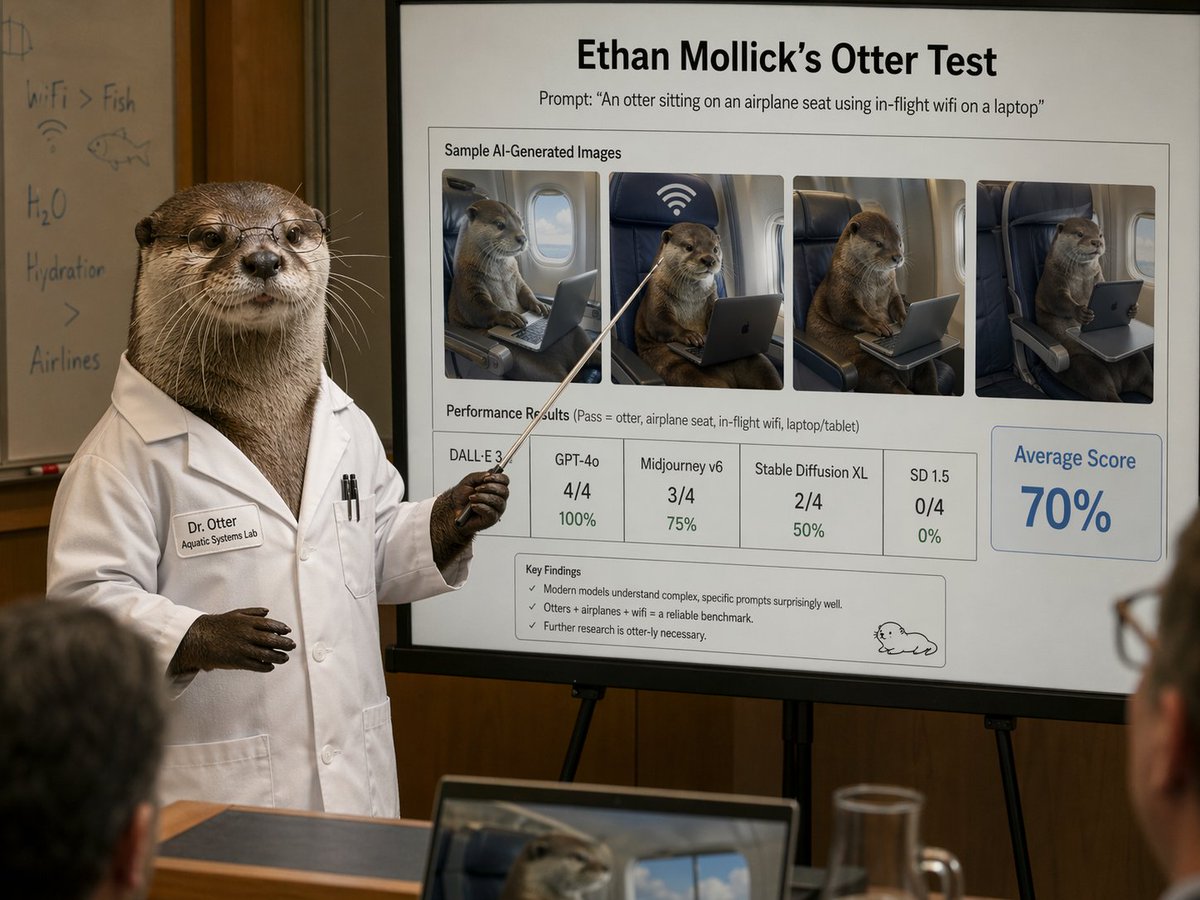
Create a photorealistic humorous scene of an otter scientist presenting AI image benchmark results in a conference room, perfect for satire or editorial content
PROMPT · EN
一张照片级逼真的幽默学术演示场景,位于会议室内:一只拟人化的水獭科学家站在画面左侧,身穿干练的白色实验服,手持一根细长的指示棒,指向画架上的大型演示项目。这只水獭像人类一样直立,拥有逼真的棕色皮毛、深色的爪子和专业的姿态。实验服上缝着一个写有“Dr. Otter”的姓名牌,下方写着较小的一行字“Aquatic Systems Lab”,胸前口袋里插着两支笔。水獭的脸部被一个方形模糊块部分遮挡。水獭身后是一个白板,上面有模糊的手写笔记和涂鸦,包括“WiFi > Fish”、“H2O”、“Hydration”、一条鱼的草图以及一个 WiFi 符号。画面的焦点是一张大型且清晰的演示 Slides,具有锐利易读的文字和精致的企业学术布局。顶部是一个粗体标题,写着“argheadline text: Ethan Mollick 的水獭测试”,下方副标题写着“提示词:\"argprompt text: 一只水獭坐在飞机座位上,用笔记本电脑使用机上 WiFi\"”。下方是一个名为“AI 生成图像样本”的方框区域,包含 4 张并排的样本图像,展示了逼真的水獭坐在飞机座位上使用笔记本电脑或平板电脑,每张图像都像模型输出一样被框起,其中一张在座位上方显示了一个巨大的 WiFi 符号。图像下方是一个标有“性能结果(通过 = 水獭、飞机座位、机上 WiFi、笔记本电脑/平板电脑)”的部分,包含 5 个分数框:“DALL·E 3”无可见数字分数,“GPT-4o”为“4/4”和“100%”,“Midjourney v6”为“3/4”和“75%”,“Stable Diffusion XL”为“2/4”和“50%”,以及“SD 1.5”为“0/4”和“0%”。右侧是一个醒目的高亮方框,写着“平均分”和“argaverage score: 70%”,字体为蓝色大号字。Slides 底部是一个“关键发现”框,包含 3 个要点:“现代模型对复杂、具体提示词的理解能力令人惊讶。”、“水獭 + 飞机 + WiFi = 一个可靠的基准测试。”以及“进一步的研究非常有必要(otter-ly necessary)。”Slides 右下角有一个简单的卡通水獭涂鸦。房间光线温暖,墙壁为木质镶板,景深较浅,前景中有几位模糊的听众,包括边缘处的一台笔记本电脑,屏幕上显示着一张水獭图像,桌上放着一个玻璃水壶。风格:超写实编辑摄影,冷面科学讽刺,可信的会议演示,高细节,自然室内光线,专业镜头压缩,易读的 Slides 排版,精致而荒诞。
Informazioni su questo prompt
Create a photorealistic humorous scene of an otter scientist presenting AI image benchmark results in a conference room, perfect for satire or editorial content. Use it as a Concept Art starting point for GPT Image 2: keep the visual structure and style constraints intact, then swap in your own subject, brand, or scene.
Start by replacing headline text, prompt text, and average score, then keep the camera, composition, and material cues in the same order. This makes the output easier to compare across variations.
Come usare questo prompt
- Copy the prompt text from this page.
- Open Sora 2 or a compatible AI image generator (e.g., DALL·E 3, Midjourney).
- Edit the curly-brace variables (like
headline text,prompt text,average score) to customize slide content. - Paste the prompt and generate your image. Refine settings or iterate for best results.


