
Elegant Academy Anime Character Sheet — Sora 2 Prompt
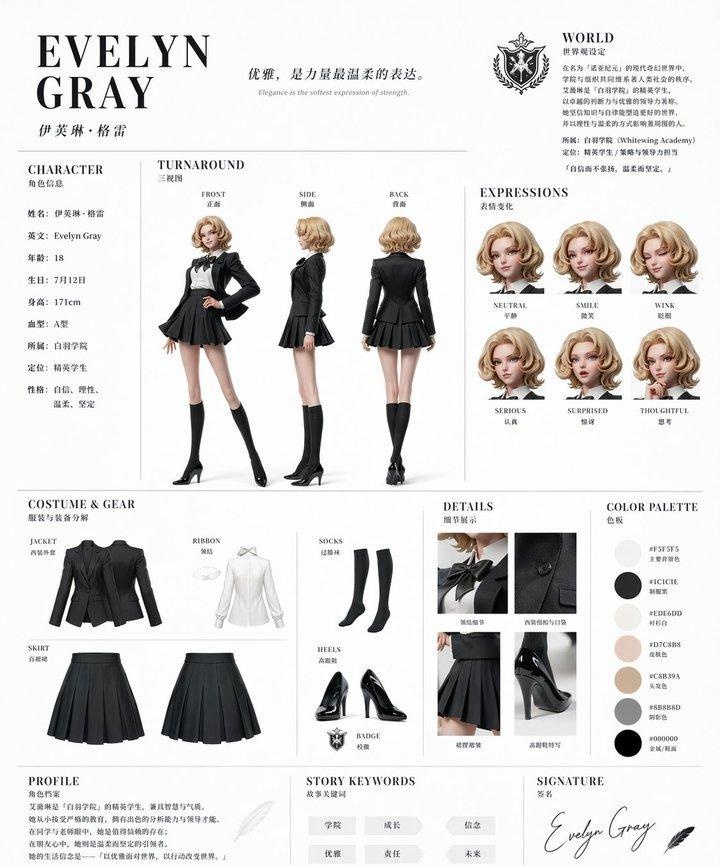
Generate a luxurious, magazine-style character design reference sheet for an elite academy student, featuring clean layouts, multilingual labels, and detailed outfit breakdowns.
Sobre este prompt
Generate a luxurious, magazine-style character design reference sheet for an elite academy student, featuring clean layouts, multilingual labels, and detailed outfit breakdowns. Use it as a Arte Conceitual starting point for GPT Image 2: keep the visual structure and style constraints intact, then swap in your own subject, brand, or scene.
This prompt is organized as structured JSON with fields such as type, style, character, outfit, layout, branding, and rendering. Keeping that hierarchy helps the model separate the subject, layout, interface elements, and detail constraints.
Start with small changes to subject, scene, camera, and color, then generate a few variations to compare composition and detail without turning the page copy into keyword stuffing.
Como usar este prompt
- Copy the full prompt and paste it into your Sora 2 (or compatible AI image generator) interface.
- Customize the customizable arguments — such as
{character name},{hair color}, and{outfit color}— to create your own unique character. - Select an appropriate model or style setting that supports anime or illustration outputs for best results.
- Generate the image and review the multi-section reference sheet, including three-view turnarounds, expression sheets, and costume close-ups.
- Iterate by adjusting variables or adding scene context to refine the character design to your vision.


