
GPT Image 2Prompt de IA
Cinematic Samurai Agency Landing Page — Sora 2 Prompt
Showcase bold agency branding with a cinematic samurai landing page featuring brutalist typography and dark gradients. Perfect for web design concepts.
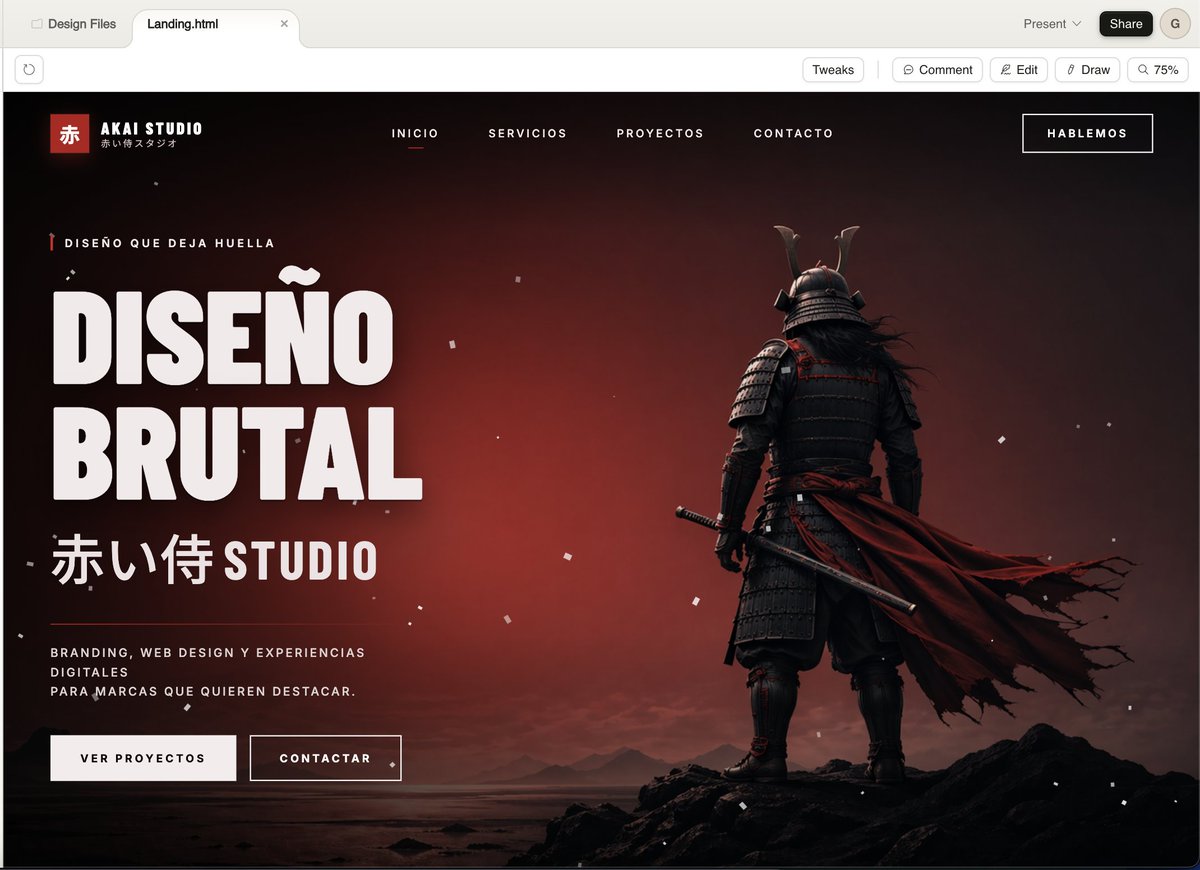
PROMPT · EN
一个电影感暗黑风格的落地页模型,展示了一家名为 argstudio name: AKAI STUDIO 的日式创意代理商,呈现于现代桌面浏览器窗口中。页面采用戏剧性的黑至深红渐变背景,带有忧郁的日落余晖,散布着细小的白色尘埃或灰烬颗粒,并采用宽屏首屏布局。在右侧,放置一个从背后拍摄的全身武士,站在平静海岸边的锯齿状黑色岩石上,身穿深色层叠盔甲和带角头盔,手持武士刀垂在身侧,一件长长的破损深红色斗篷向右强烈飘动。在左侧,创建醒目的超大号白色紧凑型无衬线标题文本(西班牙语),内容为 argheadline text: DISEÑO BRUTAL,分为两行堆叠。在标题上方,添加一行带有微小红色垂直装饰的小型眉标文本:argeyebrow text: DISEÑO QUE DEJA HUELLA。在标题下方,添加大型日语字符,后跟 STUDIO 字样:argsubheadline text: 赤い侍 STUDIO。在其下方,放置一段简短的白色小写大写辅助段落文本:argbody text: BRANDING, WEB DESIGN Y EXPERIENCIAS DIGITALES PARA MARCAS QUE QUIEREN DESTACAR。。在文案下方添加两个行动号召按钮:一个标注为“VER PROYECTOS”的实心浅色按钮,以及一个标注为“CONTACTAR”的描边深色按钮。在顶部导航栏中,包含 4 个居中的大写菜单项:“INICIO”、“SERVICIOS”、“PROYECTOS”、“CONTACTO”,其中“INICIO”使用一条红色下划线标记为激活状态。在右上角放置一个带边框的按钮,标注为 argtop button text: HABLEMOS。在网站页眉左上角,添加一个 Logo 区域,包含一个带有汉字“赤”的小红方块、品牌名称“AKAI STUDIO”以及下方微小的日语副标题。整体风格应呈现出高端粗野主义网页设计与电影级游戏主视觉图的结合:超精致的 UI 模型、锐利的排版、强烈的对比、奢华的代理商美学、极简而有力的构图、黑白红配色、细腻的颗粒感、逼真的光影效果,以及高级的呈现方式。
Sobre este prompt
Showcase bold agency branding with a cinematic samurai landing page featuring brutalist typography and dark gradients. Perfect for web design concepts. Use it as a Arte Conceitual starting point for GPT Image 2: keep the visual structure and style constraints intact, then swap in your own subject, brand, or scene.
Start by replacing studio name, headline text, eyebrow text, and subheadline text, then keep the camera, composition, and material cues in the same order. This makes the output easier to compare across variations.
Como usar este prompt
- Copy the prompt template.
- Choose your preferred AI model (e.g., Sora 2, Midjourney, DALL·E) that interprets detailed visual prompts.
- Replace the placeholder variables (e.g., {studio name}, {headline text}) with your own content, or keep the defaults for a Japanese agency aesthetic.
- Generate the output. You may need to adjust aspect ratio (e.g., 16:9 for a browser window) or add negative prompts if the model supports it.
- Refine by tweaking keywords like "brutalist," "cinematic lighting," or "dust particles" to match your desired intensity.


