
GPT Image 2AI-промпт
Cinematic Portrait with Monochrome Eye Background — Sora 2 Prompt
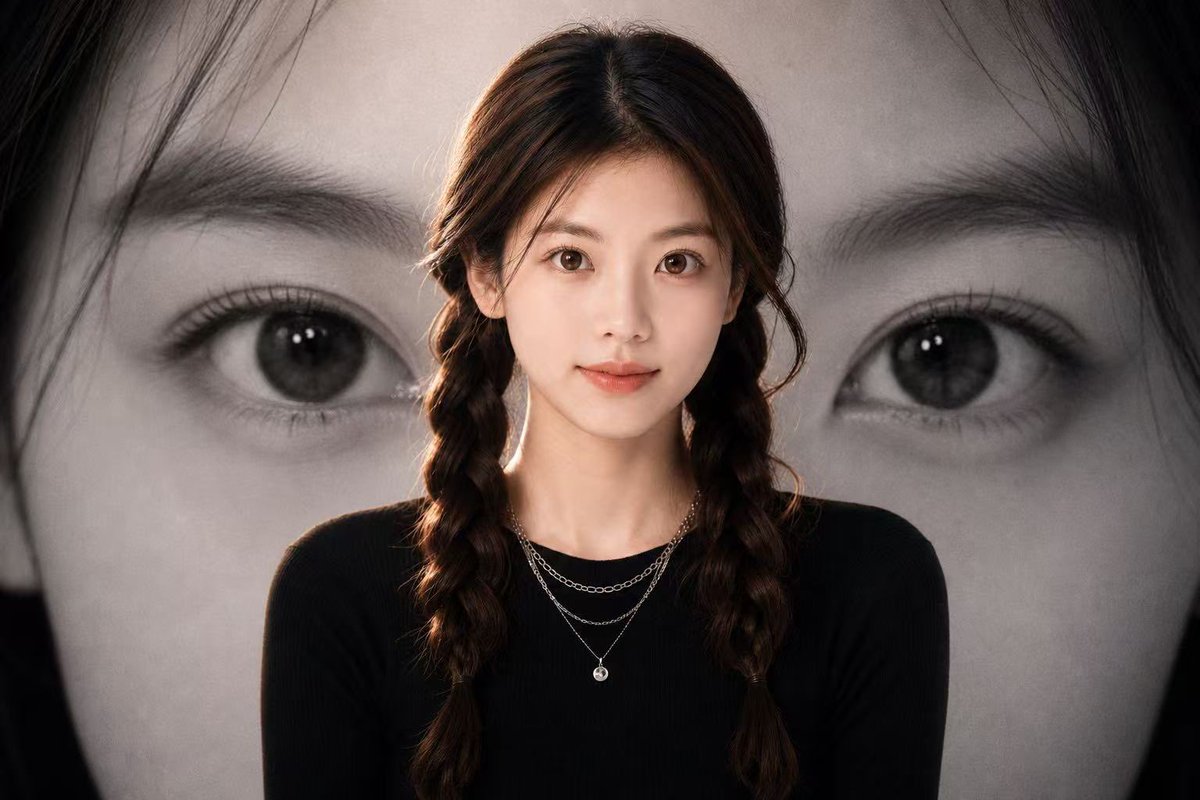
Create a stunning, high-contrast fashion poster with a realistic subject in the foreground and a dramatic, enlarged black-and-white eye behind them.
ПРОМПТ · EN
创作一张电影感人像海报,前景中心位置为 argsubject: 年轻女性 的半身像,身穿修身的 argoutfit color: 黑色 长袖上衣,佩戴精致的叠层银色项链。主体留着深棕色长发,中分并编成两条松散的辫子,采用柔和的摄影棚灯光,头发和肩部带有微妙的暖色轮廓光。主体后方的整个背景填充一张巨大的黑白人脸特写照片,聚焦于一只大眼睛、眉毛、睫毛和部分鼻梁,进行戏剧性的裁剪,使眼睛位于画面右侧,深色头发环绕边缘。使用情绪化的单色背景,前景主体采用柔和的自然色彩,高对比度,浅景深,编辑时尚海报构图,16:9 横向比例,写实摄影,简洁现代美学,无文字,无 Logo。在左侧添加一个柔和的矩形覆盖区域作为暗灰棕色块,并在主体面部覆盖一个较小的暖肤色矩形,营造出匿名海报样机效果。
О промпте
Create a stunning, high-contrast fashion poster with a realistic subject in the foreground and a dramatic, enlarged black-and-white eye behind them. Use it as a Концепт-арт starting point for GPT Image 2: keep the visual structure and style constraints intact, then swap in your own subject, brand, or scene.
Start by replacing subject and outfit color, then keep the camera, composition, and material cues in the same order. This makes the output easier to compare across variations.
Как использовать этот промпт
- Copy the prompt and paste it into your preferred AI image generator like Sora 2 or Midjourney.
- Replace the subject and outfit color variables (in curly braces) with your desired description.
- Adjust the aspect ratio or lighting details in the prompt text for different creative effects.
- Generate the image and review the composition of the foreground subject and background eye.


