
GPT Image 2AI-промпт
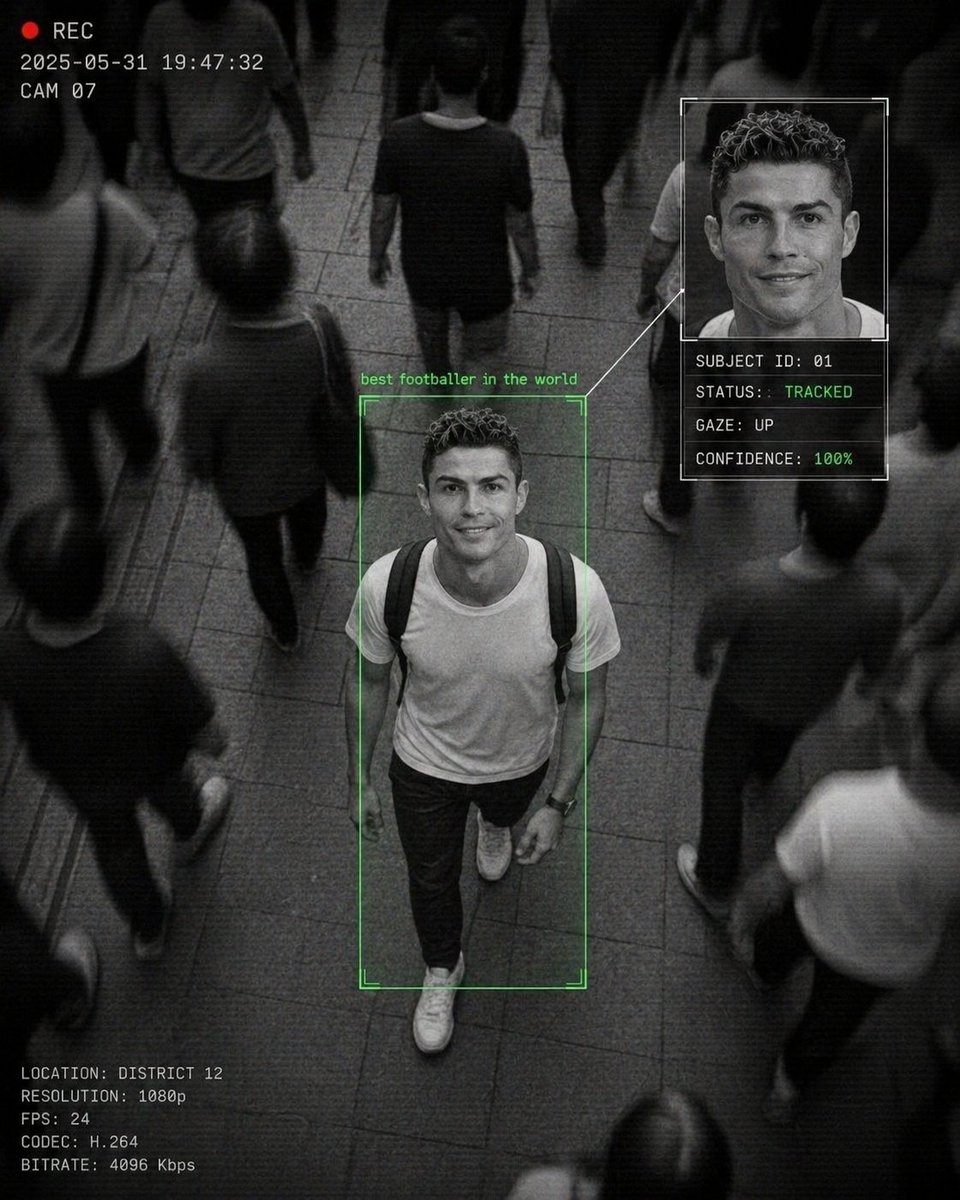
Cinematic CCTV Surveillance Interface — Sora 2 AI Prompt
Generate a dramatic monochrome surveillance scene with a focused subject, digital UI overlays, and motion-blur crowds for a documentary-style AI aesthetic.
1 / 4
ПРОМПТ · EN
一张 CCTV 风格的监控画面,俯拍 arglocation: 拥挤的街道场景,画面中心是一名 argsubject: 年轻男子 正向前走并抬头看向镜头,露出温暖友好的微笑,周围是模糊的行人动态,argcolor tone: 黑白单色调,周围人群有强烈的运动模糊,主体清晰对焦,戏剧性对比,俯视视角,AI 人脸识别界面叠加层,女性周围有绿色边框并标注 "PERSON OF INTEREST",侧边栏显示放大的面部肖像及数据文本:"SUBJECT ID: 01","STATUS: TRACKED","GAZE: UP","CONFIDENCE: 86%",面部面板与主体之间有连接线,角落有时间戳叠加,"REC" 指示灯,颗粒感纹理,数字噪点,压缩伪影,细微扫描线,电影级监控美学,纪录片风格,略微扭曲的透视,城市环境,动态构图。
О промпте
Generate a dramatic monochrome surveillance scene with a focused subject, digital UI overlays, and motion-blur crowds for a documentary-style AI aesthetic. Use it as a Концепт-арт starting point for GPT Image 2: keep the visual structure and style constraints intact, then swap in your own subject, brand, or scene.
Start by replacing location, subject, and color tone, then keep the camera, composition, and material cues in the same order. This makes the output easier to compare across variations.
Как использовать этот промпт
- Copy the prompt and paste it into your preferred AI image or video generator that supports Sora 2 or similar models.
- Replace the default arguments in the curly braces
{}likelocation,subject, andcolor tonewith your own creative details to customize the scene. - Choose a compatible model (e.g., Sora 2, Runway Gen-3, Pika) and set an appropriate aspect ratio like 16:9 for a cinematic surveillance look.
- Generate the image and refine your prompt by adjusting the subject's action, UI data, or aesthetic descriptors if needed.
- Download and use the output for projects requiring a high-tech, gritty, or thriller-inspired visual style.


