
GPT Image 2AI 提示词
Dark Fantasy Storyboard Grid — 12-Panel Sora Prompt
Generate a 12-panel cinematic storyboard with timestamps, captions, and dark fantasy visuals for short film pre-visualization.
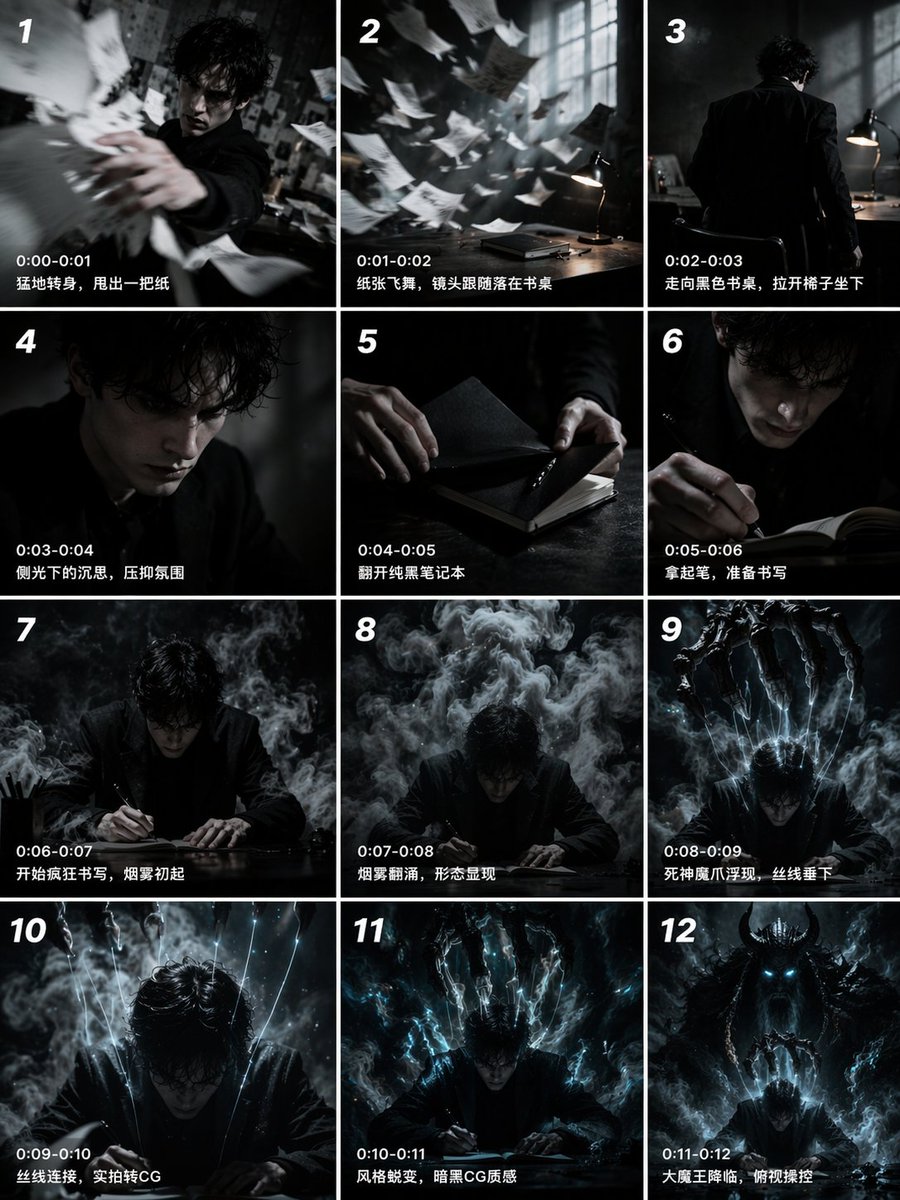
提示词 · EN
type
12-panel cinematic storyboard gridstyle
{argument name="visual style" default="dark cinematic transitioning to dark fantasy CG"}character
{argument name="main character" default="pale young man with messy black hair in a dark suit"}layout
columns
3rows
4panel_count
12panels
item 1
id
1timestamp
0:00-0:01caption
猛地转身,甩出一把纸visual
character throwing papers at cameraitem 2
id
2timestamp
0:01-0:02caption
纸张飞舞,镜头跟随落在书桌visual
papers flying in dark room with desk lampitem 3
id
3timestamp
0:02-0:03caption
走向黑色书桌,拉开椅子坐下visual
character walking away towards deskitem 4
id
4timestamp
0:03-0:04caption
侧光下的沉思,压抑氛围visual
close-up of character's face in shadowitem 5
id
5timestamp
0:04-0:05caption
翻开纯黑笔记本visual
close-up of hands opening a black notebookitem 6
id
6timestamp
0:05-0:06caption
拿起笔,准备书写visual
close-up of character holding pen over notebookitem 7
id
7timestamp
0:06-0:07caption
开始疯狂书写,烟雾初起visual
character writing frantically, smoke risingitem 8
id
8timestamp
0:07-0:08caption
烟雾翻涌,形态显现visual
thick smoke surging around characteritem 9
id
9timestamp
0:08-0:09caption
死神魔爪浮现,丝线垂下visual
skeletal hands emerging above, glowing threads hanging downitem 10
id
10timestamp
0:09-0:10caption
丝线连接,实拍转CGvisual
glowing threads attaching to character's headitem 11
id
11timestamp
0:10-0:11caption
风格蜕变,暗黑CG质感visual
magical energy, heavy CG fantasy style shiftitem 12
id
12timestamp
0:11-0:12caption
大魔王降临,俯视操控visual
{argument name="final entity" default="giant horned demon figure"} looming behind, controlling character like a puppet关于这个提示词
Generate a 12-panel cinematic storyboard with timestamps, captions, and dark fantasy visuals for short film pre-visualization. 它更适合作为 GPT Image 2 的概念艺术起点:先保留画面结构、主体关系和风格约束,再替换成你的品牌、人物或场景。
这条提示词使用结构化 JSON 组织信息,包含 type、style、character、layout、panels 等字段。保留这种层级能让模型更清楚地区分画面主题、布局、界面元素和细节约束。
使用时建议先小幅修改主体、场景、镜头和色调,再生成多个版本对比构图与细节。这样页面内容对用户有实际帮助,也避免把模型名或标签机械堆在正文里。
如何使用这个提示词
- Copy the prompt into your preferred AI video or image model. 2. Choose a model like Sora, Runway, or Pika that supports cinematic grids. 3. Customize the
visual styleandmain characterarguments to match your vision. 4. Generate the storyboard to receive a 3x4 grid with timed panels and scene descriptions. 5. Use the output as a visual blueprint for your film or animation project.


