
GPT Image 2AI 提示词
1960s Art Film Poster — Vintage Collage Prompt
Generate a tactile, handcrafted European art film poster with ripped paper, offset printing, bold fonts, and cinematic collage elements for a rebellious, intellectual look.
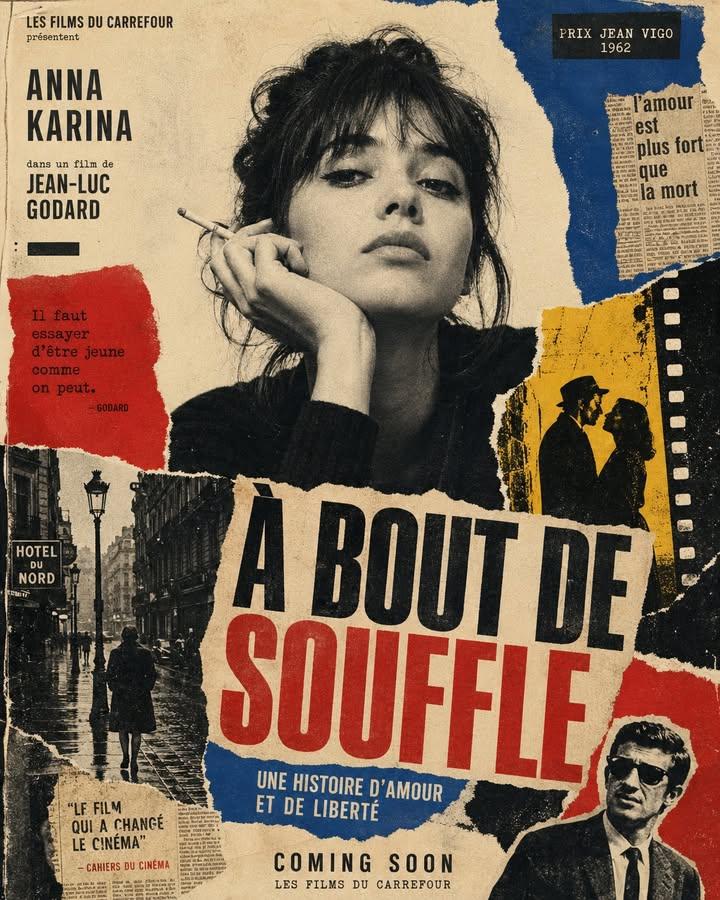
1 / 2
提示词 · EN
在做旧的奶油色纸张上创作一幅垂直构图的海报,营造出手工模拟的质感。使用粗糙的撕纸边缘、分层的杂志剪贴、复印颗粒感、半色调纹理、墨水渗色以及略有偏差的丝网印刷套色效果。主体应为黑白摄影肖像,置于画面中心或中上方位置。 在主体周围点缀深红、钴蓝、暖黄、黑色和象牙色的图形色块。添加辅助性的拼贴碎片,如雨中的欧洲街道、胶片边框、报纸剪报、城市剪影和电影细节,像 20 世纪 60 年代的艺术电影海报那样进行手工排版。 使用具有强烈视觉层级的粗体压缩字体。添加大号标题文字:“argmain title: [主标题]”。添加较小的副标题文字:“argsubtitle: [副标题]”。添加底部文字:“argevent details: [品牌名称 / 活动名称 / 即将推出 / 日期]”。如有需要,可在顶部添加一行小字:“[标语]”。 最终成品应呈现出电影感、知识分子气息、叛逆感和编辑风格,如同 20 世纪 60 年代一张带有鲜明视角的遗失欧洲电影海报。保持其原始、触感、印刷感、不完美和手工制作的特质。避免使用现代的光泽感饰面。
关于这个提示词
Generate a tactile, handcrafted European art film poster with ripped paper, offset printing, bold fonts, and cinematic collage elements for a rebellious, intellectual look. 它更适合作为 GPT Image 2 的概念艺术起点:先保留画面结构、主体关系和风格约束,再替换成你的品牌、人物或场景。
使用时优先替换 main title、subtitle、event details 等占位符,并保持镜头、构图和材质描述的顺序不变。这样更容易获得稳定的画面结果,也方便继续做多版本对比。
如何使用这个提示词
- Copy the prompt text.
- Paste into an AI image generator like Sora, Midjourney, or DALL-E 3.
- Replace placeholder variables (e.g.,
main title,subtitle,event details) with your own text. - Generate the image and iterate by adjusting style weights or collage elements.
- Use the output for posters, album art, or editorial designs.


