
GPT Image 2AI 提示词
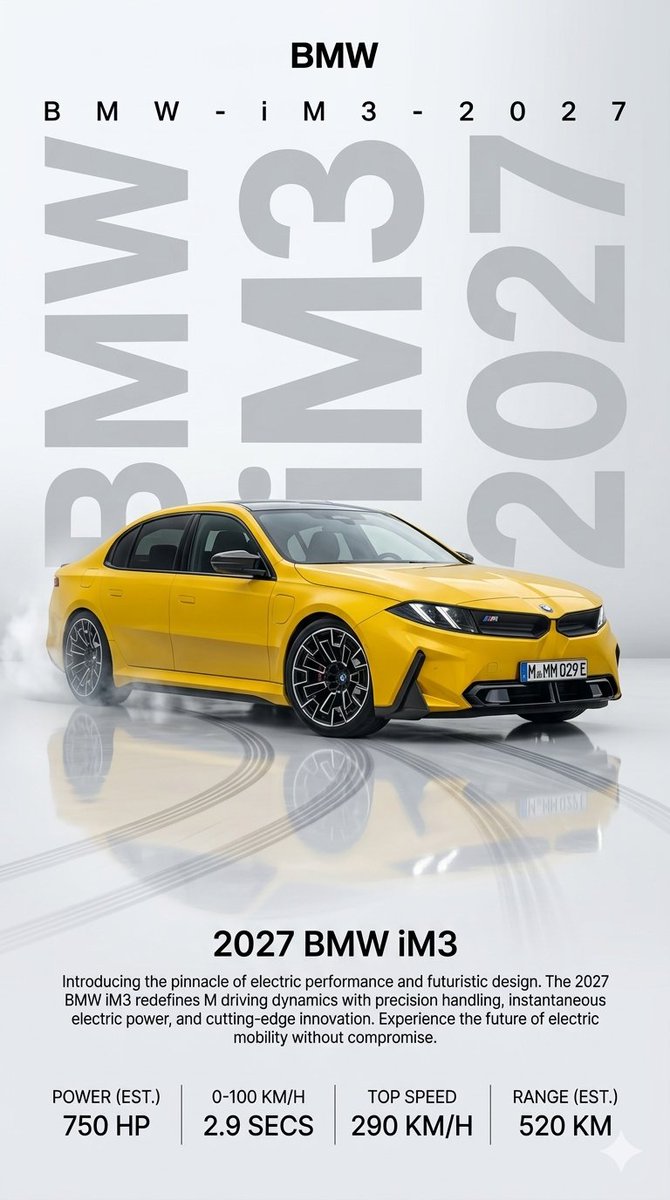
2027 BMW iM3 Electric Launch Poster — Sora 2 Prompt
Create a stunning vertical automotive launch poster for a yellow 2027 BMW iM3, complete with studio lighting, reflective floor, and performance specs.
提示词 · EN
type
高端汽车发布海报format
9:16 垂直广告海报brand
{argument name="brand name" default="BMW"}vehicle
model
{argument name="vehicle model" default="BMW iM3"}year
{argument name="model year" default="2027"}body
现代电动性能轿车,四门,极具侵略性的 M 系列风格前脸color
{argument name="car color" default="亮金属黄色"}details
黑色车顶和窗框,雕塑感引擎盖,锐利的 LED 大灯,带有小型 M 徽标的黑色双肾格栅,运动型下进气口,隐藏式门把手,大型黑色多辐空气动力学轮毂配银色点缀,低趴姿态,欧式前车牌显示 M-MM 029Ecomposition
background
干净的浅灰色摄影棚背景,带有柔和的垂直渐变top_text
count
2items
item 1
顶部居中显示大型粗体 BMW 标题item 2
下方显示宽间距的 B M W - i M 3 - 2 0 2 7 字样typography_background
count
3items
item 1
左侧超大浅灰色垂直 BMW 字母item 2
中央车后超大浅灰色 iM3 字母item 3
右侧垂直堆叠的超大浅灰色 2027 数字style
巨大的半透明几何无衬线字体作为图形背景main_render
2027 BMW iM3 黄色车型四分之三前侧视角,停在画面中心偏左位置,照片级摄影棚灯光,亮面车漆,逼真的反射效果floor
高光反射白色地面,倒映出车身,前景有深色弧形轮胎刹车痕,后轮处有轻微烟雾飘散,暗示电动性能发布lower_information_block
headline
{argument name="headline text" default="2027 BMW iM3"}paragraph
呈现电动性能与未来设计的巅峰之作。2027 BMW iM3 以精准的操控、瞬时的电力输出和尖端的创新,重新定义了 M 系列的驾驶动态。体验毫不妥协的未来电动出行。stats_count
4stats
item 1
label
功率 (预估)value
750 马力item 2
label
0-100 公里/小时value
2.9 秒item 3
label
最高时速value
290 公里/小时item 4
label
续航 (预估)value
520 公里dividers
四个数据列之间有细长的垂直灰色分隔线style
流畅的照片级汽车产品渲染,融合极简主义编辑手册设计,清晰的黑色无衬线字体,高端电动汽车性能品牌感,浅色单色背景衬托高对比度黄色车身,极致纯净的商业质感关于这个提示词
Create a stunning vertical automotive launch poster for a yellow 2027 BMW iM3, complete with studio lighting, reflective floor, and performance specs. 它更适合作为 GPT Image 2 的概念艺术起点:先保留画面结构、主体关系和风格约束,再替换成你的品牌、人物或场景。
这条提示词使用结构化 JSON 组织信息,包含 type、format、brand、vehicle、composition、style 等字段。保留这种层级能让模型更清楚地区分画面主题、布局、界面元素和细节约束。
使用时建议先小幅修改主体、场景、镜头和色调,再生成多个版本对比构图与细节。这样页面内容对用户有实际帮助,也避免把模型名或标签机械堆在正文里。
如何使用这个提示词
- Copy the entire prompt JSON from this page.
- Open your preferred AI image generator (e.g., Sora 2, Midjourney, DALL·E).
- Customize the brand name, vehicle model, year, headline, and car color by editing the
{argument}fields to match your desired concept. - Paste the modified prompt and generate your image.
- Review the output and adjust variables or regenerate for the best result.


