
GPT Image 2AI 提示词
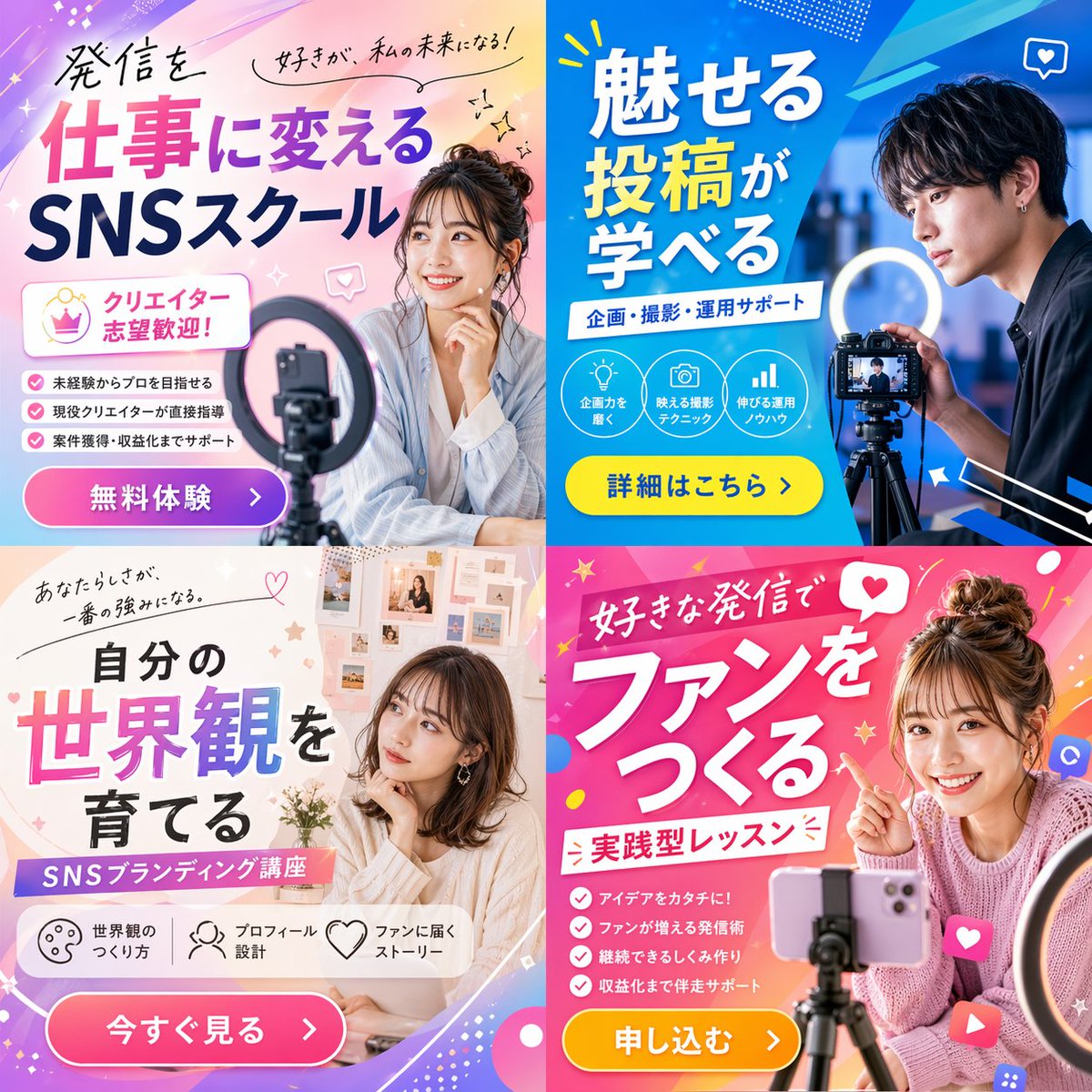
2x2 Social Media Course Promotional Banner Ad
Generate a vibrant 2x2 grid banner ad for a social media or content creation school, featuring diverse models, dynamic layouts, and customizable typography for any campaign.
提示词 · EN
type
2x2 网格宣传横幅广告theme
{argument name="course theme" default="社交媒体内容创作学校"}panels
item 1
position
左上color_palette
浅蓝与粉色柔和渐变subject
年轻女性微笑着,手托下巴,前景有智能手机和环形补光灯typography
headline
{argument name="top left headline" default="将发布内容转化为工作,SNS 学院"}subheadings
item 1
热爱,成就我的未来!item 2
欢迎有志成为创作者的你!layout_elements
bullet_points_count
3call_to_action_button
粉色按钮,标注为 '免费体验 >'item 2
position
右上color_palette
深蓝与青色几何风格subject
年轻男性专注地看着三脚架上的专业相机,配有环形补光灯typography
headline
{argument name="top right headline" default="学习如何制作吸睛贴文"}subheadings
item 1
策划、拍摄、运营支持layout_elements
circular_icons_count
3icon_types
item 1
灯泡item 2
相机item 3
柱状图call_to_action_button
黄色按钮,标注为 '查看详情 >'item 3
position
左下color_palette
柔和米色与白色美学subject
年轻女性若有所思地看向侧面,背景为情绪板typography
headline
{argument name="bottom left headline" default="培养属于你的世界观"}subheadings
item 1
你的个性,就是最大的优势。item 2
SNS 品牌塑造课程layout_elements
horizontal_icons_count
3icon_types
item 1
调色板item 2
人物item 3
爱心call_to_action_button
粉色按钮,标注为 '立即查看 >'item 4
position
右下color_palette
活力粉与洋红色波普设计subject
年轻女性灿烂微笑,指向文字,扎着丸子头,三脚架上架着智能手机typography
headline
{argument name="bottom right headline" default="通过热爱的内容建立粉丝群"}subheadings
item 1
实践型课程layout_elements
bullet_points_count
4call_to_action_button
黄色按钮,标注为 '立即报名 >'关于这个提示词
Generate a vibrant 2x2 grid banner ad for a social media or content creation school, featuring diverse models, dynamic layouts, and customizable typography for any campaign. 它更适合作为 GPT Image 2 的概念艺术起点:先保留画面结构、主体关系和风格约束,再替换成你的品牌、人物或场景。
这条提示词使用结构化 JSON 组织信息,包含 type、theme、panels 等字段。保留这种层级能让模型更清楚地区分画面主题、布局、界面元素和细节约束。
使用时建议先小幅修改主体、场景、镜头和色调,再生成多个版本对比构图与细节。这样页面内容对用户有实际帮助,也避免把模型名或标签机械堆在正文里。
如何使用这个提示词
- Copy the entire prompt JSON object. 2. Paste it into your chosen AI image generator (like Sora 2, Midjourney, or DALL-E). 3. Customize the variables in curly braces
{}—such ascourse themeor the headline text—to match your specific school or offer. 4. Adjust thedefaultvalues inside the quotes for instant customization. 5. Generate the image to create a professional, multi-panel promotional banner.


