
GPT Image 2AI 提示词
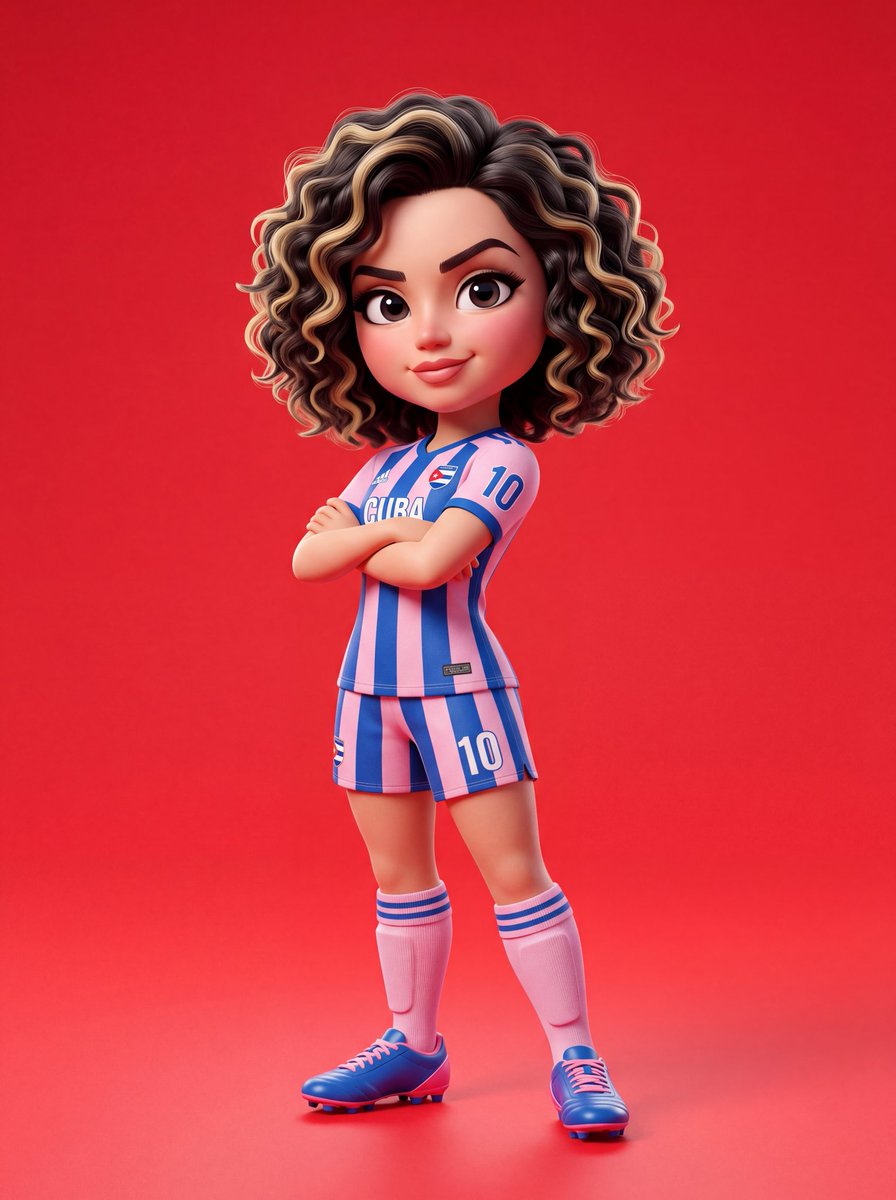
Pixar-Style 3D Character Design — Sora 2 Prompt
Create a bold, stylized cartoon character with exaggerated proportions, studio lighting, and vibrant colors in the signature Pixar 3D style.
1 / 2
提示词 · EN
{ "prompt_type": "3D_character_design", "style": { "rendering": "argrendering style: 皮克斯风格", "dimension": "3D", "aesthetic": "卡通", "quality": "超高分辨率", "lighting": "柔和摄影棚灯光", "depth": "电影级景深" }, "subject": { "type": "角色", "based_on": "argcharacter name: Sadie Sink", "design_approach": "具有夸张比例的风格化卡通" }, "character_anatomy": { "head": { "size": "头部较大,与身体比例夸张", "skin": "光滑,有光泽的质感", "eyes": { "size": "大而富有表现力", "style": "卡通夸张风格" }, "eyebrows": "锐利,轮廓分明", "hair": { "length": "短发", "texture": "卷发", "color": "自然底色配金色挑染" } }, "body": { "proportions": "夸张的卡通风格", "build": "运动型" } }, "outfit": { "jersey": { "type": "argoutfit type: 足球衫", "pattern": "条纹", "colors": ["粉色", "红色"], "fit": "标准运动剪裁" }, "shorts": { "type": "足球短裤", "colors": ["粉色", "红色"], "pattern": "与上衣配套" }, "socks": { "height": "及膝袜", "colors": ["粉色", "红色"] }, "footwear": { "type": "钉鞋", "style": "足球钉鞋" } }, "pose": { "body_position": "站立", "arms": "双臂交叉于胸前", "tilt": "身体轻微倾斜", "attitude": "自信", "expression": { "mouth": "浅浅的微笑", "overall_mood": "自信且酷" } }, "composition": { "framing": "全身照", "alignment": "居中", "background": { "type": "纯色", "color": "亮红色" } }, "textures_and_materials": { "skin": "光滑,有光泽", "fabric": "色彩鲜艳,渲染清晰", "overall_finish": "有光泽且阴影干净" }, "lighting": { "type": "摄影棚", "quality": "柔和", "shadows": "干净,细腻", "highlights": "柔和且带有光泽反射" }, "technical_specs": { "resolution": "超高分辨率", "style_reference": "皮克斯 / 专业 3D 角色设计", "color_palette": ["粉色", "红色", "金色", "亮红色背景"], "detail_level": "高度详细", "professional_grade": true }
}
关于这个提示词
Create a bold, stylized cartoon character with exaggerated proportions, studio lighting, and vibrant colors in the signature Pixar 3D style. 它更适合作为 GPT Image 2 的概念艺术起点:先保留画面结构、主体关系和风格约束,再替换成你的品牌、人物或场景。
使用时优先替换 rendering style、character name、outfit type 等占位符,并保持镜头、构图和材质描述的顺序不变。这样更容易获得稳定的画面结果,也方便继续做多版本对比。
如何使用这个提示词
- Copy the full JSON prompt from the page.
- Choose an AI model like Sora 2 that supports structured prompts.
- Edit the variables (e.g.,
character name,outfit type,rendering style) to customize your character. - Paste the adjusted prompt into your AI model and generate.
- Refine by adjusting pose, colors, or lighting until you get the perfect result.


