
GPT Image 2AI 提示词
3D Witch Game UI Render with Start Menu — Sora 2 Prompt
Create a polished 3D witch character with a clean game UI featuring start, settings, credits, and multiplayer buttons—ideal for game concept art and mockups.
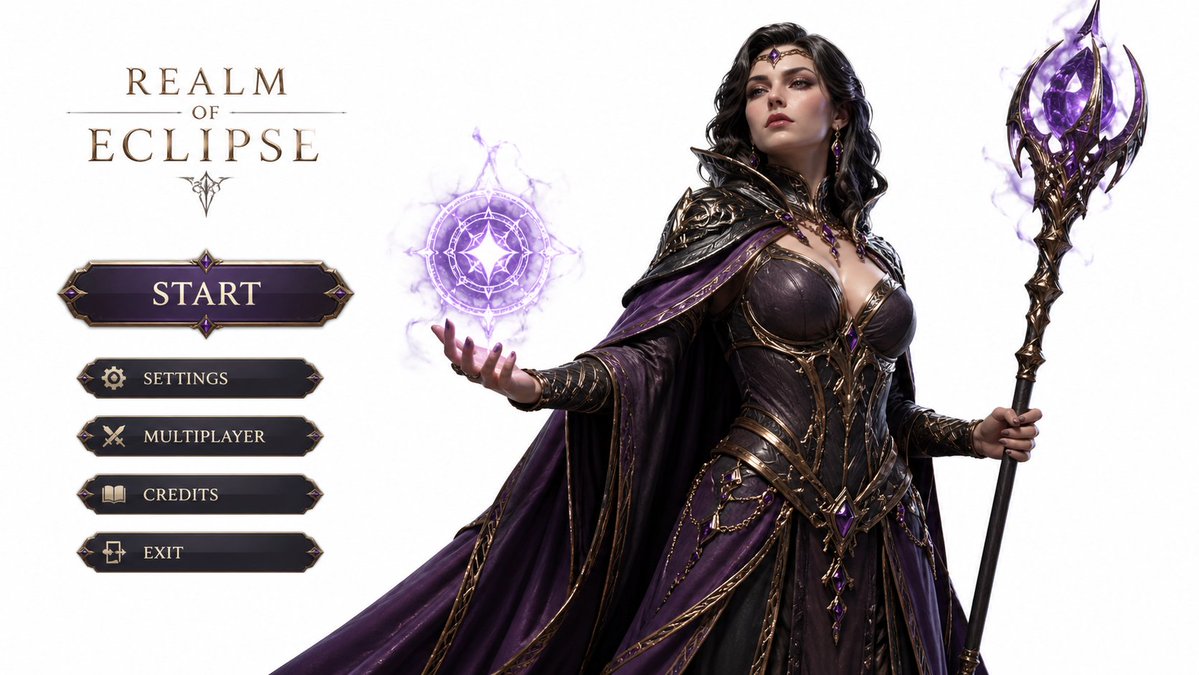
提示词 · EN
一张高度精细的 3D 游戏角色渲染图,主角为 argcharacter description: 优雅而强大的女巫,背景为白色,左侧配有开始按钮以及设置、制作人员名单、多人游戏等选项,比例为 16:9
关于这个提示词
Create a polished 3D witch character with a clean game UI featuring start, settings, credits, and multiplayer buttons—ideal for game concept art and mockups. 它更适合作为 GPT Image 2 的概念艺术起点:先保留画面结构、主体关系和风格约束,再替换成你的品牌、人物或场景。
使用时优先替换 character description 等占位符,并保持镜头、构图和材质描述的顺序不变。这样更容易获得稳定的画面结果,也方便继续做多版本对比。
如何使用这个提示词
- Copy the prompt above, including the customizable
{character description}variable. - Paste it into an AI image/video generator such as Sora 2, Midjourney, or DALL·E.
- Replace the default character description with your own, e.g., "a fierce warrior elf" or keep "elegant and powerful witch".
- Ensure the output aspect ratio is set to 16:9 for correct UI layout.
- Generate the image, then iterate by tweaking the character or UI details as needed.


