
GPT Image 2AI 提示词
3D Perspective Text Integrated into Scenes — Sora 2 Prompt
Generate stunning 3D perspective text that seamlessly integrates into any scene, like a cross-sea bridge, with dramatic cinematic lighting and extreme perspective distortion.
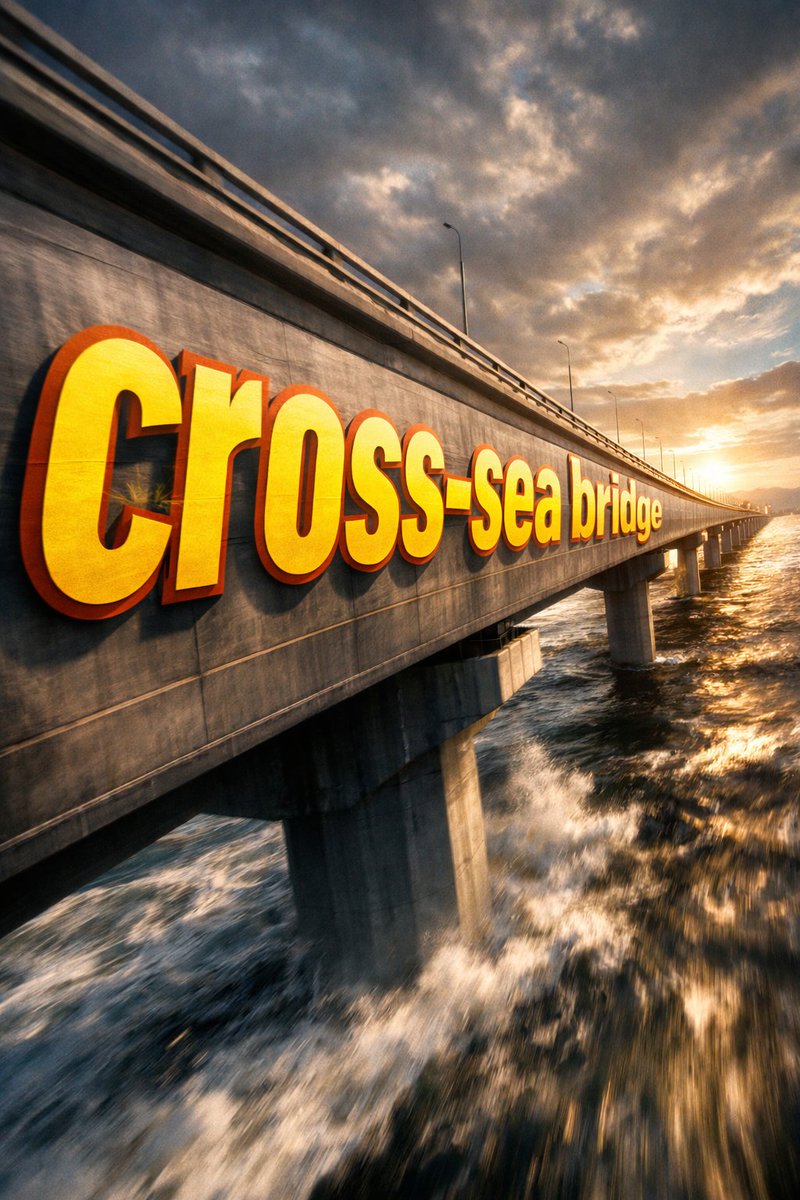
提示词 · EN
① 场景 argscene description: 跨海大桥侧面,戏剧性的电影级视角。巨大的粗体无衬线文字 "___② 文字内容 argtext content: 跨海大桥" 绘制在 ___③ 主体:无,从镜头前的近处向远端逐渐透视缩减。字形贴合表面曲率,与表面融为一体而非悬浮。部分文字区域被 ___④ 前景物体:无,遮挡,在缝隙中露出以营造深度层次感。argtext color and style: 超大号亮黄色 + 锐利橙色轮廓,极端的透视畸变与消失点对齐。电影级光影,运动模糊,海报级动态融合排版。
关于这个提示词
Generate stunning 3D perspective text that seamlessly integrates into any scene, like a cross-sea bridge, with dramatic cinematic lighting and extreme perspective distortion. 它更适合作为 GPT Image 2 的概念艺术起点:先保留画面结构、主体关系和风格约束,再替换成你的品牌、人物或场景。
使用时优先替换 scene description、text content、text color and style 等占位符,并保持镜头、构图和材质描述的顺序不变。这样更容易获得稳定的画面结果,也方便继续做多版本对比。
如何使用这个提示词
- Copy the prompt template from sora2hub.com.
- Replace the bracketed variables (scene description, text content, foreground objects, etc.) with your own details or use the defaults.
- Adjust text color and style (e.g., bright yellow with orange outline) as desired.
- Paste the customized prompt into your AI video generation model (such as Sora 2).
- Generate and download your cinematic 3D perspective text video.


