GPT Image 2AI 提示词
3D Glass Savings App Mockup — Mint UI Sora Prompt
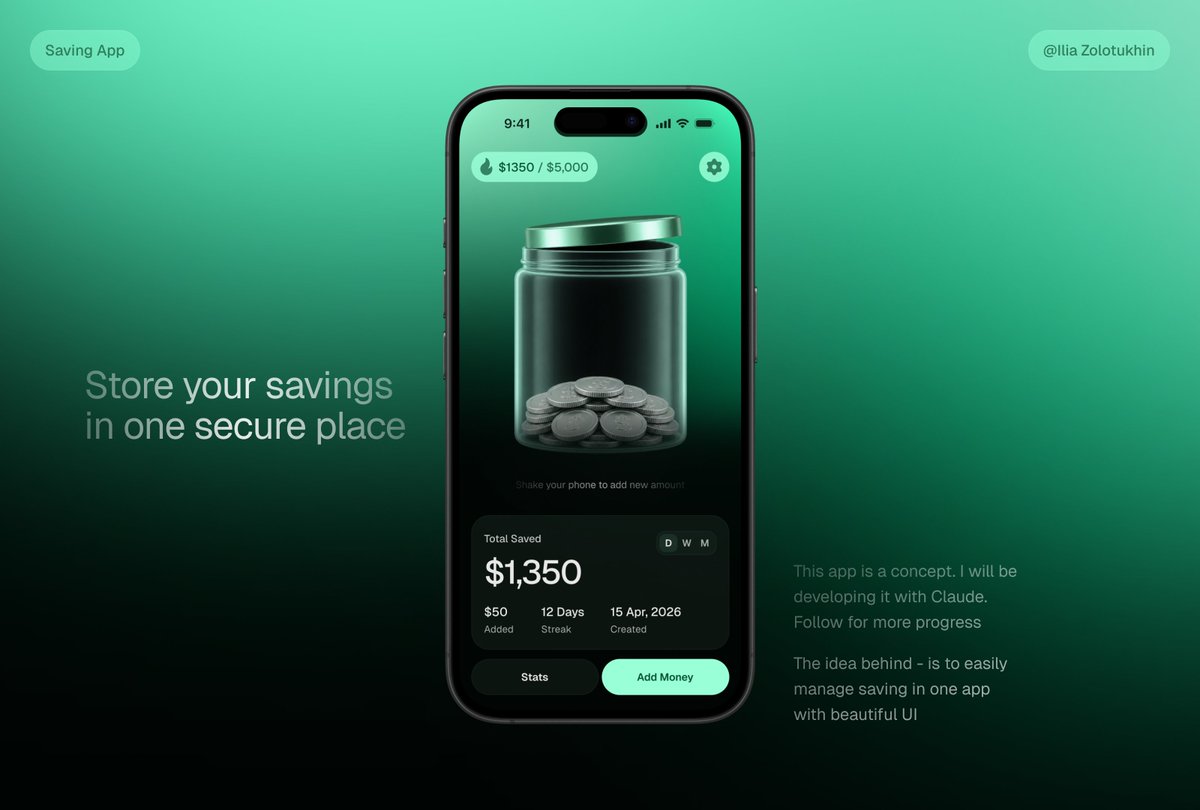
Generate a cinematic fintech app concept featuring a glass jar UI, smartphone mockup, and polished marketing copy for portfolio showcases.
提示词 · EN
type
高级金融科技应用概念主视觉模型style
时尚的 3D 玻璃拟态 UI,深薄荷绿渐变,逼真的智能手机渲染,柔和的摄影棚灯光,高对比度,精致的产品设计展示,细腻的模糊与光晕效果,电影级阴影canvas
aspect_ratio
16:9 横屏background
平滑的青色至祖母绿渐变,底部渐变为近黑色,极简科技展示背景layout
centerpiece
一部大型黑色 iPhone 风格智能手机,居中偏右,正面朝向,圆角设计,灵动岛摄像头开孔,纤薄黑色边框,逼真的侧边按钮和反射效果left_text_block
position
左中headline
{argument name="headline text" default="将您的储蓄存放在一个安全的地方"}style
大号浅灰色无衬线字体,两行,柔和透明度right_text_block
position
右下paragraph_count
2text
item 1
此应用为一个概念设计。我将使用 Claude 进行开发。关注以获取更多进展item 2
该理念旨在通过美观的 UI 在一个应用中轻松管理储蓄style
小号柔和灰色无衬线字体top_badges
count
2items
item 1
position
左上text
储蓄应用shape
圆角半透明薄荷色胶囊item 2
position
右上text
{argument name="creator handle" default="@Ilia Zolotukhin"}shape
圆角半透明薄荷色胶囊phone_screen
status_bar
time
9:41icons
信号、Wi-Fi、电池count
4top_controls
count
2items
item 1
position
左上text
{argument name="savings progress" default="$1350 / $5,000"}icon
小火焰或水滴图标shape
薄荷色半透明圆角胶囊item 2
position
右上icon
设置齿轮shape
薄荷色圆形按钮main_visual
大型半透明玻璃罐,配有金属薄荷色盖子,位于屏幕中央,罐底堆叠着银币;具有光泽的折射效果、垂直高光、3D 深度,深绿色内部背景micro_instruction
摇动手机以添加新金额stats_card
position
手机屏幕底部shape
大型深色圆角玻璃卡片title
总储蓄main_amount
{argument name="saved amount" default="$1,350"}time_toggle
count
3labels
item 1
日item 2
周item 3
月active
日metrics
count
3items
item 1
value
$50label
已添加item 2
value
12 天label
连续记录item 3
value
2026 年 4 月 15 日label
创建日期bottom_buttons
count
2items
item 1
text
统计style
深色圆角按钮item 2
text
存钱style
明亮薄荷色圆角按钮rendering_notes
使存钱罐成为视觉焦点,展现逼真的玻璃透明度和硬币几何结构,简洁现代的排版,平衡的留白,无杂乱感,产品拍摄级质量,适用于储蓄应用落地页预告关于这个提示词
Generate a cinematic fintech app concept featuring a glass jar UI, smartphone mockup, and polished marketing copy for portfolio showcases. 它更适合作为 GPT Image 2 的概念艺术起点:先保留画面结构、主体关系和风格约束,再替换成你的品牌、人物或场景。
这条提示词使用结构化 JSON 组织信息,包含 type、style、canvas、layout、phone screen、rendering notes 等字段。保留这种层级能让模型更清楚地区分画面主题、布局、界面元素和细节约束。
使用时建议先小幅修改主体、场景、镜头和色调,再生成多个版本对比构图与细节。这样页面内容对用户有实际帮助,也避免把模型名或标签机械堆在正文里。
如何使用这个提示词
- Copy the entire prompt JSON object.
- Choose a compatible AI model like Sora 2 or a text-to-image generator.
- Customize variables such as
headline text,saved amount, orcreator handleto match your project. - Generate the output and refine by adjusting style keywords (e.g., lighting, color) if needed.
- Use the result for presentations, portfolios, or social media posts.