
GPT Image 2AI 提示词
3D SaaS Mascot Brand Guide — Sora 2 Prompt
Create a complete 3D mascot brand guide for your SaaS platform, featuring a soft-rendered character, use case grid, color palette, and clean UI — all from a single prompt.
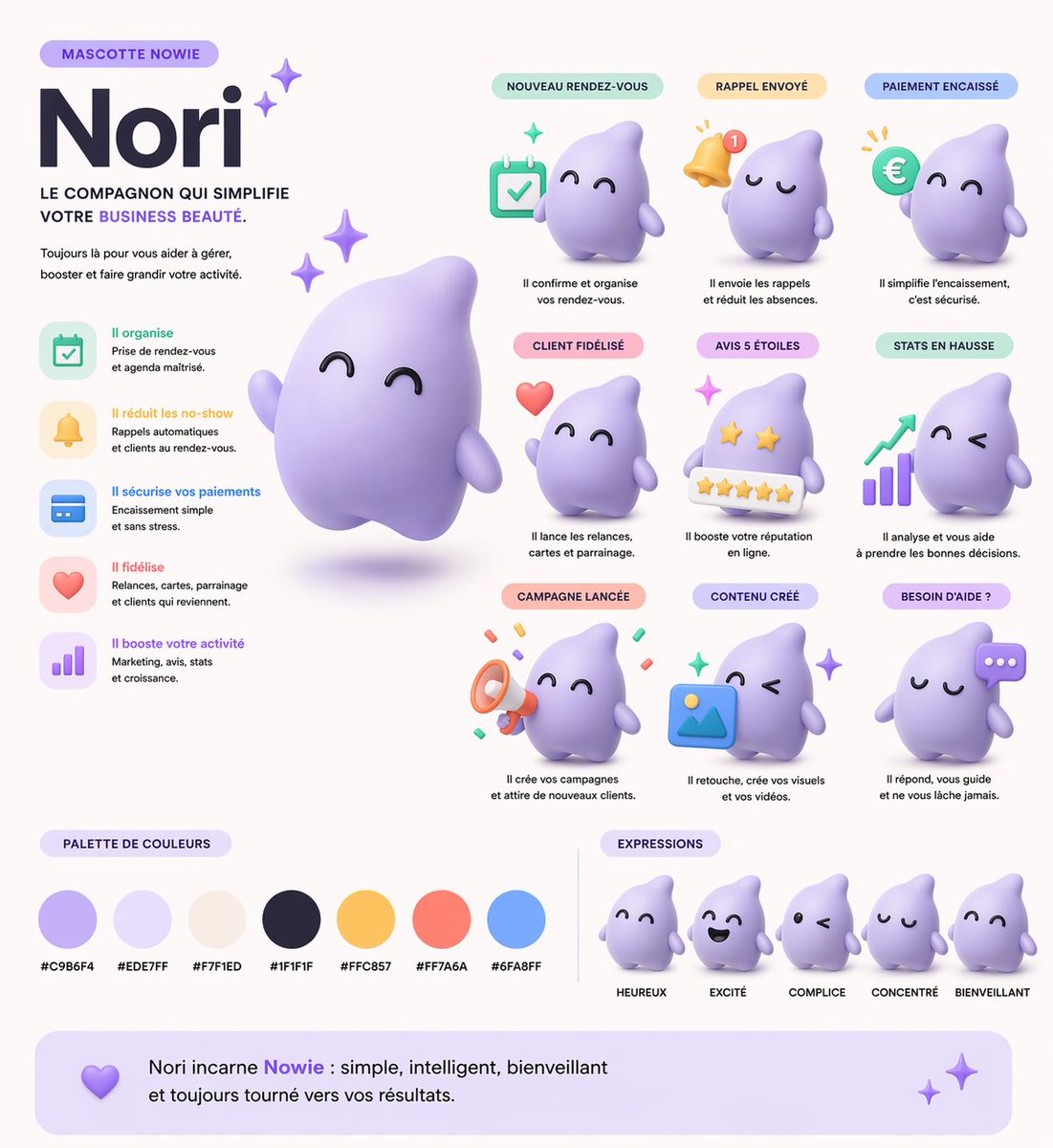
提示词 · EN
type
3D 吉祥物品牌指南表style
柔和 3D 渲染,定格动画风格,柔和 UI,简洁的企业级 SaaS 美学mascot
name
{argument name="mascot name" default="Nori"}shape
{argument name="mascot shape" default="柔和水滴幽灵"}color
{argument name="mascot color" default="柔和紫色"}texture
哑光塑料,软陶质感layout
header_left
tag
吉祥物 {argument name="brand name" default="NOWIE"}title
{argument name="mascot name" default="Nori"}subtitle
让您的 {argument name="business type" default="美业业务"} 变得更简单的伙伴。main_image
带有闪光效果的吉祥物悬浮大型 3D 渲染图features_list
position
中左count
5items
item 1
icon
calendartitle
高效组织item 2
icon
belltitle
减少爽约item 3
icon
credit cardtitle
保障支付安全item 4
icon
hearttitle
提升客户忠诚度item 5
icon
bar charttitle
助力业务增长use_cases_grid
position
右上至中右layout
3x3 网格count
9items
item 1
label
新预约prop
calendaritem 2
label
提醒已发送prop
notification bellitem 3
label
支付已完成prop
euro coinitem 4
label
客户已留存prop
floating heartitem 5
label
5 星好评prop
5-star rating baritem 6
label
数据增长prop
bar chart with upward arrowitem 7
label
活动已发布prop
megaphoneitem 8
label
内容已创建prop
image placeholder iconitem 9
label
需要帮助?prop
chat bubblecolor_palette
title
配色方案position
底左count
7swatches
item 1
#C9B6F4item 2
#EDE7FFitem 3
#F7F1EDitem 4
#1F1F1Fitem 5
#FFC857item 6
#FF7A6Aitem 7
#6FA8FFexpressions
title
表情position
底右count
5labels
item 1
开心item 2
兴奋item 3
默契item 4
专注item 5
友善footer
text
{argument name="mascot name" default="Nori"} 是 {argument name="brand name" default="Nowie"} 的化身:简单、智能、友善,始终致力于为您带来成果。关于这个提示词
Create a complete 3D mascot brand guide for your SaaS platform, featuring a soft-rendered character, use case grid, color palette, and clean UI — all from a single prompt. 它更适合作为 GPT Image 2 的概念艺术起点:先保留画面结构、主体关系和风格约束,再替换成你的品牌、人物或场景。
这条提示词使用结构化 JSON 组织信息,包含 type、style、mascot、layout 等字段。保留这种层级能让模型更清楚地区分画面主题、布局、界面元素和细节约束。
使用时建议先小幅修改主体、场景、镜头和色调,再生成多个版本对比构图与细节。这样页面内容对用户有实际帮助,也避免把模型名或标签机械堆在正文里。
如何使用这个提示词
- Copy the prompt from this page.
- Open Sora 2 (or any text-to-image model like DALL·E 3).
- Paste the prompt and replace the
{argument}placeholders with your brand’s details, such as mascot name, color, and business type. - Generate the image to receive a fully designed 3D mascot brand guide table.
- (Optional) Tweak the colors or layout variables to perfectly match your identity.


