GPT Image 2AI 提示词
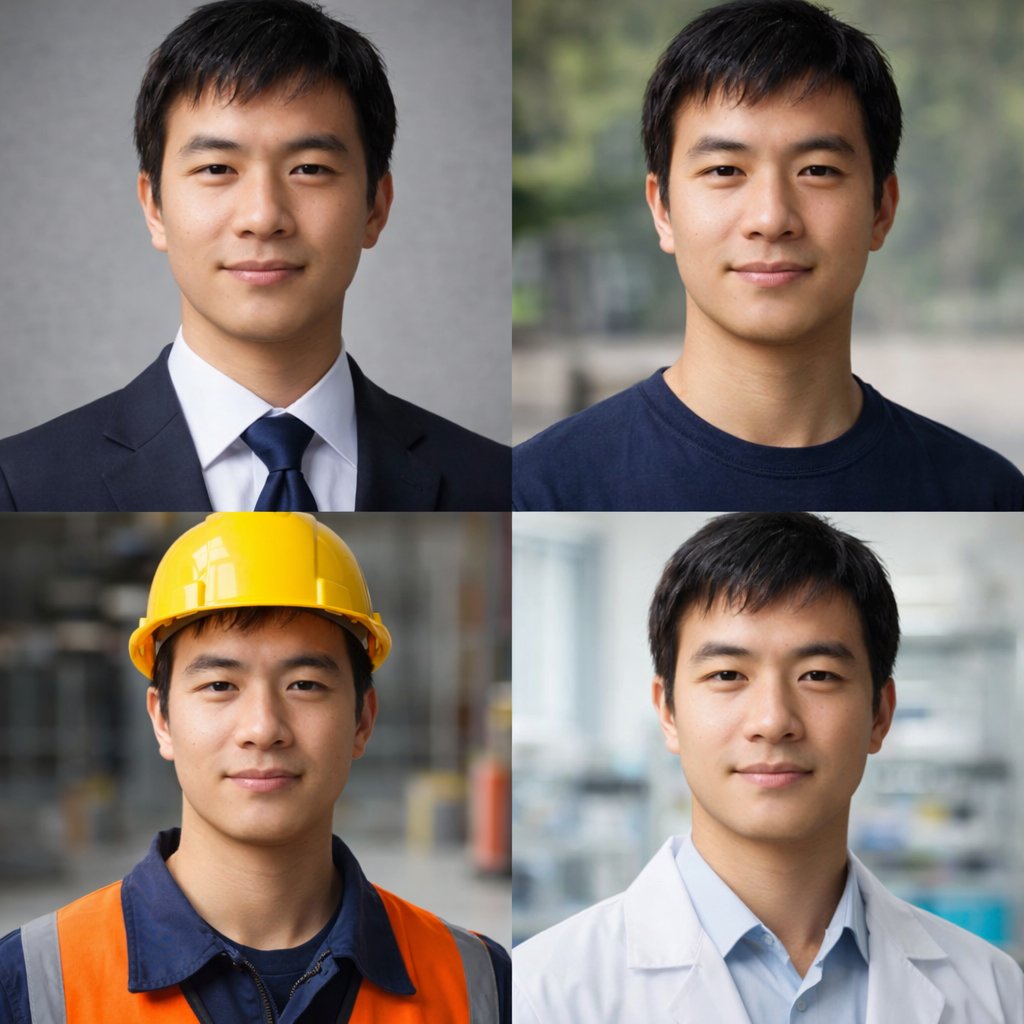
Professional 2x2 Portrait Grid — 4 Jobs, 1 Face
Create a photo-realistic 2x2 grid showing the same person in four professional and casual outfits, perfect for versatile headshots or avatars.
提示词 · EN
type
2x2 肖像网格subject
{argument name="subject description" default="年轻的东亚男性,留着黑色短发,面带微笑"}style
照片级写实,高分辨率,专业布光,所有面板中面部特征保持一致layout
format
2x2 网格panel_count
4panels
item 1
position
左上description
{argument name="profession 1" default="企业专业人士,身着深海军蓝西装、白衬衫和蓝色领带,背景为灰色纹理背景"}item 2
position
右上description
{argument name="profession 2" default="休闲装扮,身着深蓝色圆领 T 恤,背景为模糊的户外公园"}item 3
position
左下description
{argument name="profession 3" default="建筑工人,戴着黄色安全帽,身着海军蓝工作衬衫和亮橙色高能见度背心,背景为模糊的仓库"}item 4
position
右下description
{argument name="profession 4" default="医疗专业人士,身着浅蓝色衬衫外搭白色实验服,背景为模糊的实验室"}关于这个提示词
Create a photo-realistic 2x2 grid showing the same person in four professional and casual outfits, perfect for versatile headshots or avatars. 它更适合作为 GPT Image 2 的概念艺术起点:先保留画面结构、主体关系和风格约束,再替换成你的品牌、人物或场景。
这条提示词使用结构化 JSON 组织信息,包含 type、subject、style、layout 等字段。保留这种层级能让模型更清楚地区分画面主题、布局、界面元素和细节约束。
使用时建议先小幅修改主体、场景、镜头和色调,再生成多个版本对比构图与细节。这样页面内容对用户有实际帮助,也避免把模型名或标签机械堆在正文里。
如何使用这个提示词
- Copy the JSON prompt.
- Select a model that handles photo-realism (e.g., Sora 2).
- Adjust the
subjectvariable to describe the person's core features. - Edit each
professionpanel's description to match your desired job roles. - Generate the image to receive a consistent 4-panel portrait grid.