GPT Image 2AI 提示词
4-Panel Comic & Infographic: AI Prompt for Visual Storytelling
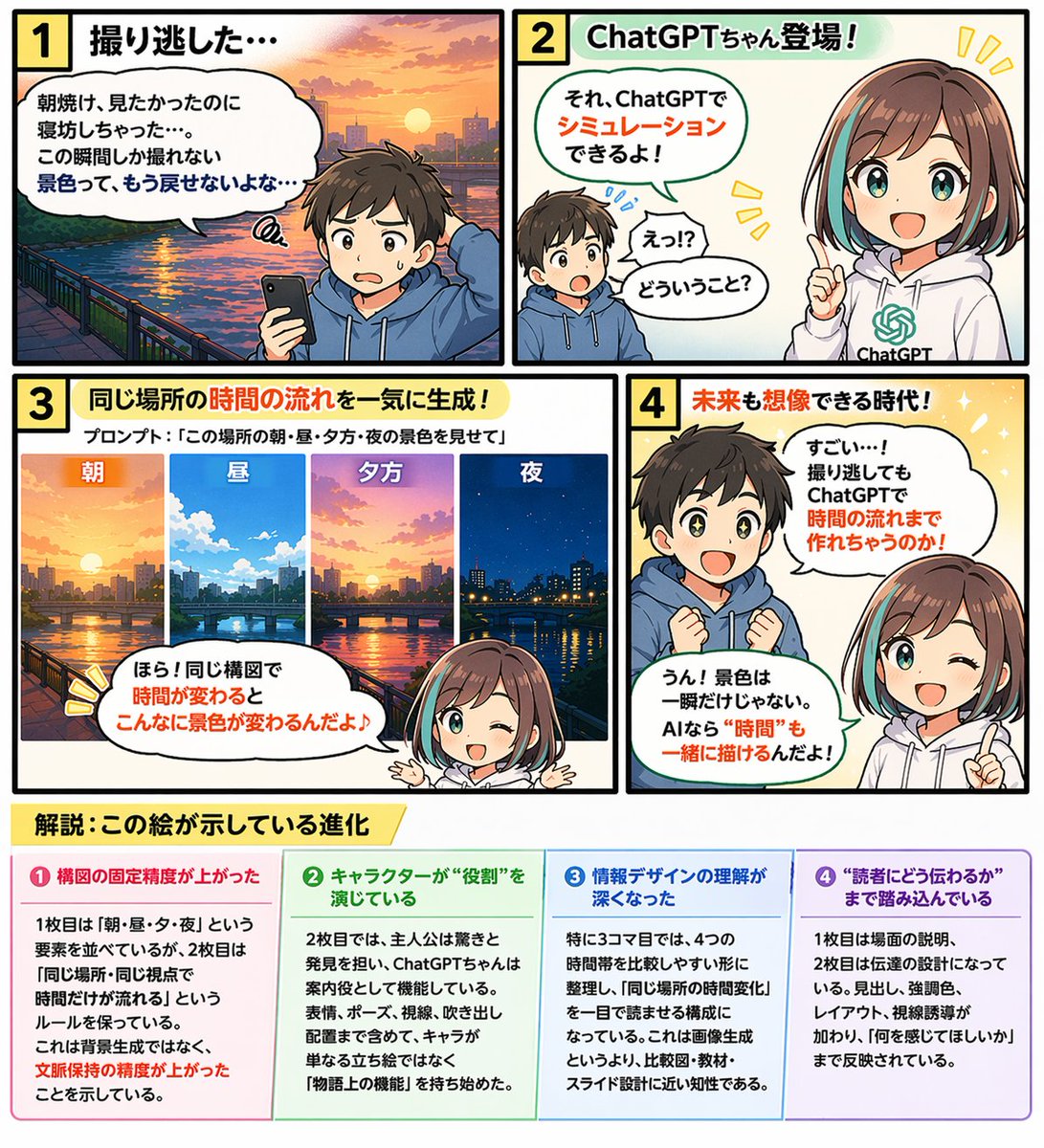
Produce a 4-panel educational comic with a 4-column infographic, perfect for tutorials, concept explanations, and visual storytelling.
提示词 · EN
type
带底部信息图表的 4 格教育漫画characters
boy
description
小男孩,棕色头发outfit
{argument name="boy outfit" default="蓝色连帽衫"}girl
name
{argument name="main character name" default="ChatGPT 酱"}description
动漫女孩hair
{argument name="girl hair style" default="棕色波波头,带青色挑染"}outfit
带有绿色 AI 标志的白色连帽衫layout
comic_panels
item 1
panel_number
1title
1 错过了拍摄时机……scene
男孩拿着智能手机显得很失望,背景是河流与城市的日出speech_bubble
明明想看朝霞的,结果睡过头了……这种瞬间才能捕捉到的景色,再也回不来了吧……item 2
panel_number
2title
2 ChatGPT 酱登场!scene
男孩感到惊讶,女孩指着前方微笑着speech_bubbles
item 1
诶!?什么意思?item 2
那个,用 ChatGPT 就能模拟出来哦!item 3
panel_number
3title
3 一次性生成同一地点的时间流转!sub_text
提示词:{argument name="panel 3 prompt text" default="“展示这个地方早、中、晚、夜的景色”"}sub_images
count
4description
同一城市景观在不同时间段的景象labels
item 1
早item 2
中item 3
晚item 4
夜scene
女孩在下方指着上方的子图像speech_bubble
看!在构图不变的情况下,时间改变后景色会发生这么大的变化♪item 4
panel_number
4title
4 连未来都能想象的时代!scene
男孩眼神闪烁,感到惊叹,女孩眨眼并指着前方speech_bubbles
item 1
好厉害……!就算错过了拍摄,用 ChatGPT 也能把时间流转制作出来吗!item 2
嗯!景色不只是一瞬间。有了 AI,连“时间”也能一起描绘出来哦!infographic_section
position
底部title
{argument name="infographic main title" default="解析:这张图所展示的进化"}columns
count
4headers
item 1
❶ 构图的固定精度提升了item 2
❷ 角色正在扮演“角色”item 3
❸ 对信息设计的理解加深了item 4
❹ 深入到了“如何传达给读者”的层面content_description
每个标题下方的详细说明文字关于这个提示词
Produce a 4-panel educational comic with a 4-column infographic, perfect for tutorials, concept explanations, and visual storytelling. 它更适合作为 GPT Image 2 的概念艺术起点:先保留画面结构、主体关系和风格约束,再替换成你的品牌、人物或场景。
这条提示词使用结构化 JSON 组织信息,包含 type、characters、layout 等字段。保留这种层级能让模型更清楚地区分画面主题、布局、界面元素和细节约束。
使用时建议先小幅修改主体、场景、镜头和色调,再生成多个版本对比构图与细节。这样页面内容对用户有实际帮助,也避免把模型名或标签机械堆在正文里。
如何使用这个提示词
- Copy the prompt from this page.
- Paste it into an AI image generator like Sora 2, DALL·E 3, or Midjourney v6.
- Customize the variables: Modify arguments such as boy outfit, girl hair style, infographic titles, and panel 3 prompt text.
- Generate the image. The output will be a 4-panel comic with a 4-column infographic at the bottom.
- Refine if needed: Tweak the panel descriptions or infographic content for better results.