
GPT Image 2AI 提示词
2x2 Japanese Ad Banner Grid — Sora 2 Prompt
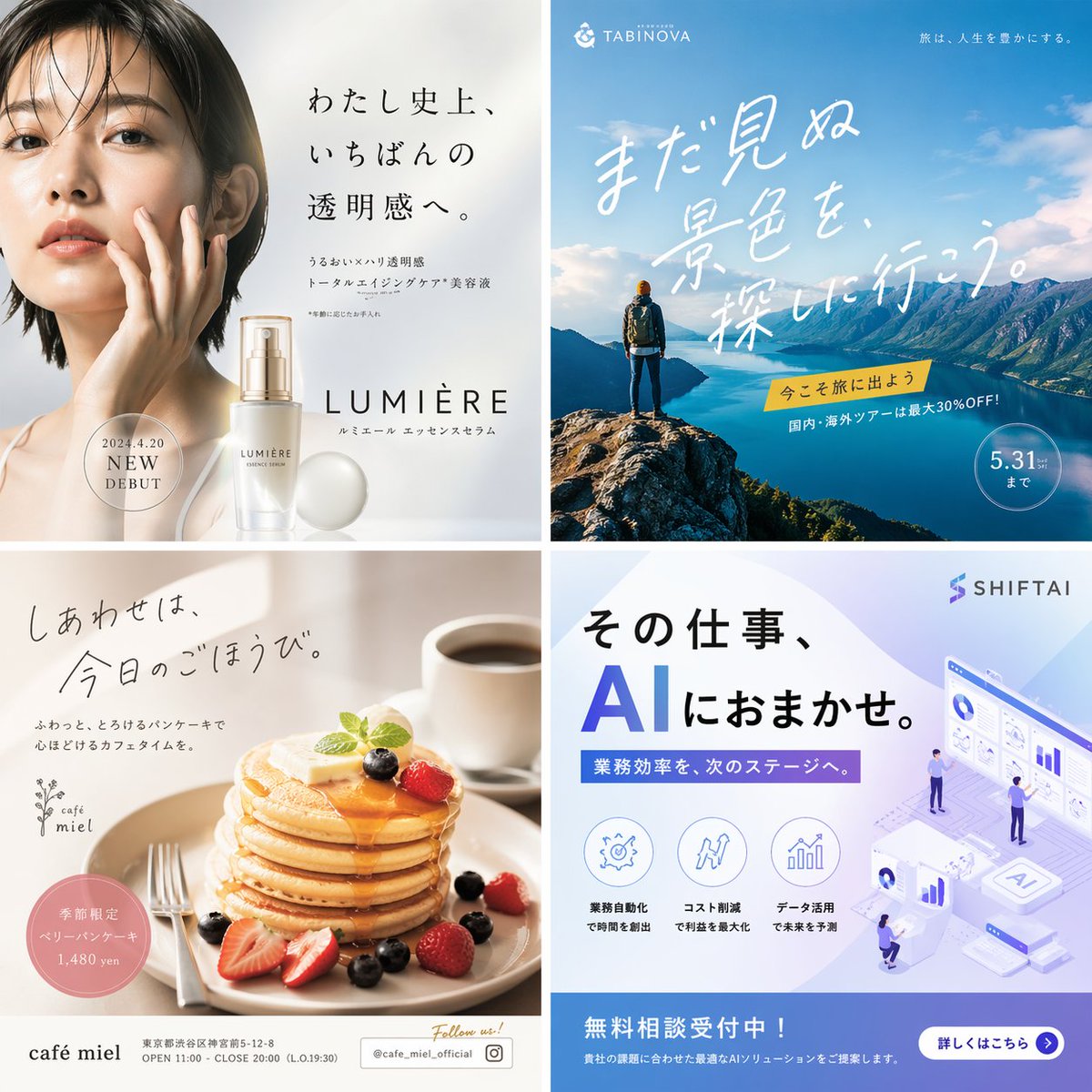
Generate a polished 2×2 grid mockup featuring four distinct Japanese-style commercial banners for skincare, travel, food, and tech — perfect for design presentations.
提示词 · EN
type
2x2 广告横幅网格layout
四个不同的象限,每个象限包含不同风格的商业广告quadrants
item 1
position
左上industry
护肤与美妆visuals
一位年轻亚洲女性的特写肖像,皮肤清透亮泽,手触脸颊;旁边摆放着一个精致的精华液瓶,配有一个发光的珍珠状球体brand
LUMIèREcopy
item 1
{argument name="beauty catchphrase" default="わたし史上、いちばんの透明感へ。"}item 2
水润 × 紧致透明感 全效抗衰老精华液item 3
2024 年 4 月 20 日 全新上市color_palette
白色、柔米色、浅灰色item 2
position
右上industry
旅行社visuals
一名背包客站在岩石悬崖上,俯瞰着湛蓝的峡湾和晴空下雄伟的山脉brand
TABINOVAcopy
item 1
{argument name="travel catchphrase" default="まだ見ぬ景色を探しに行こう。"}item 2
现在就出发去旅行吧item 3
国内外旅游团最高可享 30% 折扣!item 4
截止至 5 月 31 日color_palette
天蓝色、深海蓝、大地绿与棕色item 3
position
左下industry
咖啡与餐饮visuals
一叠令人垂涎的松软煎饼,上面放着融化的黄油,淋着糖浆,点缀着新鲜草莓和蓝莓;背景中有一杯黑咖啡和一把银色叉子brand
café mielcopy
item 1
{argument name="cafe catchphrase" default="しあわせは、今日のごほうび。"}item 2
用松软即化的煎饼,享受放松的咖啡时光。item 3
季节限定 浆果煎饼 1,480 日元item 4
关注我们! @cafe_miel_officialcolor_palette
暖米色、诱人的棕色、鲜艳的红色item 4
position
右下industry
B2B SaaS / AI 技术visuals
等距 3D 插图,展示了微型办公室员工与悬浮的数据仪表盘、条形图及中央 AI 服务器单元进行交互;左下角有 3 个圆形功能图标brand
{argument name="tech brand name" default="SHIFTAI"}copy
item 1
{argument name="tech catchphrase" default="その仕事、AIにおまかせ。"}item 2
将业务效率提升至新阶段。item 3
免费咨询受理中!item 4
点击了解详情color_palette
企业蓝、紫色渐变、清爽白关于这个提示词
Generate a polished 2×2 grid mockup featuring four distinct Japanese-style commercial banners for skincare, travel, food, and tech — perfect for design presentations. 它更适合作为 GPT Image 2 的概念艺术起点:先保留画面结构、主体关系和风格约束,再替换成你的品牌、人物或场景。
这条提示词使用结构化 JSON 组织信息,包含 type、layout、quadrants 等字段。保留这种层级能让模型更清楚地区分画面主题、布局、界面元素和细节约束。
使用时建议先小幅修改主体、场景、镜头和色调,再生成多个版本对比构图与细节。这样页面内容对用户有实际帮助,也避免把模型名或标签机械堆在正文里。
如何使用这个提示词
- Copy the full prompt JSON above into your preferred AI image generator (Sora 2, Midjourney, etc.).
- Select an appropriate model that handles text-heavy graphic layouts well.
- Customize the
{argument}variables — swap catchphrases, brand names, or date text to match your project. - Adjust color palettes or visual descriptions in each quadrant if you need different aesthetics.
- Generate and iterate: refine wording or styling details until the banner grid looks production-ready.


