
GPT Image 2AI 提示词
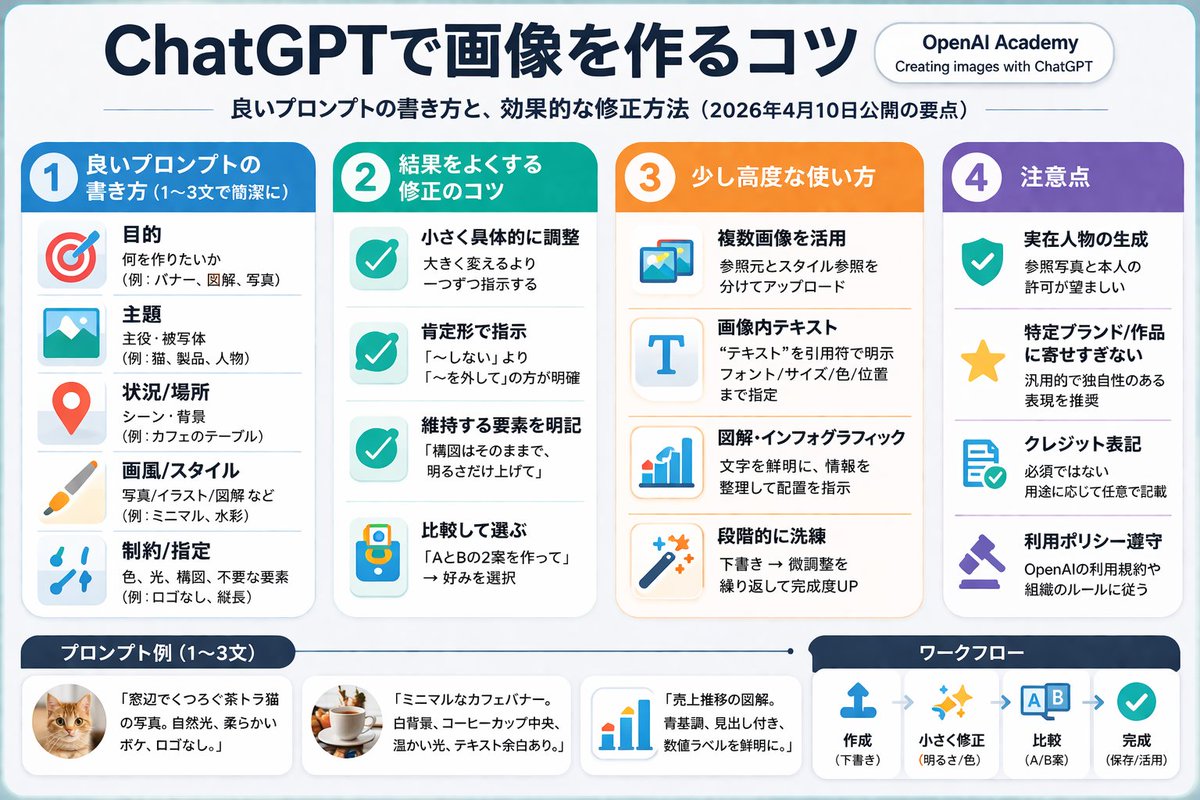
ChatGPT Image Prompt Infographic — Clean 4-Column Guide
Create a professional, pastel-toned 4-column infographic that teaches effective AI image prompting techniques with icons, examples, and a workflow diagram.
提示词 · EN
type
infographicstyle
clean, corporate, flat design, soft pastel colors, rounded corners, white backgroundheader
main_title
{argument name="main title" default="ChatGPTで画像を作るコツ"}subtitle
{argument name="subtitle" default="良いプロンプトの書き方と、効果的な修正方法(2026年4月10日公開の要点)"}top_right_badge
OpenAI Academy / Creating images with ChatGPTlayout
columns
item 1
color_theme
blueheader
{argument name="column 1 title" default="1 良いプロンプトの書き方 (1〜3文で簡潔に)"}item_count
5icons
item 1
targetitem 2
landscape pictureitem 3
map pinitem 4
paintbrushitem 5
slidersitem 2
color_theme
greenheader
{argument name="column 2 title" default="2 結果をよくする修正のコツ"}item_count
4icons
item 1
checkmarkitem 2
checkmarkitem 3
checkmarkitem 4
A/B comparisonitem 3
color_theme
orangeheader
3 少し高度な使い方item_count
4icons
item 1
multiple imagesitem 2
letter Titem 3
bar chartitem 4
magic wanditem 4
color_theme
purpleheader
4 注意点item_count
4icons
item 1
shield with checkitem 2
staritem 3
document with checkitem 4
gavelfooter
left_section
title
{argument name="bottom left title" default="プロンプト例 (1〜3文)"}item_count
3thumbnails
item 1
orange tabby catitem 2
coffee cup on white backgrounditem 3
blue bar chartright_section
title
ワークフローstep_count
4icons
item 1
upload arrowitem 2
sparklesitem 3
A/B boxesitem 4
checkmarkflow_style
horizontal with dashed arrows关于这个提示词
Create a professional, pastel-toned 4-column infographic that teaches effective AI image prompting techniques with icons, examples, and a workflow diagram. 它更适合作为 GPT Image 2 的概念艺术起点:先保留画面结构、主体关系和风格约束,再替换成你的品牌、人物或场景。
这条提示词使用结构化 JSON 组织信息,包含 type、style、header、layout 等字段。保留这种层级能让模型更清楚地区分画面主题、布局、界面元素和细节约束。
使用时建议先小幅修改主体、场景、镜头和色调,再生成多个版本对比构图与细节。这样页面内容对用户有实际帮助,也避免把模型名或标签机械堆在正文里。
如何使用这个提示词
- Copy the full JSON prompt and paste it into your preferred AI image generator that supports structured layouts (Sora 2, Midjourney, or DALL·E). 2. Review the default Japanese text and swap any variable fields — such as
main_titleorsubtitle— with your own language or topic. 3. Adjust column themes (blue, green, orange, purple), icon choices, or item counts to match your brand or content needs. 4. Generate the image and inspect each column for readability; iterate by refining the style keywords like "flat design" or "soft pastel colors." 5. Export the final infographic in your desired resolution for social media, blog posts, or presentations.


