
GPT Image 2AI 提示词
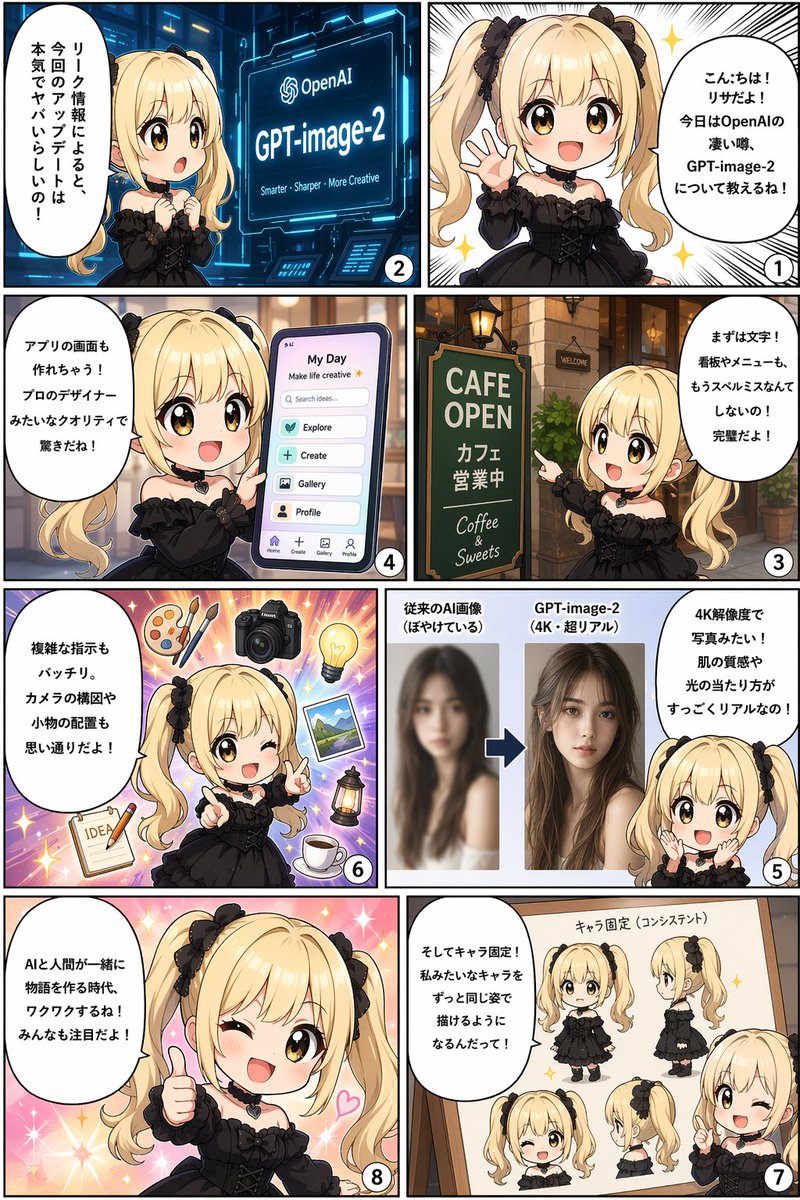
8-Panel Comic Infographic — GPT-image-2 Features Explained
Create an engaging 8-panel comic infographic where a mascot explains cutting-edge AI features like 4K resolution, UI design, and character consistency.
提示词 · EN
type
8 格漫画信息图reading_order
从右向左character
name
{argument name="character name" default="莉莎"}appearance
{argument name="character appearance" default="金色双马尾,黑色哥特裙,黑色心形项圈"}panels
item 1
number
1action
开心地挥手speech_bubble
{argument name="greeting text" default="你好!我是莉莎!今天来跟大家聊聊 OpenAI 的重磅传闻,关于 GPT-image-2 的那些事儿!"}item 2
number
2action
惊讶地看着发光的屏幕screen_text
OpenAI {argument name="product name" default="GPT-image-2"} 更智能 - 更清晰 - 更具创造力speech_bubble
据泄露的消息称,这次的更新简直强得离谱!item 3
number
3action
指向咖啡馆招牌sign_text
CAFE OPEN 咖啡馆 营业中 Coffee & Sweetsspeech_bubble
首先是文字处理!无论是招牌还是菜单,再也不会出现拼写错误了!简直完美!item 4
number
4action
拿着显示应用界面的智能手机ui_elements_count
6ui_elements
item 1
我的日常item 2
搜索灵感...item 3
探索item 4
创作item 5
图库item 6
个人资料speech_bubble
甚至能直接生成应用界面!这专业设计师级别的质量,真的让人惊叹!item 5
number
5action
展示对比图comparison
模糊肖像 vs 清晰的 4K 写实女性肖像speech_bubble
4K 分辨率,画质如照片般真实!皮肤质感和光影效果都极其细腻!item 6
number
6action
眨眼并指向前方floating_objects_count
7floating_objects
item 1
调色板item 2
相机item 3
灯泡item 4
风景照item 5
灯笼item 6
咖啡杯item 7
写着 IDEA 的笔记本speech_bubble
复杂的指令也能完美执行。相机的构图和道具的摆放都能随心所欲!item 7
number
7action
指向项目whiteboard_poses_count
5whiteboard_poses
item 1
正面全身item 2
侧面全身item 3
正面脸部item 4
侧面脸部item 5
半身眨眼speech_bubble
还有角色固定功能!像我这样的角色,以后都能保持形象一致了!item 8
number
8action
竖起大拇指,眨眼,背景闪闪发光speech_bubble
{argument name="conclusion text" default="AI 与人类共同创作故事的时代,真是令人兴奋!大家一定要持续关注哦!"}关于这个提示词
Create an engaging 8-panel comic infographic where a mascot explains cutting-edge AI features like 4K resolution, UI design, and character consistency. 它更适合作为 GPT Image 2 的概念艺术起点:先保留画面结构、主体关系和风格约束,再替换成你的品牌、人物或场景。
这条提示词使用结构化 JSON 组织信息,包含 type、reading order、character、panels 等字段。保留这种层级能让模型更清楚地区分画面主题、布局、界面元素和细节约束。
使用时建议先小幅修改主体、场景、镜头和色调,再生成多个版本对比构图与细节。这样页面内容对用户有实际帮助,也避免把模型名或标签机械堆在正文里。
如何使用这个提示词
- Copy the full comic infographic prompt.
- Replace the placeholder variables (e.g., character name, product name) with your own details.
- Use a capable image generation model (like FLUX or Stable Diffusion 3) and paste the prompt.
- Generate the image. For best results, enable high-resolution and set a vertical aspect ratio.
- If the layout isn't perfect, try a second generation or use an inpainting tool to fix speech bubbles.


