
GPT Image 2AI 提示词
8-Panel Manga Strip — AI Explainer Prompt
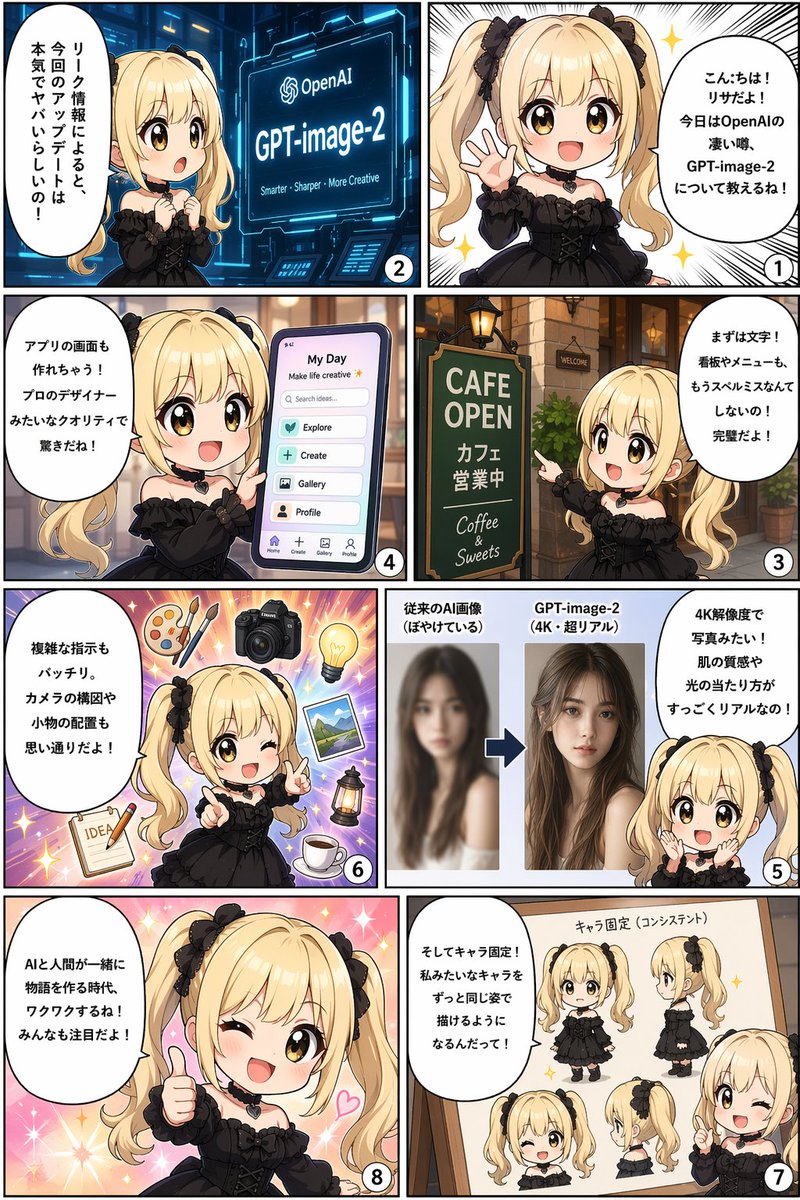
Create a cute 8-panel manga comic with a chibi character explaining AI features, complete with UI mockups and speech bubbles.
提示词 · EN
type
8-panel manga comic striplayout
4 rows, 2 columns grid, reading right-to-left, top-to-bottomcharacter
appearance
{argument name="character appearance" default="chibi anime girl, blonde twin tails, black bows, brown eyes, black gothic dress, heart choker"}panels
item 1
number
1position
top rightvisual
Character waving and smiling happily against a sparkling white background.speech_bubble
{argument name="panel 1 text" default="こんにちは!リサだよ!今日はOpenAIの凄い噂、GPT-image-2について教えるね!"}item 2
number
2position
top leftvisual
Character looking surprised at a futuristic blue holographic screen displaying the OpenAI logo and '{argument name="topic" default="GPT-image-2"}'.screen_subtext
{argument name="panel 2 screen text" default="Smarter - Sharper - More Creative"}speech_bubble
According to leak info, this update is seriously crazy!item 3
number
3position
row 2 rightvisual
Character pointing at a green cafe sign outside a brick building.sign_text
item 1
CAFE OPENitem 2
Cafe is openitem 3
Coffee & Sweetsspeech_bubble
First, text! Signboards and menus won't have spelling mistakes anymore! It's perfect!item 4
number
4position
row 2 leftvisual
Character holding a large smartphone displaying a mobile app interface.ui_elements
header
item 1
My Dayitem 2
Make life creativesearch_bar
Search ideas...buttons_count
4buttons_labels
item 1
Exploreitem 2
Createitem 3
Galleryitem 4
Profilebottom_nav_icons_count
4speech_bubble
It can even make app screens! The pro-designer quality is surprising!item 5
number
5position
row 3 rightvisual
Character looking amazed at a before-and-after image comparison graphic.graphic_elements
left_image
Blurry photo of a womanleft_label
Conventional AI image (blurry)right_image
Sharp, realistic 4K photo of the same womanright_label
{argument name="topic" default="GPT-image-2"} (4K super real)separator
Blue arrow pointing rightspeech_bubble
It's like a photo in 4K resolution! Skin texture and lighting are super realistic!item 6
number
6position
row 3 leftvisual
Character winking and pointing, surrounded by floating objects on a purple starburst background.floating_objects_count
7floating_objects_labels
item 1
wooden palette with 2 brushesitem 2
DSLR cameraitem 3
glowing lightbulbitem 4
landscape photographitem 5
vintage lanternitem 6
cup of coffee on sauceritem 7
notepad with pencil and the word IDEAspeech_bubble
Complex instructions are perfect too. Camera composition and prop placement are exactly as you want!item 7
number
7position
row 4 rightvisual
Character pointing at a wooden whiteboard displaying a character reference sheet of herself.whiteboard_title
Character consistencycharacter_views_count
5character_views_labels
item 1
front full-bodyitem 2
side full-bodyitem 3
front face winkingitem 4
side faceitem 5
half-body pointingspeech_bubble
And character consistency! You'll be able to draw characters like me in the exact same appearance!item 8
number
8position
row 4 leftvisual
Character giving a thumbs up, winking, and smiling broadly against a sparkling pink background.speech_bubble
{argument name="panel 8 text" default="AIと人間が一緒に物語を作る時代、ワクワクするね!みんなも注目だよ!"}关于这个提示词
Create a cute 8-panel manga comic with a chibi character explaining AI features, complete with UI mockups and speech bubbles. 它更适合作为 GPT Image 2 的概念艺术起点:先保留画面结构、主体关系和风格约束,再替换成你的品牌、人物或场景。
这条提示词使用结构化 JSON 组织信息,包含 type、layout、character、panels 等字段。保留这种层级能让模型更清楚地区分画面主题、布局、界面元素和细节约束。
使用时建议先小幅修改主体、场景、镜头和色调,再生成多个版本对比构图与细节。这样页面内容对用户有实际帮助,也避免把模型名或标签机械堆在正文里。
如何使用这个提示词
- Copy this prompt and paste it into an AI image generator that supports complex layouts.
- Choose a model known for detailed, text-heavy outputs (e.g., Sora 2 or GPT-image-2).
- Customize the
character appearancevariable to change the mascot's look. - Edit the
panel 1 textandtopicvariables to fit your feature or announcement. - Generate and iterate—refine speech bubble text or panel visuals as needed.


