
GPT Image 2AI 提示词
3x3 Step-by-Step Cookie Recipe Grid — Sora 2 Prompt
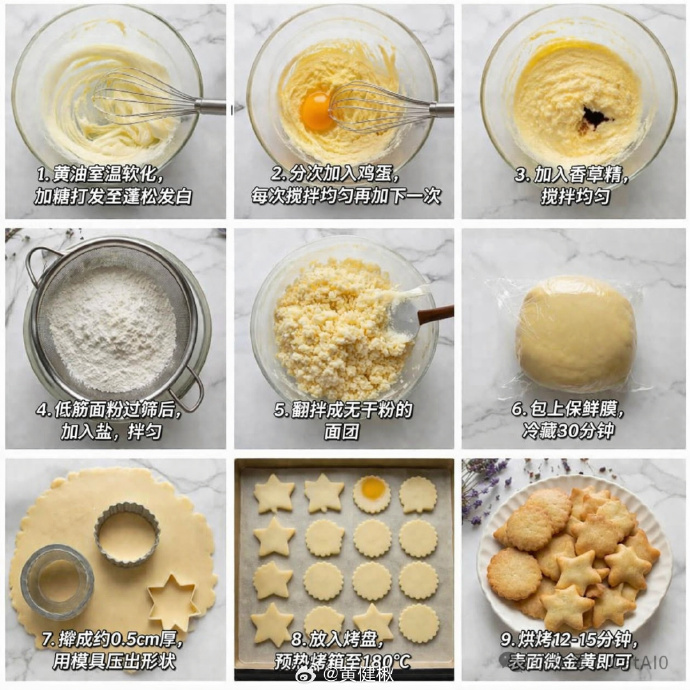
Generates a stunning 9-panel photographic tutorial grid for butter cookies, complete with professional top-down shots and bilingual instructional overlays.
提示词 · EN
type
step-by-step recipe tutorial gridrecipe
{argument name="recipe name" default="butter cookies"}style
top-down food photography, bright natural lighting, photorealisticbackground
{argument name="background texture" default="white marble countertop"}layout
grid
3x3total_panels
9panels
item 1
step
1visual
whisking softened butter and sugar in a glass bowl with a metal whisktext_overlay
{argument name="step 1 text" default="1. 黄油室温软化,加糖打发至蓬松发白"}item 2
step
2visual
adding a raw egg yolk to the butter mixture, whiskingtext_overlay
2. 分次加入鸡蛋,每次搅拌均匀再加下一次item 3
step
3visual
adding dark vanilla extract to the mixture in the glass bowltext_overlay
3. 加入香草精,搅拌均匀item 4
step
4visual
sifting white flour through a round metal sieve into a glass bowltext_overlay
4. 低筋面粉过筛后,加入盐,拌匀item 5
step
5visual
mixing crumbly dough with a spatula in a glass bowltext_overlay
5. 翻拌成无干粉的面团item 6
step
6visual
a smooth ball of dough tightly wrapped in clear plastic wraptext_overlay
6. 包上保鲜膜,冷藏30分钟item 7
step
7visual
rolled out flat dough with round and star-shaped metal cookie cutters cutting out shapestext_overlay
7. 擀成约0.5cm厚,用模具压出形状item 8
step
8visual
raw star and round cookie dough shapes arranged neatly on a parchment-lined baking sheettext_overlay
8. 放入烤盘,预热烤箱至180°Citem 9
step
9visual
{argument name="final product" default="baked golden-brown star and round cookies piled on a white fluted plate"}text_overlay
{argument name="step 9 text" default="9. 烘烤12-15分钟,表面微金黄即可"}关于这个提示词
Generates a stunning 9-panel photographic tutorial grid for butter cookies, complete with professional top-down shots and bilingual instructional overlays. 它更适合作为 GPT Image 2 的概念艺术起点:先保留画面结构、主体关系和风格约束,再替换成你的品牌、人物或场景。
这条提示词使用结构化 JSON 组织信息,包含 type、recipe、style、background、layout 等字段。保留这种层级能让模型更清楚地区分画面主题、布局、界面元素和细节约束。
使用时建议先小幅修改主体、场景、镜头和色调,再生成多个版本对比构图与细节。这样页面内容对用户有实际帮助,也避免把模型名或标签机械堆在正文里。
如何使用这个提示词
- Copy the entire prompt JSON object.
- Paste it into your chosen AI video or image generation model that supports JSON parameters.
- Customize the
argumentfields (e.g., recipe name, background, step text) to match your desired tutorial. - Generate the output to receive a cohesive 3x3 image grid.
- Use the result as a single shareable image or as a visual recipe card.


