
GPT Image 2AI 提示词
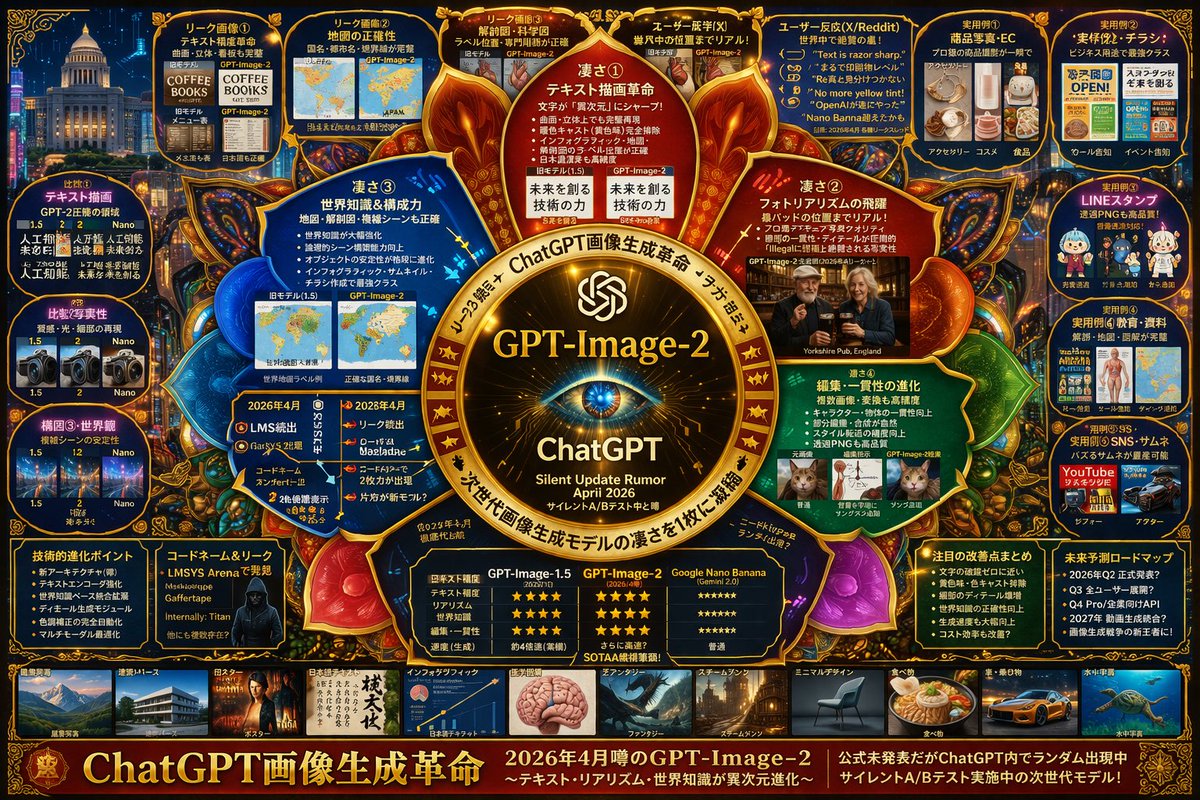
GPT-Image-2 Infographic: Cyberpunk Tech Layout — Prompt
Create a detailed cyberpunk infographic comparing rumored next-gen AI models with glowing neon aesthetics and complex layouts.
提示词 · EN
type
高密度未来科技风信息图项目theme
colors
{argument name="theme color" default="金色与深蓝色"}style
深色模式,发光霓虹边框,复杂的思维导图布局,赛博科技美学centerpiece
description
发光的金色圆形徽标,类似于眼睛或相机镜头text
item 1
{argument name="main title" default="GPT-Image-2"}item 2
ChatGPTitem 3
静默更新传闻 {argument name="release date" default="2026 年 4 月"}layout
top_left
title
泄露图片count
4items
item 1
文本渲染咖啡菜单item 2
世界地图item 3
解剖图item 4
照片级真实感的酒吧top_right
title
用例与反馈count
5items
item 1
电商产品item 2
商业传单item 3
聊天贴纸item 4
教育材料item 5
YouTube 缩略图left_side
title
版本对比count
3items
item 1
文本渲染对比item 2
照片真实感对比item 3
构图稳定性对比inner_ring
title
核心功能count
4items
item 1
文本绘制革命item 2
照片真实感飞跃item 3
世界知识item 4
编辑一致性bottom_left
title
技术规格count
2items
item 1
技术演进要点item 2
带有代号的黑客剪影bottom_center
title
模型对比表columns
3headers
item 1
GPT-Image-1.5item 2
{argument name="main title" default="GPT-Image-2"}item 3
{argument name="competitor model" default="Google Nano Banana"}rows
item 1
文本准确性item 2
真实感item 3
世界知识item 4
编辑能力item 5
速度bottom_right
title
未来展望count
2items
item 1
显著改进列表item 2
未来路线图时间轴bottom_edge
title
风格画廊count
10items
item 1
建筑item 2
海报item 3
日语文本item 4
信息图item 5
奇幻item 6
蒸汽朋克item 7
极简设计item 8
食物item 9
汽车item 10
水下footer
title
主横幅text
item 1
{argument name="subtitle" default="ChatGPT 画像生成革命"}item 2
处于静默 A/B 测试中的下一代模型关于这个提示词
Create a detailed cyberpunk infographic comparing rumored next-gen AI models with glowing neon aesthetics and complex layouts. 它更适合作为 GPT Image 2 的概念艺术起点:先保留画面结构、主体关系和风格约束,再替换成你的品牌、人物或场景。
这条提示词使用结构化 JSON 组织信息,包含 type、theme、centerpiece、layout 等字段。保留这种层级能让模型更清楚地区分画面主题、布局、界面元素和细节约束。
使用时建议先小幅修改主体、场景、镜头和色调,再生成多个版本对比构图与细节。这样页面内容对用户有实际帮助,也避免把模型名或标签机械堆在正文里。
如何使用这个提示词
- Copy the full prompt from this page.
- Choose an AI image generator (e.g., DALL·E 3, Midjourney, Stable Diffusion).
- Tweak the customizable variables like
theme colorormain titleto fit your needs. - Paste the prompt and generate the infographic.
- Regenerate with different seeds or minor adjustments until you get the perfect high-tech layout.


