
GPT Image 2AI 提示词
Is ChatGPT Getting gpt-image-2? Infographic Dashboard
Generate a professional 3-column infographic analyzing ChatGPT's image model rumors, features, timeline, and editing capabilities—perfect for AI teams.
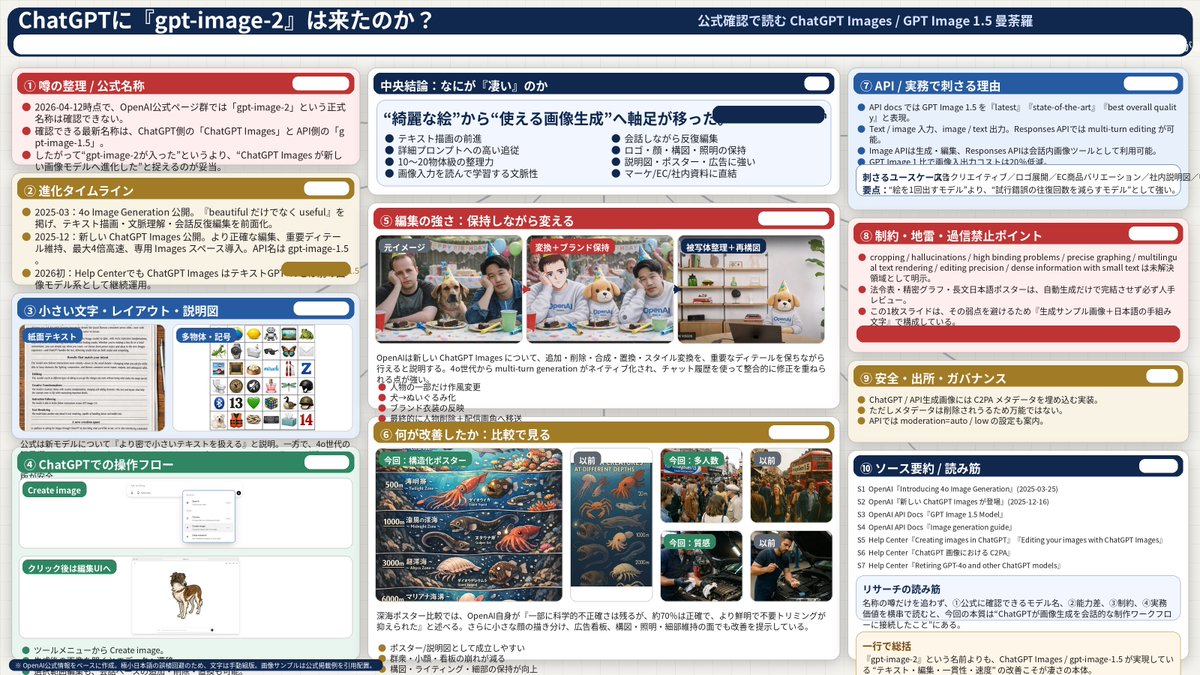
提示词 · EN
type
信息图仪表板style
企业演示 Slides,密集信息布局,扁平化设计header
left_title
{argument name="main title" default="ChatGPT 是否迎来了『gpt-image-2』?"}right_subtitle
{argument name="subtitle" default="通过官方确认解读 ChatGPT Images / GPT Image 1.5 曼荼罗"}background_color
{argument name="theme color 1" default="深蓝色"}layout
columns
3sections
item 1
id
1title
① 传闻梳理 / 官方名称color
{argument name="theme color 2" default="红色"}content_type
3 个要点item 2
id
2title
② 进化时间轴color
金色content_type
3 个时间轴要点item 3
id
3title
③ 小字、布局与说明图color
蓝色content_type
2 张展示文本文档和图标网格的嵌入式图像item 4
id
4title
④ ChatGPT 操作流程color
绿色content_type
展示聊天界面和狗图像的 UI 模型item 5
id
centraltitle
核心结论:究竟『厉害』在哪里color
深蓝色subtitle
{argument name="central conclusion" default="重心从“精美图片”转向“实用图像生成”"}content_type
2 列,每列 4 个要点item 6
id
5title
⑤ 编辑能力:在保持原样中进行修改color
红色content_type
3 张展示照片编辑过程的连续图像item 7
id
6title
⑥ 改进之处:对比分析color
金色content_type
6 张对比图像(本次 vs 之前),涵盖海报、人群、纹理item 8
id
7title
⑦ API / 实际业务中的核心价值color
蓝色content_type
3 个要点item 9
id
8title
⑧ 限制、雷区与切忌盲目信任的要点color
红色content_type
3 个要点item 10
id
9title
⑨ 安全、出处与治理color
金色content_type
3 个要点item 11
id
10title
⑩ 来源汇总 / 阅读指南color
深蓝色content_type
7 个来源列表及一个总结框关于这个提示词
Generate a professional 3-column infographic analyzing ChatGPT's image model rumors, features, timeline, and editing capabilities—perfect for AI teams. 它更适合作为 GPT Image 2 的概念艺术起点:先保留画面结构、主体关系和风格约束,再替换成你的品牌、人物或场景。
这条提示词使用结构化 JSON 组织信息,包含 type、style、header、layout 等字段。保留这种层级能让模型更清楚地区分画面主题、布局、界面元素和细节约束。
使用时建议先小幅修改主体、场景、镜头和色调,再生成多个版本对比构图与细节。这样页面内容对用户有实际帮助,也避免把模型名或标签机械堆在正文里。
如何使用这个提示词
- Copy the prompt and paste it into an AI image generator with layout capabilities (e.g., DALL·E 3, Canva AI, or a design-focused model).
- Replace the
{argument}placeholders with your desired titles, colors, and conclusion text before generating. - Select a high-resolution output setting for clear text and embedded images.
- Generate the infographic. Run multiple versions if needed and combine the best elements manually for a polished result.


