
GPT Image 2AI 提示词
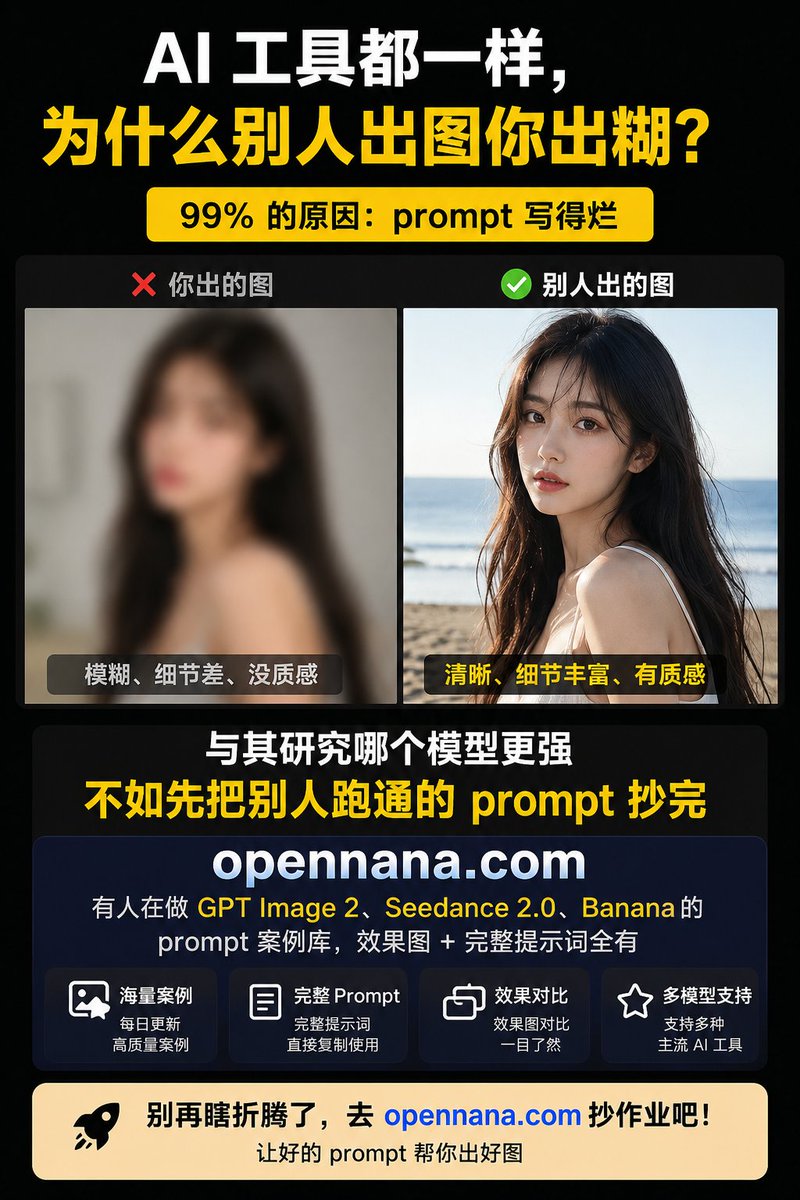
AI Prompt Comparison Poster — Show Why Quality Prompts Matter
Create a high-contrast Chinese infographic that compares blurry vs. crisp AI image results to market a prompt resource library.
提示词 · EN
type
中文竖版社交媒体推广信息图海报canvas
aspect_ratio
3:4size
768x1024background
纯黑底色,带有微妙的深色渐变style
高对比度科技营销风格,粗体排版,简洁的卡片布局theme
primary_colors
item 1
黑色item 2
白色item 3
亮黄色accent_colors
item 1
红色item 2
绿色item 3
深海军蓝item 4
暖米色item 5
蓝色链接typography
厚重粗体无衬线中文字体,大号压缩显示文本,圆角卡片标签headline_section
position
顶部text_lines
item 1
text
AI 工具都一样,color
白色size
超大item 2
text
为什么别人出图你出糊?color
亮黄色size
超大badge
text
99% 的原因:prompt 写得烂position
标题下方style
圆角黄色胶囊形状,配黑色粗体文字comparison_section
position
中上部container
深色圆角矩形count
2panels
item 1
label
❌ 你出的图position
左侧image_description
故意模糊的低质量室内年轻女性肖像,长黑发,面部被方形马赛克遮挡,背景为暗灰色bottom_caption
模糊、细节差、没质感caption_style
深色半透明圆角标签,配白色文字item 2
label
✅ 别人出的图position
右侧image_description
清晰且细节丰富的海滩生活化年轻女性肖像,长黑发,背景为海平线,面部被方形马赛克遮挡,暖色自然光,高纹理和细节bottom_caption
清晰、细节丰富、有质感caption_style
深色半透明圆角标签,配黄色文字middle_message
position
对比图下方居中count
2lines
item 1
text
与其研究哪个模型更强color
白色size
大号粗体item 2
text
不如先把别人跑通的 prompt 抄完color
亮黄色size
超大粗体product_card
position
中下部style
大型深海军蓝圆角矩形卡片,带有微妙边框brand
{argument name="website domain" default="opennana.com"}brand_style
超大白色粗体居中域名description_text
有人在做 GPT Image 2、 Seedance 2.0、 Banana 的
prompt 案例库,效果图 + 完整提示词全有highlight_terms
item 1
GPT Image 2item 2
Seedance 2.0item 3
Bananafeature_boxes
count
4items
item 1
icon
图像/照片轮廓图标title
海量案例subtitle
每日更新
高质量案例item 2
icon
文档轮廓图标title
完整 Promptsubtitle
完整提示词
直接复制使用item 3
icon
重叠方块对比图标title
效果对比subtitle
效果图对比
一目了然item 4
icon
星形轮廓图标title
多模型支持subtitle
支持多种
主流 AI 工具call_to_action
position
底部style
宽幅暖米色圆角横幅left_icon
黑色火箭图标main_text
别再瞎折腾了,去 {argument name="website domain" default="opennana.com"} 抄作业吧!main_text_color
黑色,域名为亮蓝色sub_text
让好的 prompt 帮你出好图sub_text_color
黑色composition_notes
使用紧凑的边距、居中对齐、强烈的视觉层级、大号易读的中文字体、两张摄影示例图,除图标和圆角卡片外无需额外装饰,海报针对移动端社交信息流的可读性进行优化。关于这个提示词
Create a high-contrast Chinese infographic that compares blurry vs. crisp AI image results to market a prompt resource library. 它更适合作为 GPT Image 2 的概念艺术起点:先保留画面结构、主体关系和风格约束,再替换成你的品牌、人物或场景。
这条提示词使用结构化 JSON 组织信息,包含 type、canvas、theme、headline section、comparison section、middle message、product card 等字段。保留这种层级能让模型更清楚地区分画面主题、布局、界面元素和细节约束。
使用时建议先小幅修改主体、场景、镜头和色调,再生成多个版本对比构图与细节。这样页面内容对用户有实际帮助,也避免把模型名或标签机械堆在正文里。
如何使用这个提示词
- Copy the entire JSON prompt structure into your AI image generator (e.g., DALL·E, Midjourney, Stable Diffusion).
- Select a model that supports complex scene composition and text rendering.
- Customize the website domain (
{argument name="website domain"}) and any specific text lines to match your brand. - Adjust color codes or layout details if your platform uses different syntax for aspect ratio and styling.
- Generate the image; the output should be a 3:4 vertical poster with a black background, yellow accents, and a clear before/after comparison.


