
GPT Image 2AI 提示词
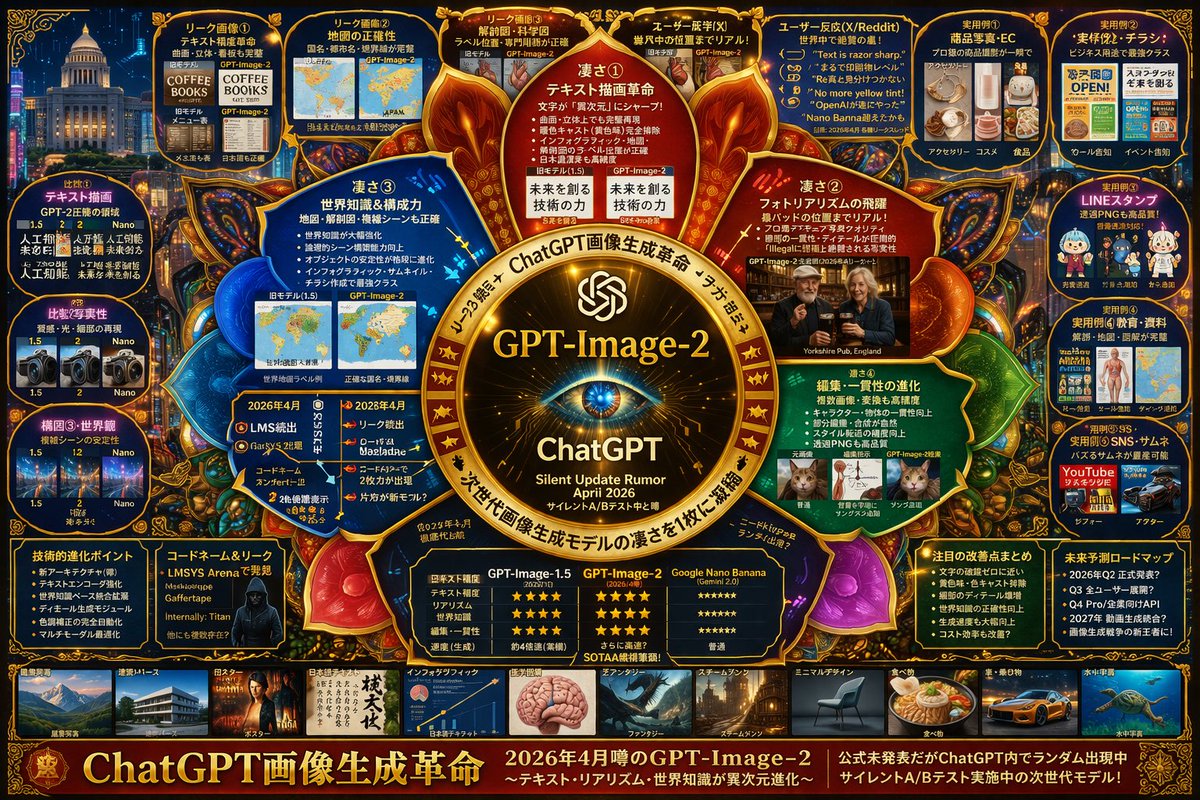
Cyberpunk AI Model Infographic — Neon Grid Layout Prompt
Generate a detailed, high-density infographic poster with radial grids, neon accents, and tech-focused UI — ideal for showcasing AI model features, comparisons, and roadmaps.
提示词 · EN
type
高密度な未来感あふれるインフォグラフィックポスターstyle
ダークな背景に {argument name="theme color" default="ゴールドとダークブルー"} のネオンアクセント、高度に構造化されたグリッドと放射状のレイアウト、テクノロジー重視の UI 美学centerpiece
visual
{argument name="centerpiece icon" default="光り輝くサイバネティックな眼球レンズ"}、周囲を輝くノードを備えた華やかなゴールドの円形フレームで囲むtext
item 1
{argument name="model name" default="GPT-Image-2"}item 2
ChatGPTitem 3
サイレントアップデートの噂 {argument name="release date" default="2026 年 4 月"}layout
inner_circle_panels
count
4description
中心を囲む 4 つの扇形パネルで、コア機能を詳細に説明labels
item 1
凄さ① テキスト描画革命item 2
凄さ② フォトラリアリズムの飛躍item 3
凄さ③ 世界知識&構成力item 4
凄さ④ 編集・一貫性の進化top_row
count
5description
リーク画像、マップの精度、解剖図、ユーザーの反応を示す長方形パネルlabels
item 1
リーク画像①item 2
リーク画像②item 3
リーク画像③item 4
ユーザーの反応 (X)item 5
ユーザーの反応 (X/Reddit)left_column
count
3description
バージョン 1.5、2、Nano の比較を示す垂直スタックパネルと小さな画像グリッドlabels
item 1
比較① テキスト描画item 2
比較② 写実性item 3
構図③・世界観right_column
count
5description
小さなサンプル画像を用いた実用的なユースケースの垂直スタックlabels
item 1
実用例① 商品写真・ECitem 2
実用例② 実務・チラシitem 3
実用例③ LINE スタンプitem 4
実用例④ 教育・資料item 5
実用例⑤ SNS・サムネイルbottom_data_section
count
5description
データテーブル、箇条書きリスト、ハッカー風のイメージlabels
item 1
技術的進化ポイントitem 2
コードネーム&リークitem 3
性能比較表 (GPT-Image-1.5 vs GPT-Image-2 vs Google Nano Banana)item 4
注目の改善点まとめitem 5
未来予測ロードマップbottom_thumbnail_strip
count
10description
さまざまな生成スタイルを示す小さな正方形画像の水平列labels
item 1
建築item 2
ポスターitem 3
日本語テキストitem 4
インフォグラフィックitem 5
ファンタジーitem 6
スチームパンクitem 7
ミニマルデザインitem 8
食べ物item 9
車item 10
水中footer
text
{argument name="main title" default="ChatGPT 画像生成革命"}subtext
2026 年 4 月噂の GPT-Image-2关于这个提示词
Generate a detailed, high-density infographic poster with radial grids, neon accents, and tech-focused UI — ideal for showcasing AI model features, comparisons, and roadmaps. 它更适合作为 GPT Image 2 的概念艺术起点:先保留画面结构、主体关系和风格约束,再替换成你的品牌、人物或场景。
这条提示词使用结构化 JSON 组织信息,包含 type、style、centerpiece、layout、footer 等字段。保留这种层级能让模型更清楚地区分画面主题、布局、界面元素和细节约束。
使用时建议先小幅修改主体、场景、镜头和色调,再生成多个版本对比构图与细节。这样页面内容对用户有实际帮助,也避免把模型名或标签机械堆在正文里。
如何使用这个提示词
- Copy the full prompt text from sora2hub.com.
- Choose an AI image model like Sora 2, Midjourney, or DALL·E 3 (optimized for strong text rendering).
- Customize the variables in curly braces (theme color, centerpiece icon, model name, release date, etc.).
- Paste into your chosen generator and run the prompt.
- Review the output; if needed, tweak variables or regenerate for refined layout.


