
GPT Image 2AI 提示词
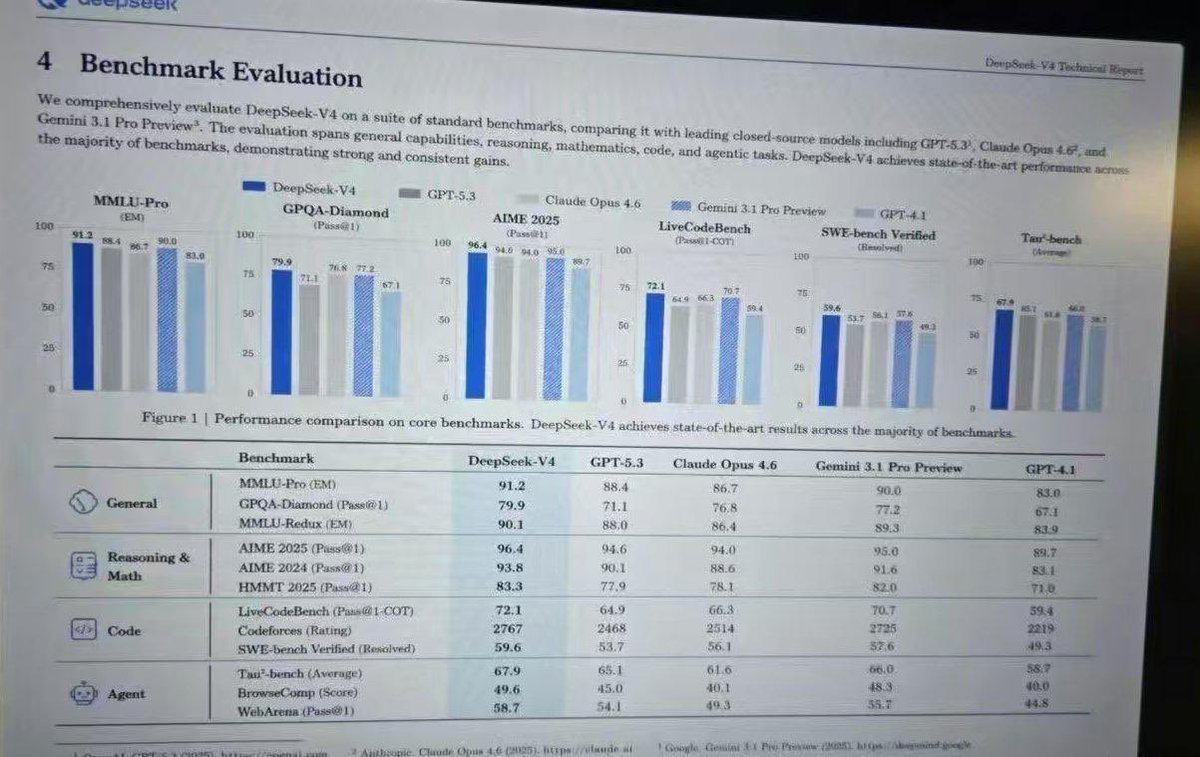
Generate Leaked AI Benchmark Photos — Realistic Screen Prompt
Generate realistic photos of monitors showing leaked AI benchmark reports with LaTeX, charts, and data tables, with screen glare and pixel grids.
提示词 · EN
type
显示学术技术报告的电脑显示器照片style
轻微倾斜的屏幕照片,可见摩尔纹,LCD 像素网格,轻微反光,LaTeX 文档排版,衬线字体document_header
left
4 基准评估right
{argument name="report title" default="DeepSeek-V4 技术报告"}introductory_text
总结 {argument name="main model name" default="DeepSeek-V4"} 对比 {argument name="competitor model 1" default="GPT-5.3"}、{argument name="competitor model 2" default="Claude Opus 4.6"} 以及 {argument name="competitor model 3" default="Gemini 3.1 Pro Preview"} 的综合评估段落。visualizations
legend
5 个带有颜色代码的项目:深蓝色、灰色、浅灰色、蓝色条纹、浅蓝色bar_charts
count
6labels
item 1
MMLU-Pro (EM)item 2
GPQA-Diamond (Pass@1)item 3
AIME 2025 (Pass@1)item 4
LiveCodeBench (Pass@1-COT)item 5
SWE-bench Verified (Resolved)item 6
Tau-bench (Average)caption
图 1 | 核心基准测试性能对比。DeepSeek-V4 在大多数基准测试中均取得了业界领先的成果。data_table
columns
item 1
基准测试item 2
{argument name="main model name" default="DeepSeek-V4"}item 3
{argument name="competitor model 1" default="GPT-5.3"}item 4
{argument name="competitor model 2" default="Claude Opus 4.6"}item 5
{argument name="competitor model 3" default="Gemini 3.1 Pro Preview"}item 6
GPT-4.1categories
count
4rows
item 1
label
通用icon
globe/networksub_items
3item 2
label
推理与数学icon
calculator/clipboardsub_items
3item 3
label
代码icon
code bracketssub_items
3item 4
label
Agenticon
robot facesub_items
3关于这个提示词
Generate realistic photos of monitors showing leaked AI benchmark reports with LaTeX, charts, and data tables, with screen glare and pixel grids. 它更适合作为 GPT Image 2 的概念艺术起点:先保留画面结构、主体关系和风格约束,再替换成你的品牌、人物或场景。
这条提示词使用结构化 JSON 组织信息,包含 type、style、document header、introductory text、visualizations、data table 等字段。保留这种层级能让模型更清楚地区分画面主题、布局、界面元素和细节约束。
使用时建议先小幅修改主体、场景、镜头和色调,再生成多个版本对比构图与细节。这样页面内容对用户有实际帮助,也避免把模型名或标签机械堆在正文里。
如何使用这个提示词
- Copy the prompt text from this page.
- Open your AI image generator (like Sora, Midjourney, or DALL·E).
- Paste the prompt and customize the model names inside the curly braces as needed.
- Use a 16:9 or 3:2 aspect ratio for a realistic monitor shape.
- Generate and refine by adjusting terms like "glare" or "pixel grid".


