
GPT Image 2AI 提示词
AI News Digital Newsletter Layout — Sora 2 Prompt
Generate a sleek, tech-themed digital newsletter page with 5 structured news sections, each featuring thematic AI imagery and customizable headlines.
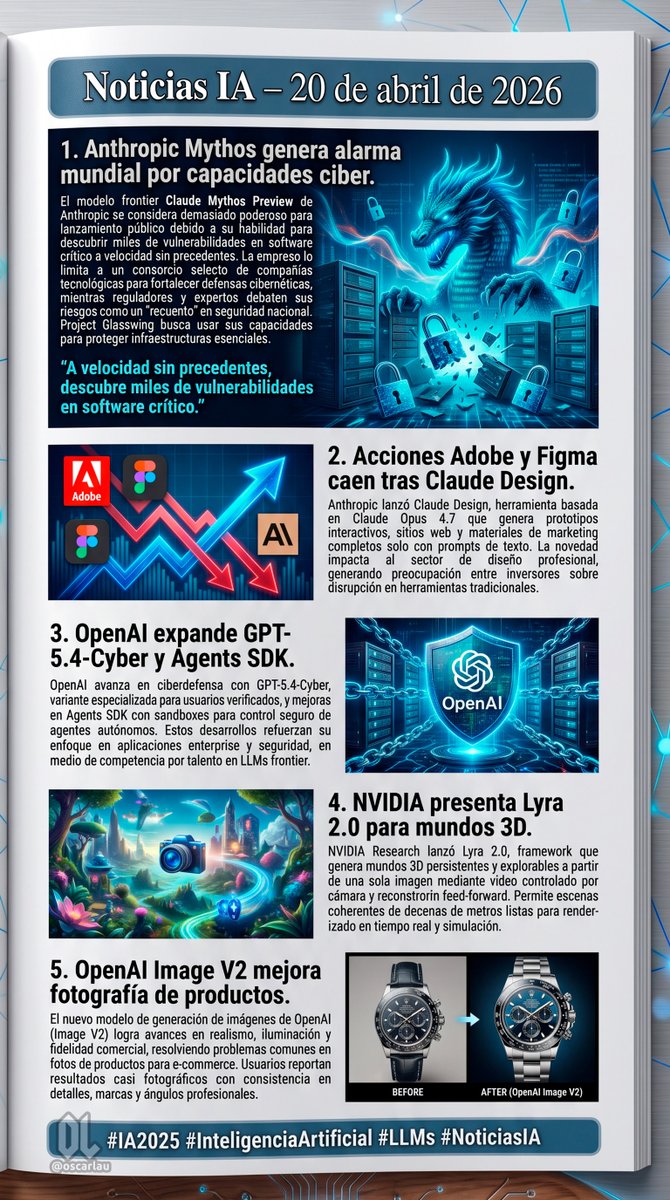
提示词 · EN
type
数字通讯页面布局background
放置在深色表面上的白色页面,带有发光的蓝色数字节点和连接线header
text
{argument name="main headline" default="AI 新闻 – 2026 年 4 月 20 日"}style
深蓝色横幅上的白色文字,带有浅蓝色边框layout
sections
item 1
id
1title
{argument name="news item 1 title" default="1. Anthropic Mythos 因网络能力引发全球警惕。"}image_description
一条发光的蓝色网络巨龙从服务器中浮现,周围环绕着漂浮的数字挂锁。layout_style
图片在右侧,标题和文本在左侧,左下方配有青色引语。item 2
id
2title
{argument name="news item 2 title" default="2. Claude Design 发布后,Adobe 和 Figma 股价下跌。"}image_description
一张风格化的股票走势图,显示出参差不齐的红色下跌箭头和发光的蓝色上涨箭头,图中包含 Adobe、Figma 的标志以及一个 'AI' 图标。layout_style
图片在左侧,标题和文本在右侧。item 3
id
3title
{argument name="news item 3 title" default="3. OpenAI 扩展 GPT-5.4-Cyber 和 Agents SDK。"}image_description
一面发光的蓝色全息盾牌,中心带有 OpenAI 标志,周围环绕着数字链条和服务器背景。layout_style
标题和文本在左侧,图片在右侧。item 4
id
4title
4. NVIDIA 发布用于 3D 世界的 Lyra 2.0。image_description
一个充满活力、超现实的 3D 奇幻景观,拥有发光的植物、漂浮的岛屿,前景中有一个发光的蓝色相机图标。layout_style
图片在左侧,标题和文本在右侧。item 5
id
5title
5. OpenAI Image V2 提升产品摄影效果。image_description
一款豪华计时码表的对比图。左侧标有 'BEFORE'(较暗,细节较少),右侧标有 'AFTER (OpenAI Image V2)'(明亮,细节丰富,专业灯光)。layout_style
标题和文本在左侧,图片在右侧。count
5footer
text
{argument name="footer hashtags" default="#AI2025 #人工智能 #LLMs #AINews"}logo
带有 '@oscarlau' 的 OL 标志style
底部深蓝色横幅上的白色文字关于这个提示词
Generate a sleek, tech-themed digital newsletter page with 5 structured news sections, each featuring thematic AI imagery and customizable headlines. 它更适合作为 GPT Image 2 的概念艺术起点:先保留画面结构、主体关系和风格约束,再替换成你的品牌、人物或场景。
这条提示词使用结构化 JSON 组织信息,包含 type、background、header、layout、footer 等字段。保留这种层级能让模型更清楚地区分画面主题、布局、界面元素和细节约束。
使用时建议先小幅修改主体、场景、镜头和色调,再生成多个版本对比构图与细节。这样页面内容对用户有实际帮助,也避免把模型名或标签机械堆在正文里。
如何使用这个提示词
- Copy the entire prompt JSON and paste it into your preferred AI model (e.g., Sora 2, ChatGPT, Claude).
- Review the default headlines and replace any
{argument}fields with your own news titles or topics. - Select your preferred AI model for best visual and layout rendering.
- Generate the output and review the structured newsletter layout with its 5 illustrated sections.
- Tweak any section titles, image descriptions, or footer hashtags to match your specific content needs.


