
GPT Image 2AI 提示词
Desktop AI Agent Architecture — Bilingual Infographic
Create a professional bilingual architecture diagram for desktop AI agents, complete with layers, icons, and styling. Ideal for enterprise presentations.
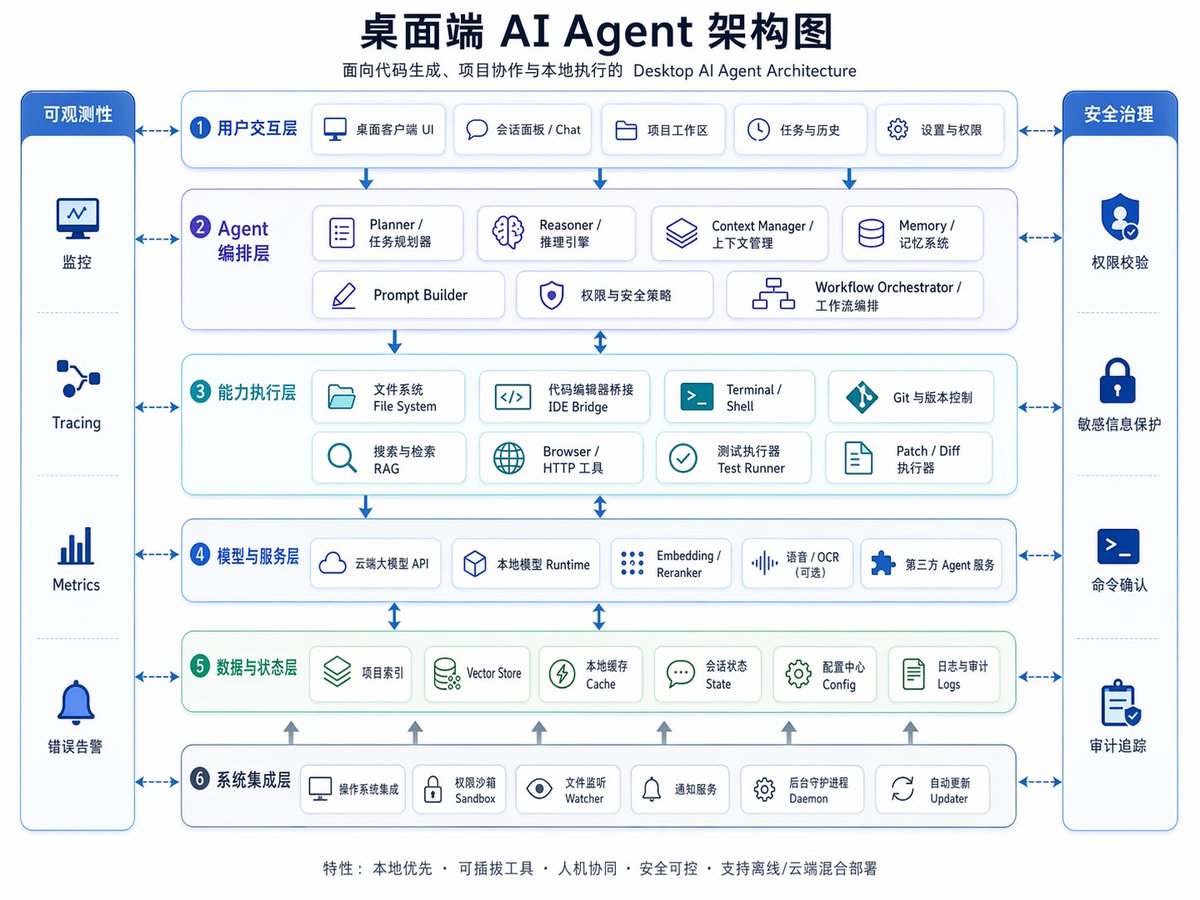
提示词 · EN
type
双语企业架构信息图topic
{argument name="headline text" default="桌面端 AI Agent 架构图"}subtitle
面向代码生成、项目协作与本地执行的 Desktop AI Agent Architecturestyle
look
简洁现代 SaaS 架构图,企业演示文稿风格,矢量信息图background
浅灰白色palette
primary
深海军蓝secondary
中蓝色accent
青绿色support
柔和灰色security
亮宝蓝色typography
粗体中文标题搭配较小的双语标签,清晰无衬线字体,高易读性icons
圆角白色卡片内嵌极简线条图标,带有细微阴影和蓝色轮廓geometry
对称网格,圆角矩形,细连接箭头,模块间距均匀layout
orientation
横向 4:3 演示幻灯片header
title_centered
truetitle_size
largesubtitle_below
truesections
item 1
title
可观测性position
最左侧垂直侧边栏count
4labels
item 1
监控item 2
Tracingitem 3
Metricsitem 4
错误告警container
高圆角蓝色面板,包含四个堆叠单元格和图标item 2
title
安全治理position
最右侧垂直侧边栏count
4labels
item 1
权限校验item 2
敏感信息保护item 3
命令确认item 4
审计追踪container
高圆角蓝色面板,包含四个堆叠单元格和图标item 3
title
1 用户交互层position
顶部水平层count
5labels
item 1
桌面客户端 UIitem 2
会话面板 / Chatitem 3
项目工作区item 4
任务与历史item 5
设置与权限container
宽圆角白色面板,带蓝色边框item 4
title
2 Agent 编排层position
第二水平层count
7labels
item 1
Planner / 任务规划器item 2
Reasoner / 推理引擎item 3
Context Manager / 上下文管理item 4
Memory / 记忆系统item 5
Prompt Builderitem 6
权限与安全策略item 7
Workflow Orchestrator / 工作流编排container
宽圆角白色面板,带淡紫蓝色调item 5
title
3 能力执行层position
第三水平层count
8labels
item 1
文件系统 File Systemitem 2
代码编辑器桥接 IDE Bridgeitem 3
Terminal / Shellitem 4
Git 与版本控制item 5
搜索与检索 RAGitem 6
Browser / HTTP 工具item 7
测试执行器 Test Runneritem 8
Patch / Diff 执行器container
宽圆角白色面板,带淡青色调item 6
title
4 模型与服务层position
第四水平层count
5labels
item 1
云端大模型 APIitem 2
本地模型 Runtimeitem 3
Embedding / Rerankeritem 4
语音 / OCR(可选)item 5
第三方 Agent 服务container
宽圆角白色面板,带蓝色边框item 7
title
5 数据与状态层position
第五水平层count
6labels
item 1
项目索引item 2
Vector Storeitem 3
本地缓存 Cacheitem 4
会话状态 Stateitem 5
配置中心 Configitem 6
日志与审计 Logscontainer
宽圆角白色面板,带淡绿色调item 8
title
6 系统集成层position
底部水平层count
6labels
item 1
操作系统集成item 2
权限沙箱 Sandboxitem 3
文件监听 Watcheritem 4
通知服务item 5
后台守护进程 Daemonitem 6
自动更新 Updatercontainer
宽圆角白色面板,带蓝色边框centerpiece
中间六层堆叠架构,两侧为治理侧边栏connectors
虚线双向箭头连接各核心层与两侧边栏;垂直蓝色箭头在核心层间向下流动;小型灰色向上箭头从底部集成层升至数据层footer
count
1text
特性: 本地优先 · 可插拔工具 · 人机协同 · 安全可控 · 支持离线/云端混合部署position
底部居中rendering
flat_vector
truehigh_resolution
truesharp_lines
truebalanced_whitespace
trueprofessional_pitch_deck_quality
true关于这个提示词
Create a professional bilingual architecture diagram for desktop AI agents, complete with layers, icons, and styling. Ideal for enterprise presentations. 它更适合作为 GPT Image 2 的概念艺术起点:先保留画面结构、主体关系和风格约束,再替换成你的品牌、人物或场景。
这条提示词使用结构化 JSON 组织信息,包含 type、topic、subtitle、style、layout、rendering 等字段。保留这种层级能让模型更清楚地区分画面主题、布局、界面元素和细节约束。
使用时建议先小幅修改主体、场景、镜头和色调,再生成多个版本对比构图与细节。这样页面内容对用户有实际帮助,也避免把模型名或标签机械堆在正文里。
如何使用这个提示词
- Copy the prompt and open an AI image generator like DALL·E 3, Midjourney, or Sora.
- Edit the
{argument name="headline text"}placeholder to set your diagram title, or modify section labels directly. - Paste the full prompt and generate the image. Ensure the model supports detailed infographics.
- Review the output; tweak colors, sections, or text for your use case.
- Use the diagram in presentations, documentation, or planning.


