
GPT Image 2AI 提示词
3D Glassmorphism AI Assistant App UI Design — Sora 2 Prompt
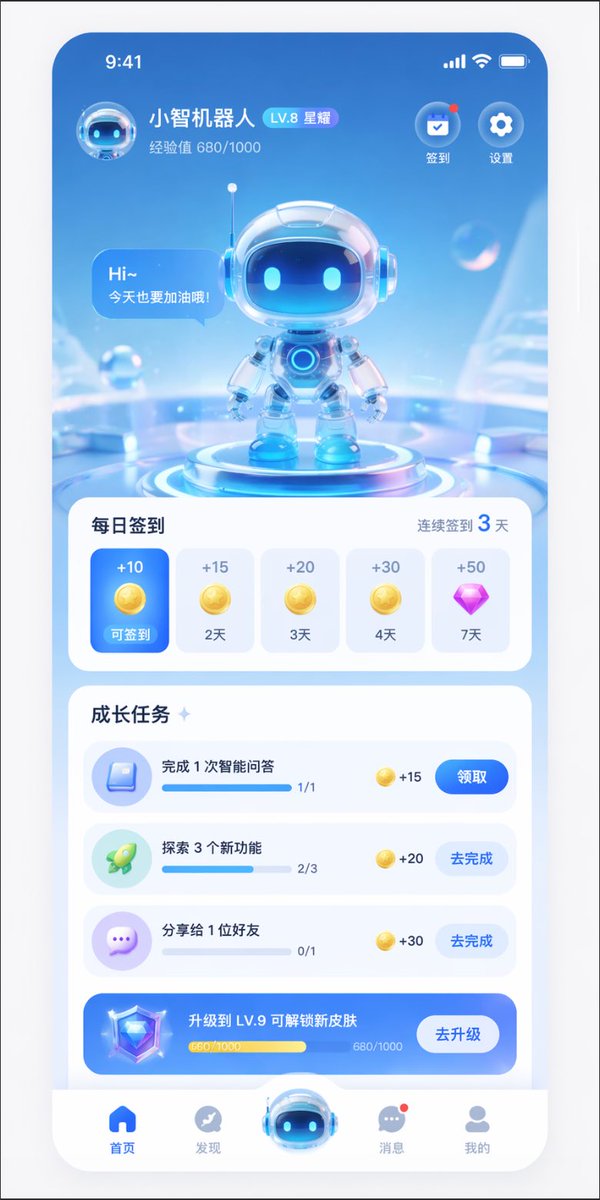
Generate a modern 3D glassmorphism AI assistant mobile app interface with a cute robot hero, daily check-in, and growth tasks.
提示词 · EN
type
移动端 App UI 设计稿theme
未来感 AI 助手,3D 玻璃拟态风格,浅蓝色与白色配色方案header
user_profile
avatar
小型 3D 机器人头像name
{argument name="app name" default="小智机器人"}level_badge
LV.8 星耀experience
经验值 680/1000top_right_icons
count
2labels
item 1
签到item 2
设置hero_display
subject
带有玻璃头盔和蓝色发光眼睛的可爱 3D 机器人pose
站在发光的未来感圆形底座上speech_bubble
{argument name="robot greeting" default="Hi~ 今天也要加油哦!"}background
带有悬浮透明气泡的抽象浅蓝色科技感环境layout
sections
item 1
title
每日签到subtitle
连续签到 3 天type
横向滚动卡片count
5items
item 1
state
激活状态蓝色卡片reward
+10 金币label
可签到item 2
state
未激活白色卡片reward
+15 金币label
2 天item 3
state
未激活白色卡片reward
+20 金币label
3 天item 4
state
未激活白色卡片reward
+30 金币label
4 天item 5
state
未激活白色卡片reward
+50 紫色钻石label
7 天item 2
title
成长任务type
纵向列表count
4items
item 1
icon
蓝色书本text
{argument name="task 1 title" default="完成 1 次智能问答"}progress
1/1reward
+15button
领取item 2
icon
绿色火箭text
{argument name="task 2 title" default="探索 3 个新功能"}progress
2/3reward
+20button
去完成item 3
icon
紫色聊天气泡text
分享给 1 位好友progress
0/1reward
+30button
去完成item 4
style
蓝色渐变横幅icon
3D 钻石text
{argument name="upgrade banner text" default="升级到 LV.9 可解锁新皮肤"}progress
680/1000button
去升级bottom_navigation
count
5items
item 1
icon
蓝色首页label
首页item 2
icon
灰色指南针label
发现item 3
icon
大型凸起 3D 机器人头像label
item 4
icon
带有红点的灰色聊天气泡label
消息item 5
icon
灰色个人资料label
我的关于这个提示词
Generate a modern 3D glassmorphism AI assistant mobile app interface with a cute robot hero, daily check-in, and growth tasks. 它更适合作为 GPT Image 2 的概念艺术起点:先保留画面结构、主体关系和风格约束,再替换成你的品牌、人物或场景。
这条提示词使用结构化 JSON 组织信息,包含 type、theme、header、hero display、layout 等字段。保留这种层级能让模型更清楚地区分画面主题、布局、界面元素和细节约束。
使用时建议先小幅修改主体、场景、镜头和色调,再生成多个版本对比构图与细节。这样页面内容对用户有实际帮助,也避免把模型名或标签机械堆在正文里。
如何使用这个提示词
- Copy the prompt template from above.
- Paste it into your preferred AI design tool (e.g., Galileo AI, Midjourney, or a UI-specific model).
- Replace the variables within
{argument ...}tags, such as the app name, robot greeting, and task titles. - Tweak any layout or color preferences if your tool allows style adjustments.
- Generate the design and iterate by refining the prompt for better results.


