
GPT Image 2AI 提示词
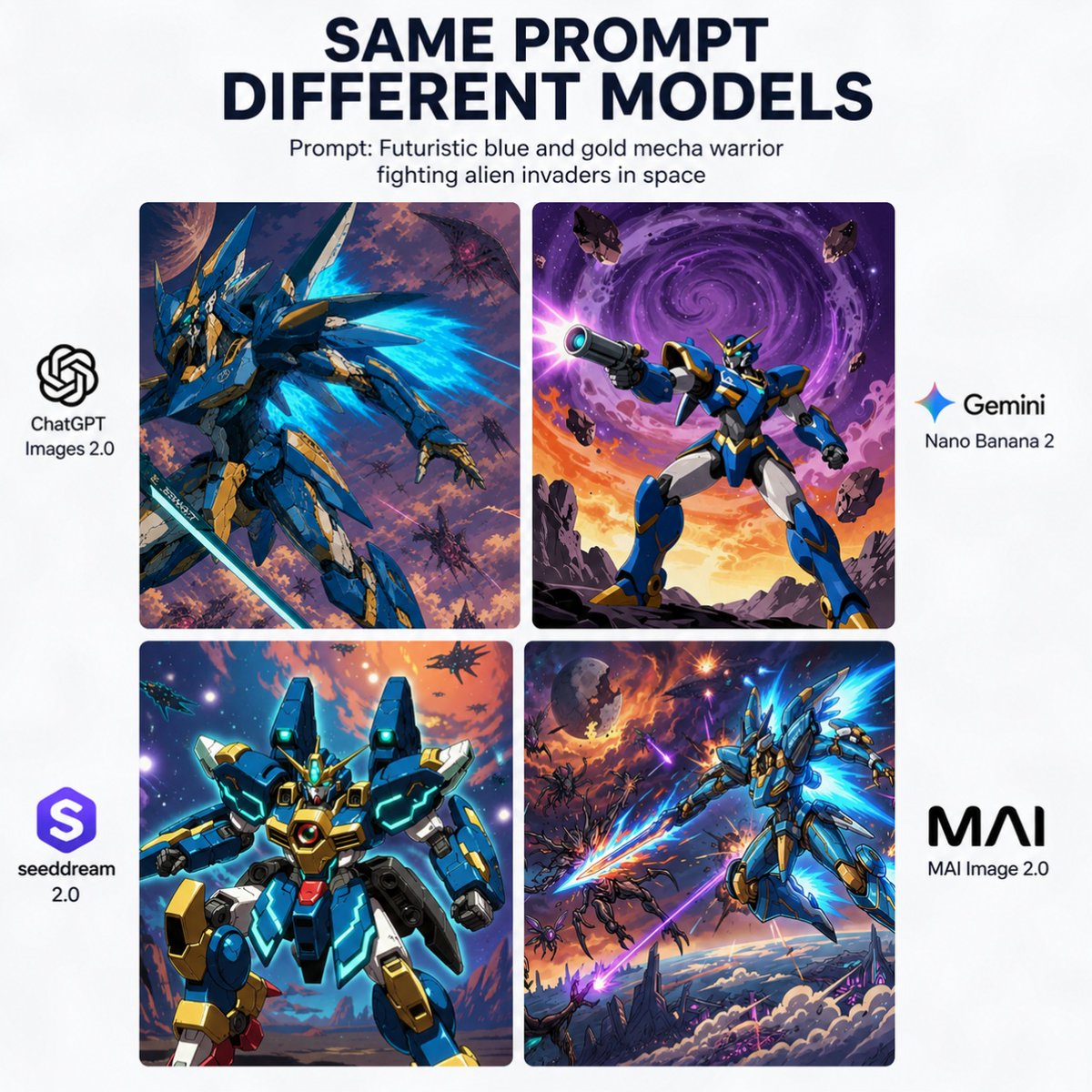
AI Model Mech Battle — Comparison Poster
A square infographic comparing how four AI image models render the same sci-fi mech prompt, perfect for benchmarks and community sharing.
提示词 · EN
type
对比海报style
简洁的社交媒体信息图,白色背景,粗体编辑排版canvas
aspect_ratio
1:1background
纯白headline
title
相同提示词
不同模型subtitle
提示词:{argument name="prompt text" default="在太空中与外星入侵者战斗的未来派蓝金机甲战士"}title_style
顶部居中,深海军蓝,大号粗体无衬线字体subtitle_style
标题下方居中,黑色小号无衬线字体layout
grid
position
centerrows
2columns
2count
4gap
窄且均匀的间距corner_radius
微圆角图像面板side_labels
left
2right
2images
item 1
position
左上model_name
ChatGPT Images 2.0scene
动态的蓝金人形机甲,呈四分之三动作姿态,周围环绕着发光的青色能量翼或推进器火焰,手持长剑,背景为混乱的紫橙色外太空战场,伴有多个小型外星飞船和碎片style
高细节动漫机甲插画,戏剧性光影,绘画感科幻背景item 2
position
右上model_name
Gemini Nano Banana 2scene
蓝金机甲英勇地站在岩石地面上,向观众瞄准大型未来派爆能枪,天空中有一个巨大的紫色漩涡星系,地平线处有橙色日落余晖,周围漂浮着小行星style
大胆的漫画动漫科幻插画,鲜明对比,海报式构图item 3
position
左下model_name
seeddream 2.0scene
正面朝向的笨重蓝金机甲,带有青色发光点缀和中央胸部核心,像角色卡肖像一样摆姿势,背景为明亮的宇宙天空,有星星、行星和远处的飞船style
干净的亮面机甲渲染,带有动漫风格,对称构图,饱和的霓虹高光item 4
position
右下model_name
MAI Image 2.0scene
流畅的蓝金机甲斜向飞过天空,带有明亮的青色能量翼和发光的能量刃,在云层和锯齿状科幻地形上方与多个外星敌人战斗,背景为爆炸性的紫橙色天空style
电影级动漫动作艺术,强烈的动感,高能特效branding
left_side
item 1
position
左上面板旁左侧label
ChatGPT Images 2.0icon
黑色 OpenAI 结状标志count
1item 2
position
左下面板旁左侧label
seeddream 2.0icon
带有白色风格化 S 的紫色圆角方形徽章count
1right_side
item 1
position
右上面板旁右侧label
Gemini Nano Banana 2icon
多色四角火花图标count
1item 2
position
右下面板旁右侧label
MAI Image 2.0icon
粗体黑色 MAI 文字标识count
1composition_notes
保持四个艺术面板视觉上各具特色,但在主题上与同一提示词保持一致,居中于平衡的方形对比布局中,适合用于对比图像生成模型的病毒式社交媒体帖关于这个提示词
A square infographic comparing how four AI image models render the same sci-fi mech prompt, perfect for benchmarks and community sharing. 它更适合作为 GPT Image 2 的概念艺术起点:先保留画面结构、主体关系和风格约束,再替换成你的品牌、人物或场景。
这条提示词使用结构化 JSON 组织信息,包含 type、style、canvas、headline、layout、images、branding 等字段。保留这种层级能让模型更清楚地区分画面主题、布局、界面元素和细节约束。
使用时建议先小幅修改主体、场景、镜头和色调,再生成多个版本对比构图与细节。这样页面内容对用户有实际帮助,也避免把模型名或标签机械堆在正文里。
如何使用这个提示词
- Copy the full prompt object.
- Select your target AI image generation platform.
- Replace the default prompt text in the "subtitle" field with your desired scene description.
- Adjust the aspect ratio and layout details if needed for your platform.
- Generate the image and use it for social media posts, model comparisons, or design inspiration.


