
GPT Image 2AI 提示词
4-Panel Fashion Try-On Poster — Sora 2 Prompt
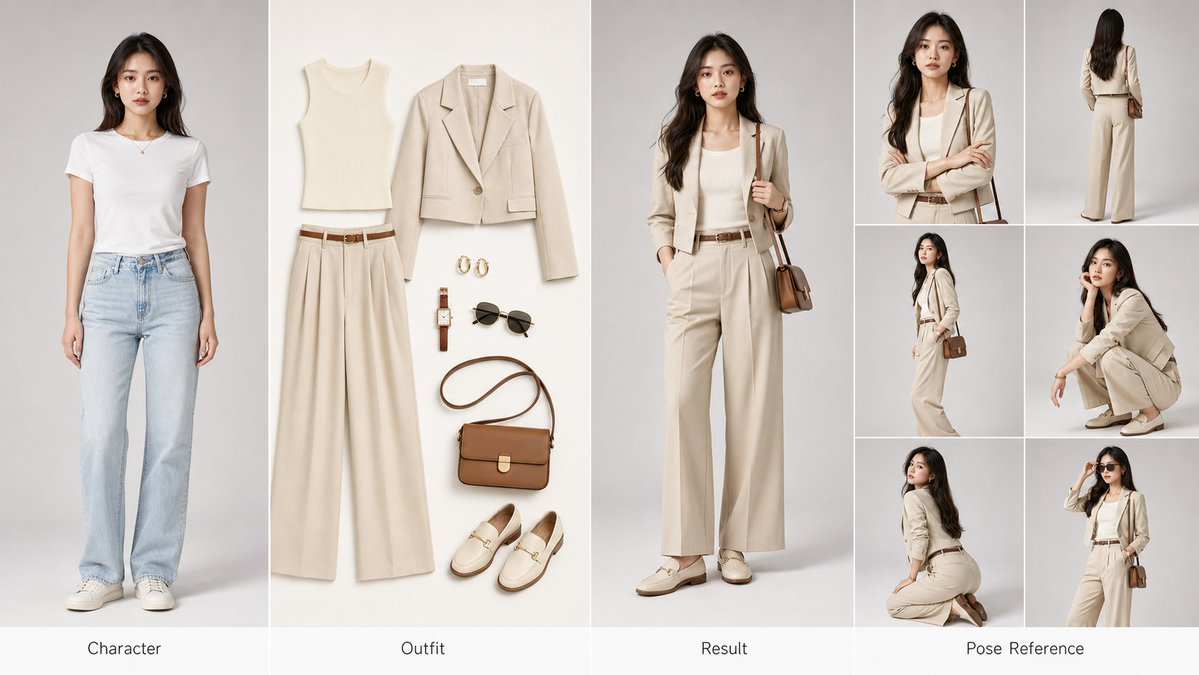
Create a professional 4-panel fashion poster for AI training and commercial display, featuring character reference, flat-lay outfit, styled result, and pose sheet.
1 / 4
提示词 · EN
创建一个横向 argaspect ratio: 16:9 arglayout: four-panel 的时尚试穿参考海报,适用于 AI 训练和商业展示。📐 布局(从左至右):① 左侧格 — 角色(原型):原始角色肖像,标准正面姿势,面部特征清晰,自然的头发和肤色,干净的浅灰色摄影棚背景,专业肖像布光。② 中间格 — 服装(平铺):完整服装套装的精致平铺展示:上衣 / 外套 / 裤子或裙子 / 鞋子 / 包袋 / 配饰,无缝白色或米色背景,商业级产品布光。③ 右侧格 — 效果(成品):同一角色穿着新服装,与原始角色特征完美匹配,自然的贴合度和面料垂坠感,光影与左侧格保持一致。④ 最右侧格 — 姿势参考:由六张小图组成的排列,展示不同角度:正面特写、背面站立、45 度侧面、蹲姿、跪姿及标志性姿势。🎨 视觉规格:4K 超高清画质,独立的干净摄影棚背景,统一的色调,三点式专业摄影棚布光,argaesthetic style: high-end fashion editorial 风格,类似 Vogue/Elle 的质感,逼真的面料纹理和反光,每个格下方带有优雅的英文标签。🎯 核心要求:角色面部一致性 ≥ 95% | 服装贴合自然 | 视觉风格统一 | 可直接使用的商业级图像。
关于这个提示词
Create a professional 4-panel fashion poster for AI training and commercial display, featuring character reference, flat-lay outfit, styled result, and pose sheet. 它更适合作为 GPT Image 2 的概念艺术起点:先保留画面结构、主体关系和风格约束,再替换成你的品牌、人物或场景。
使用时优先替换 aspect ratio、layout、aesthetic style 等占位符,并保持镜头、构图和材质描述的顺序不变。这样更容易获得稳定的画面结果,也方便继续做多版本对比。
如何使用这个提示词
- Copy the full prompt and paste it into your preferred AI image generator.
- Adjust the
aspect ratio,layout, andaesthetic stylevariables to match your project needs. - Choose a high-quality model like Sora 2 or Midjourney v6 for best photorealistic results.
- Generate the image and review the four panels for consistency in character and lighting.
- Refine and regenerate if needed, then export for training datasets or marketing materials.


