
GPT Image 2AI 提示词
How AI Works Infographic — Educational Flowchart Prompt
Generates a clean, multi-panel infographic that visually explains modern AI (ChatGPT/Claude) mechanics using flowcharts, icons, and a summary character.
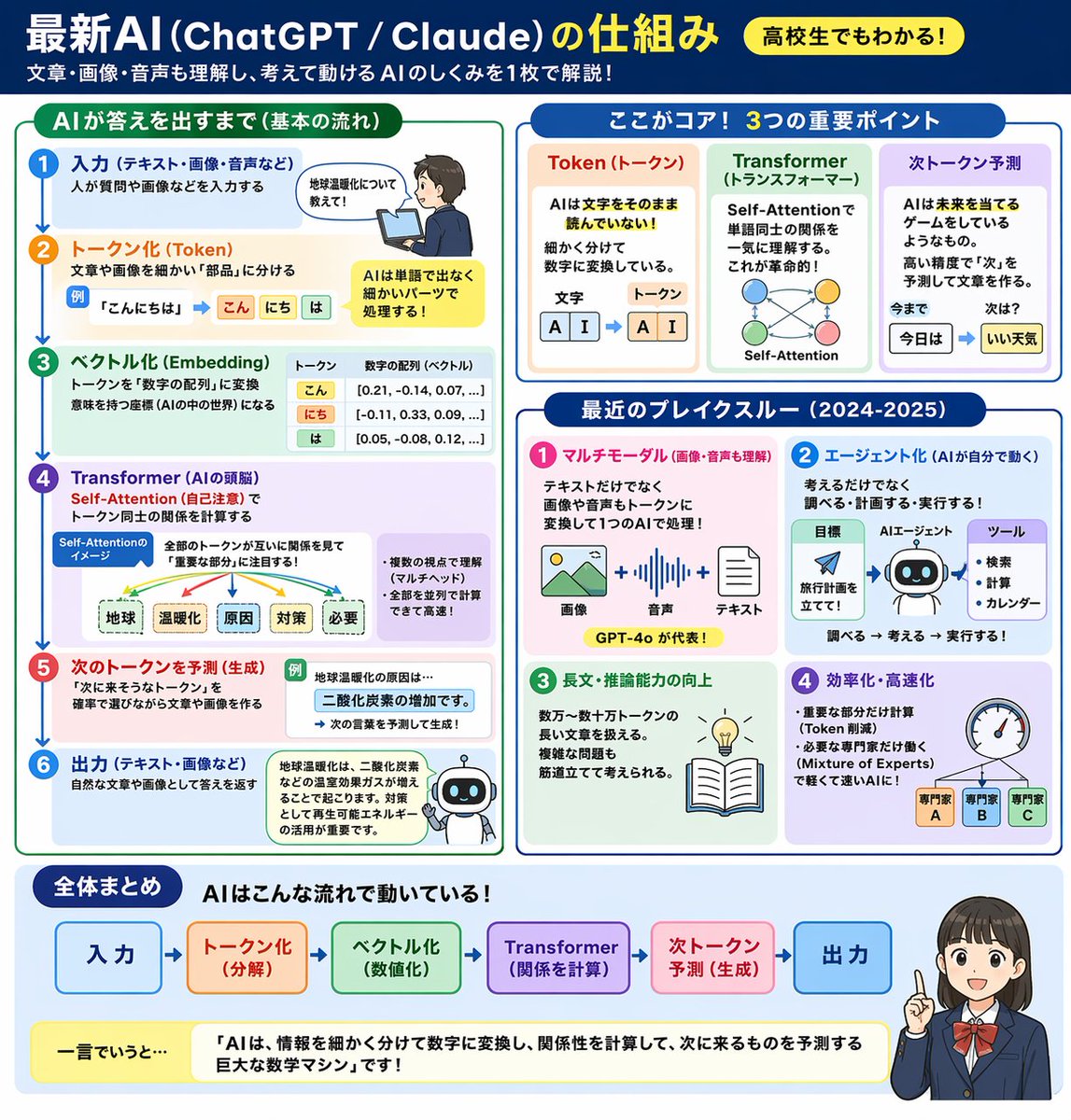
提示词 · EN
type
educational infographicheader
title
{argument name="main title" default="最新AI (ChatGPT / Claude) の仕組み"}badge
{argument name="target audience badge" default="高校生でもわかる!"}subtitle
{argument name="subtitle" default="文章・画像・音声も理解し、考えて動けるAIのしくみを1枚で解説!"}layout
style
clean, flat design, structured grid, Japanese textsections
item 1
title
AIが答えを出すまで(基本の流れ)position
left columncount
6labels
item 1
入力item 2
トークン化 (Token)item 3
ベクトル化 (Embedding)item 4
Transformer (AIの頭脳)item 5
次のトークンを予測 (生成)item 6
出力visuals
vertical flow with arrows, boy using laptop, token splitting diagram, vector number arrays, self-attention tree, robot iconitem 2
title
ここがコア! 3つの重要ポイントposition
top rightcount
3labels
item 1
Token (トークン)item 2
Transformer (トランスフォーマー)item 3
次トークン予測visuals
tokenization blocks, self-attention node network, word prediction sequenceitem 3
title
最近のブレイクスルー (2024-2025)position
middle rightcount
4labels
item 1
マルチモーダルitem 2
エージェント化item 3
長文・推論能力の向上item 4
効率化・高速化visuals
image/audio/text icons, robot agent flowchart, lightbulb and book, speedometer with 3 expert nodesitem 4
title
全体まとめposition
bottom full widthelements
item 1
horizontal 6-step flowchartitem 2
yellow summary box with text: {argument name="summary text" default="「AIは、情報を細かく分けて数字に変換し、関係性を計算して、次に来るものを予測する巨大な数学マシン」です!"}item 3
{argument name="character style" default="anime-style female student pointing and smiling"}关于这个提示词
Generates a clean, multi-panel infographic that visually explains modern AI ChatGPT/Claude mechanics using flowcharts, icons, and a summary character. 它更适合作为 GPT Image 2 的概念艺术起点:先保留画面结构、主体关系和风格约束,再替换成你的品牌、人物或场景。
这条提示词使用结构化 JSON 组织信息,包含 type、header、layout 等字段。保留这种层级能让模型更清楚地区分画面主题、布局、界面元素和细节约束。
使用时建议先小幅修改主体、场景、镜头和色调,再生成多个版本对比构图与细节。这样页面内容对用户有实际帮助,也避免把模型名或标签机械堆在正文里。
如何使用这个提示词
- Copy the full prompt JSON and paste it into your preferred AI image generator (e.g., Sora 2, DALL·E 3, Midjourney).
- Replace placeholder variables like
main title,subtitle, andsummary textwith your own Japanese (or English) content to customize the lesson. - Adjust the
target audience badgeorcharacter stylearguments to match your desired tone or audience level. - Select a model that supports high-resolution, text-heavy layouts for best results.
- Generate and iterate — tweak section labels or layout descriptions if text renders incorrectly.


