
GPT Image 2AI 提示词
Japanese AI Prompt Gallery UI — Minimalist Web Interface for Creative Inspiratio
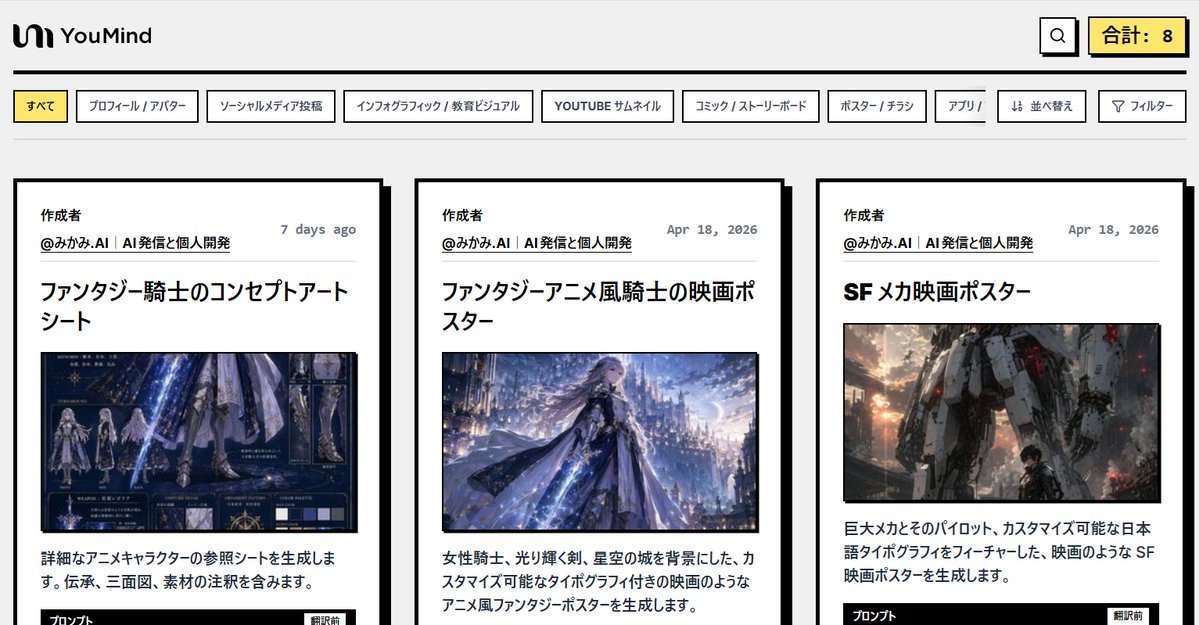
A sleek, retro-inspired desktop web interface mockup for browsing a curated Japanese AI prompt gallery, perfect for product demos and landing page concepts.
提示词 · EN
type
日语 AI Prompt 画廊 Web 界面模型style
简洁的编辑类 Web UI,带有粗黑边框、浅灰色页面背景、极简扁平化设计、微妙的复古科技美学、高对比度排版、类似截图的构图brand
name
YouMindlogo_position
左上角logo_style
简单的黑色抽象图标后跟粗体字标page
background
#f3f3f3header_height
紧凑top_bar
count
3items
item 1
品牌 logo 在左item 2
搜索按钮在右上角附近item 3
高亮显示的总数计数器在最右侧counter_text
合计: 8category_tabs
position
页眉下方count
9labels
item 1
全部item 2
个人资料 / 头像item 3
社交媒体帖子item 4
信息图 / 教育视觉item 5
YOUTUBE 缩略图item 6
漫画 / 分镜item 7
海报 / 传单item 8
应用 / item 9
排序item 10
筛选active_tab
全部tab_style
带有黑色边框的矩形白色标签,激活标签填充浅黄色layout
main_view
底部裁剪的三列式卡片画廊visible_cards
3card_style
带有粗黑边框和偏移黑色投影的大型白色卡片,留白充裕,编辑杂志式布局card_spacing
均匀的水平间距cards
item 1
position
左author_section
title
创建者handle
@みかみ..AI | AI 发信与个人开发date
7 天前headline
奇幻骑士概念艺术图集image_type
冷色调的奇幻骑士角色参考图body_text
生成详细的动漫角色参考图。包含背景设定、三视图和材质标注。footer_hint
底部边缘显示了一个被部分裁剪的黑色按钮,标签为“Prompt”item 2
position
中author_section
title
创建者handle
@みかみ..AI | AI 发信与个人开发date
2026 年 4 月 18 日headline
奇幻动漫风骑士电影海报image_type
动漫风格奇幻骑士海报,包含女骑士、发光的剑、飘逸的斗篷以及发光的城堡城市背景body_text
生成带有女骑士、发光剑、星空城堡背景以及可自定义排版的电影感动漫风奇幻海报。item 3
position
右author_section
title
创建者handle
@みかみ..AI | AI 发信与个人开发date
2026 年 4 月 18 日headline
科幻机甲电影海报image_type
电影感科幻机甲海报,包含巨大的类人机器人和城市战争背景下的小型飞行员身影,温暖的日落火花和烟雾body_text
生成以巨大机甲及其驾驶员为特色,并带有可自定义日语排版的电影感科幻海报。footer_hint
底部边缘显示了一个被部分裁剪的黑色按钮,标签为“Prompt”composition
aspect_ratio
宽屏桌面截图,约 16:9camera
正面全页捕捉crop
卡片底部略微裁剪,保留页眉、标签和大部分卡片内容text_rendering
所有可见界面文本和卡片文本均为日语,清晰的无衬线 UI 字体,粗体标题,较小的灰色日期,黑色正文color_palette
count
5colors
item 1
浅灰色背景item 2
白色卡片和标签item 3
黑色边框和文字item 4
浅黄色高亮item 5
缩略图内柔和的蓝色和橙色调关于这个提示词
A sleek, retro-inspired desktop web interface mockup for browsing a curated Japanese AI prompt gallery, perfect for product demos and landing page concepts. 它更适合作为 GPT Image 2 的概念艺术起点:先保留画面结构、主体关系和风格约束,再替换成你的品牌、人物或场景。
这条提示词使用结构化 JSON 组织信息,包含 type、style、brand、page、layout、cards、composition 等字段。保留这种层级能让模型更清楚地区分画面主题、布局、界面元素和细节约束。
使用时建议先小幅修改主体、场景、镜头和色调,再生成多个版本对比构图与细节。这样页面内容对用户有实际帮助,也避免把模型名或标签机械堆在正文里。
如何使用这个提示词
- Copy the entire prompt JSON and paste it into your preferred AI image generator that supports structured or detailed prompts.
- Select a high-capability model like GPT-4, Claude, or Midjourney that excels at rendering UI mockups and web layouts.
- Adjust variables such as the number of cards, category tab labels, color palette, or brand name to match your project needs.
- Generate the image and review the output for layout accuracy, typography, and the retro-tech aesthetic.
- Iterate by refining spacing, border thickness, or card content until the mockup matches your vision.


