
GPT Image 2AI 提示词
AI Email Prompt Carousel — Dark Glassmorphism Slides
Generate a stunning dark-themed social carousel with six ready-to-use email prompts displayed in glowing glass-effect cards.
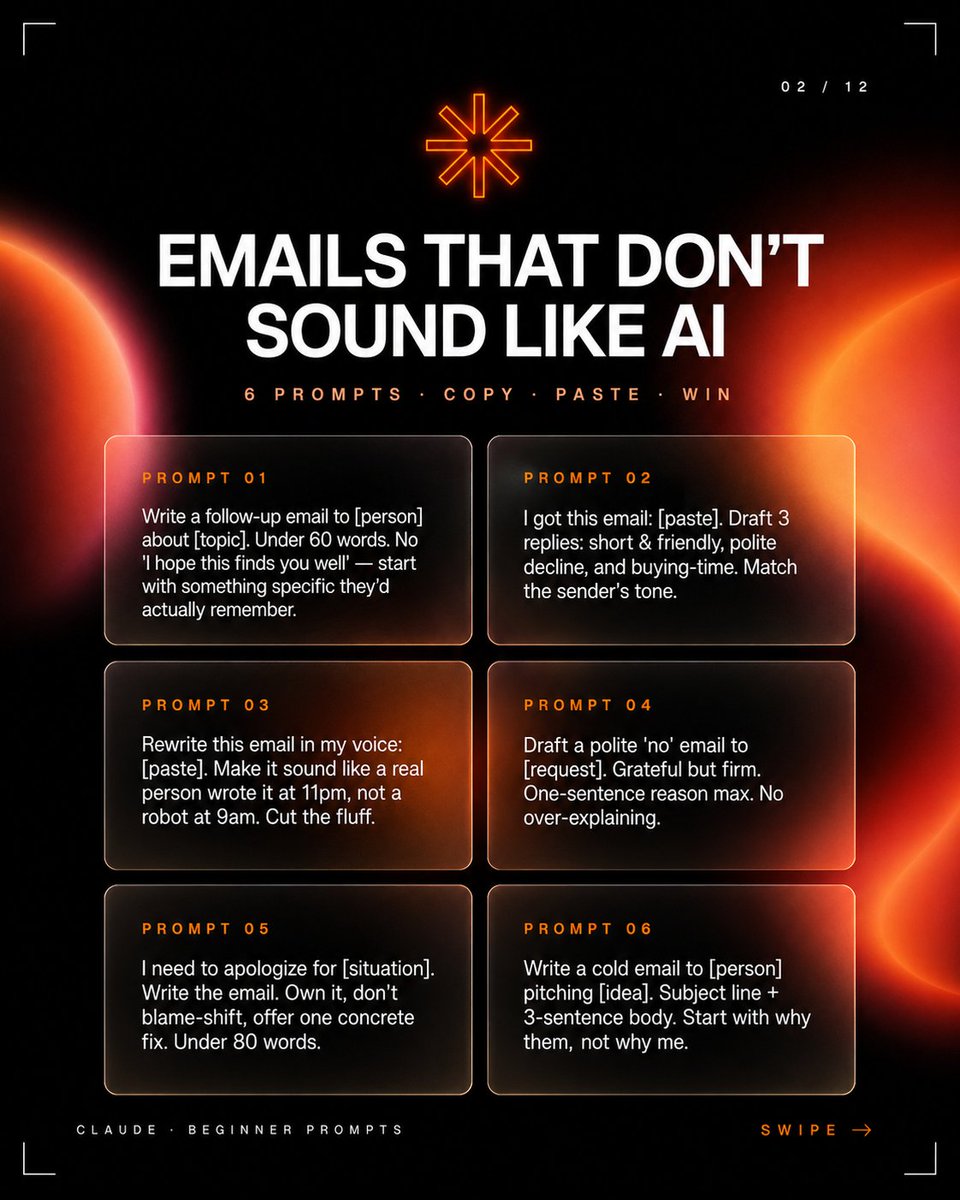
提示词 · EN
type
社交媒体轮播图缩略图format
正方形 1:1style
高级深色科技编辑风格,高对比度黑色背景,左右边缘带有发光的橙红色抽象行星/日食渐变,柔和的镜头光晕,细腻的噪点,带有细圆角边框的玻璃拟态卡片,未来感极简 HUD 角落裁剪标记layout
slide_indicator
position
右上角text
02 / 12top_icon
position
顶部居中description
小型发光橙色八角星符号headline
position
上部居中text
{argument name="headline text" default="告别 AI 味的邮件"}typography
大号加粗大写白色无衬线字体,居中,紧凑行间距subheadline
position
标题下方text
{argument name="subheadline text" default="6 个提示词 · 复制 · 粘贴 · 搞定"}typography
小号大写橙色字间距无衬线字体prompt_cards
count
6arrangement
两列三行,等大的半透明深色圆角卡片,带有温暖的橙色光反射和细淡边框cards
item 1
label
提示词 01position
第一行左body
写一封关于 [主题] 的跟进邮件给 [人名]。字数少于 60 字。不要用“希望你一切都好”之类的客套话——从他们真正记得的具体事情写起。item 2
label
提示词 02position
第一行右body
我收到了这封邮件:[粘贴内容]。起草 3 种回复:简短友好型、礼貌拒绝型和争取时间型。匹配发送者的语气。item 3
label
提示词 03position
第二行左body
用我的口吻重写这封邮件:[粘贴内容]。让它听起来像是一个真实的人在晚上 11 点写的,而不是机器在早上 9 点写的。删掉废话。item 4
label
提示词 04position
第二行右body
起草一封礼貌的“拒绝”邮件给 [请求]。感激但坚定。理由最多一句话。不要过度解释。item 5
label
提示词 05position
第三行左body
我需要为 [情况] 道歉。写这封邮件。勇于承担,不要推卸责任,提供一个具体的解决方案。字数少于 80 字。item 6
label
提示词 06position
第三行右body
写一封冷启动邮件给 [人名] 推销 [想法]。包含主题行 + 3 句正文。从“为什么是他们”而不是“为什么是我”开始。footer
left_text
{argument name="footer label" default="CLAUDE · 初学者提示词"}right_text
{argument name="swipe text" default="向左滑动 →"}position
底部角落typography
微型大写字间距字体,左侧为淡灰色,右侧为橙色color_palette
background
近黑色primary_text
白色accent
霓虹橙色和红色card_fill
透明烟黑色带琥珀色高光composition_notes
保持所有文字清晰易读,具有强烈的层级感:巨大的标题、较小的副标题、六个清晰分隔的提示词卡片。使用电影感的橙色光球从侧面渗入,但保持中心区域足够暗以确保可读性。关于这个提示词
Generate a stunning dark-themed social carousel with six ready-to-use email prompts displayed in glowing glass-effect cards. 它更适合作为 GPT Image 2 的概念艺术起点:先保留画面结构、主体关系和风格约束,再替换成你的品牌、人物或场景。
这条提示词使用结构化 JSON 组织信息,包含 type、format、style、layout、color palette、composition notes 等字段。保留这种层级能让模型更清楚地区分画面主题、布局、界面元素和细节约束。
使用时建议先小幅修改主体、场景、镜头和色调,再生成多个版本对比构图与细节。这样页面内容对用户有实际帮助,也避免把模型名或标签机械堆在正文里。
如何使用这个提示词
- Copy the Prompt: Copy the entire prompt JSON into your preferred AI image generator like Sora 2.
- Choose a Model: Select a model that excels at photorealistic or stylized graphic design outputs.
- Tweak Variables: Customize the
headline,subheadline, andprompt_cardsbody text with your own email topics. - Generate & Refine: Generate the image and adjust parameters like color palette or layout density if needed.
- Export: Download the final 1:1 square image for direct use on Instagram, LinkedIn, or other social platforms.


