
GPT Image 2AI 提示词
Dark AI Analytics Dashboard — SaaS UI Prompt
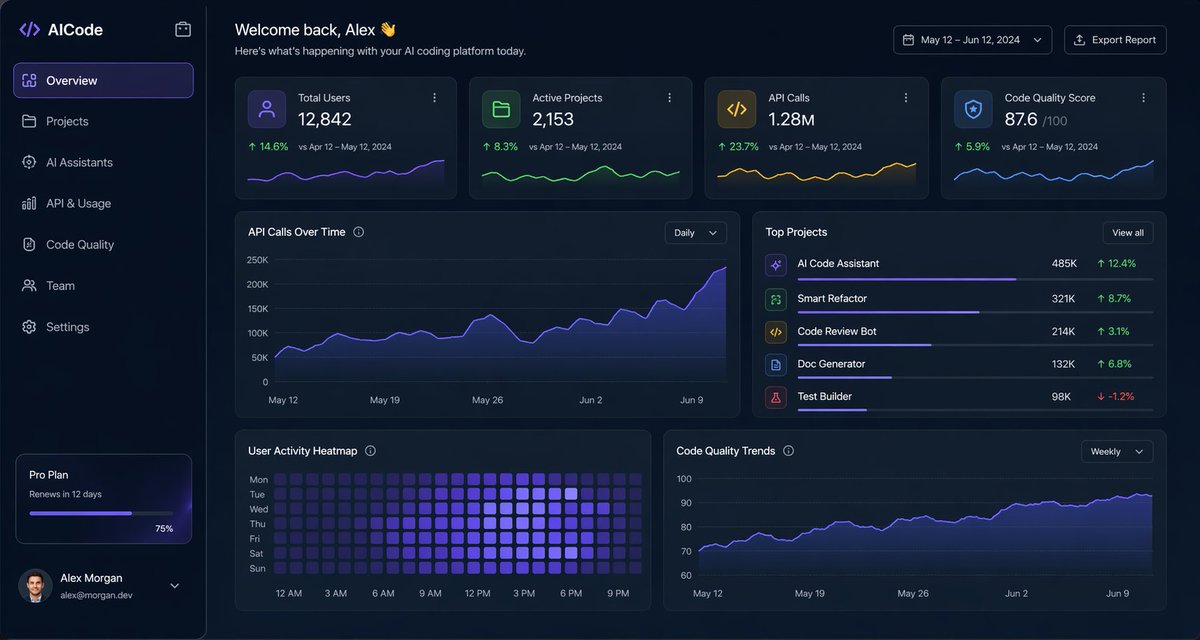
Create a stunning dark-mode analytics dashboard for AI coding platforms, featuring metric cards, charts, and a sleek sidebar. Ideal for SaaS prototypes and data-heavy UI designs.
提示词 · EN
type
深色 SaaS 分析仪表盘 UIproduct
brand
{argument name="brand name" default="AICode"}theme
深海军蓝磨砂玻璃质感界面,带有微妙的渐变、柔和光晕、圆角卡片、细边框,现代开发者工具美学canvas
aspect_ratio
16:9background
深午夜蓝,带有淡淡的暗角和柔和的径向光效layout
structure
左侧边栏加主内容区域sections
item 1
title
侧边栏position
左侧count
8labels
item 1
AICodeitem 2
概览item 3
项目item 4
AI Assistantsitem 5
API 与使用情况item 6
代码质量item 7
团队item 8
设置details
顶部显示 Logo,选中“概览”并带有紫色高亮,底部订阅卡片显示 Pro Plan,12 天后到期,水平进度条显示 75%,底部用户个人资料包含头像、{argument name="user name" default="Alex Morgan"} 以及邮箱 alex.devitem 2
title
页眉position
顶部主区域count
4labels
item 1
欢迎回来,Alex 👋item 2
这是您 AI 编程平台今日的动态。item 3
2024 年 5 月 12 日 – 6 月 12 日item 4
导出报告details
左侧为大号问候语,右侧为日期范围选择器和导出按钮item 3
title
指标卡片position
页眉下方第一行count
4labels
item 1
总用户数item 2
活跃项目item 3
API 调用量item 4
代码质量评分values
item 1
12,842item 2
2,153item 3
1.28Mitem 4
876details
每张卡片包含一个小图标、大号主数值,以及与 2024 年 4 月 12 日 – 5 月 12 日的对比文本,正向增长百分比分别为 14.6%、8.3%、23.7%、5.9%,底部带有迷你折线图;颜色分别为紫色、绿色、琥珀色和蓝色item 4
title
主要分析面板position
中间和底部行count
4labels
item 1
API 调用趋势item 2
热门项目item 3
用户活跃热力图item 4
代码质量趋势details
“API 调用趋势”为宽幅面积图,带有“每日”下拉菜单,紫色折线呈上升趋势,终点接近 250K;“热门项目”为包含 5 个项目的排名列表,带有进度条和百分比变化;“用户活跃热力图”为 7 行周热力图,带有从上午 12 点到晚上 9 点的小时标签;“代码质量趋势”为折线图,带有“每周”下拉菜单,紫色曲线平滑上升,从约 70 升至 90 出头item 5
title
热门项目列表position
中间右侧面板count
5labels
item 1
AI Code Assistantitem 2
Smart Refactoritem 3
Code Review Botitem 4
Doc Generatoritem 5
Test Buildervalues
item 1
485Kitem 2
321Kitem 3
214Kitem 4
132Kitem 5
98Kdetails
前四项的绿色正向增长分别为 12.4%、8.7%、3.1%、6.8%,Test Builder 为红色负增长 -1.2%;每一行都有一个彩色方形图标和细水平进度条style
visual_language
高端金融科技与 AI 产品设计原型rendering
清晰的高保真 UI 原型,微妙的阴影,霓虹边缘光效,精致的图表,简洁的无衬线字体primary_accent
{argument name="accent color" default="电光紫"}secondary_accents
item 1
翡翠绿item 2
琥珀黄item 3
青蓝色density
信息丰富且空间感强,网格平衡,高度易读关于这个提示词
Create a stunning dark-mode analytics dashboard for AI coding platforms, featuring metric cards, charts, and a sleek sidebar. Ideal for SaaS prototypes and data-heavy UI designs. 它更适合作为 GPT Image 2 的概念艺术起点:先保留画面结构、主体关系和风格约束,再替换成你的品牌、人物或场景。
这条提示词使用结构化 JSON 组织信息,包含 type、product、canvas、layout、style 等字段。保留这种层级能让模型更清楚地区分画面主题、布局、界面元素和细节约束。
使用时建议先小幅修改主体、场景、镜头和色调,再生成多个版本对比构图与细节。这样页面内容对用户有实际帮助,也避免把模型名或标签机械堆在正文里。
如何使用这个提示词
- Copy the prompt template from this page.
- Open your preferred AI image generator (e.g., Midjourney, DALL-E 3, Stable Diffusion).
- Replace
{argument}placeholders with your own values or keep the defaults. - Paste the full prompt into the generator and run it.
- Review the output; tweak variables or prompt details to refine the result.


