
GPT Image 2AI 提示词
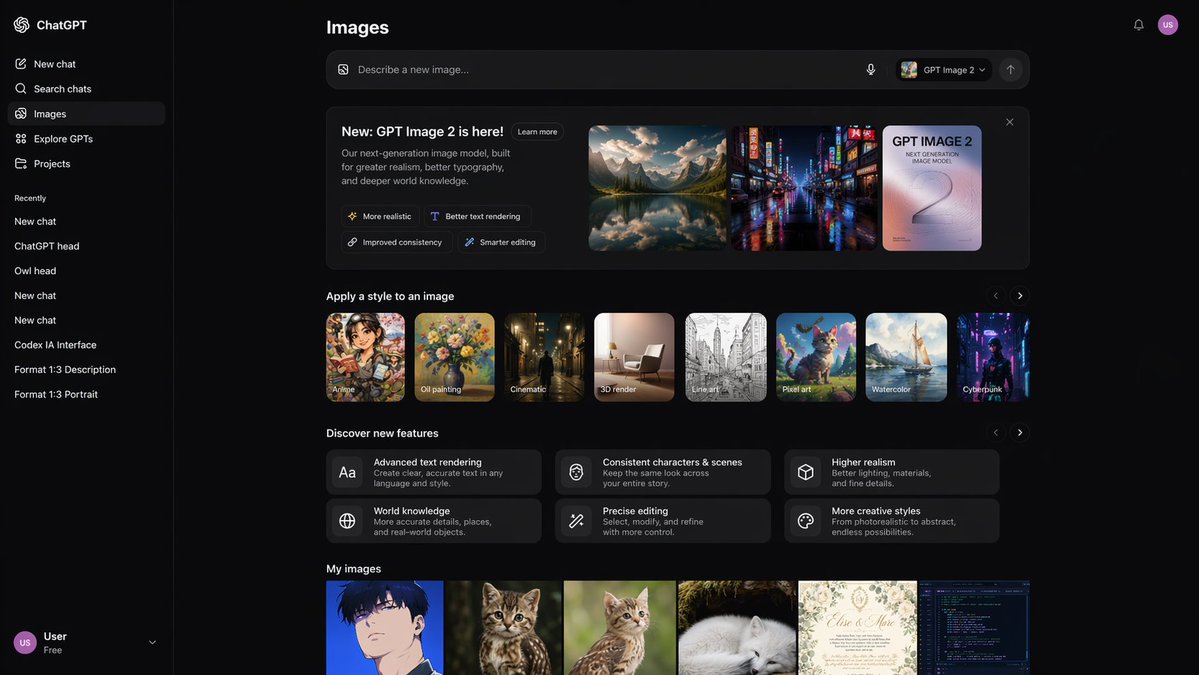
Deep Mode AI Image Generator UI Prototype with Sidebar
Create a sleek, dark mode UI prototype for an AI image generator complete with sidebar navigation, style thumbnails, and image gallery.
提示词 · EN
type
UI/UX Web 应用原型theme
深色模式sidebar
logo
{argument name="app name" default="ChatGPT"}navigation_items
5recent_chats_count
8user_profile
用户,免费版main_content
header
图像input_bar
placeholder
{argument name="input placeholder" default="描述一张新图像..."}model_selector
{argument name="model name" default="GPT Image 2"}sections
item 1
title
{argument name="hero title" default="新功能:GPT Image 2 现已发布!"}description
我们的下一代图像模型,旨在实现更高的真实感、更出色的排版效果以及更深层的世界知识。feature_tags_count
4hero_images_count
3hero_images_descriptions
item 1
山间湖泊景观item 2
霓虹赛博朋克街道item 3
排版海报item 2
title
为图像应用风格style_thumbnails_count
8style_labels
item 1
动漫item 2
油画item 3
电影感item 4
3D 渲染item 5
线条艺术item 6
像素艺术item 7
水彩item 8
赛博朋克item 3
title
探索新功能feature_cards_count
6feature_labels
item 1
高级文本渲染item 2
一致的角色与场景item 3
更高的真实感item 4
世界知识item 5
精准编辑item 6
更多创意风格item 4
title
我的图像recent_images_count
6recent_images_descriptions
item 1
动漫男孩肖像item 2
虎斑小猫item 3
虎斑小猫item 4
熟睡的北极白狐item 5
婚礼请柬item 6
代码编辑器终端关于这个提示词
Create a sleek, dark mode UI prototype for an AI image generator complete with sidebar navigation, style thumbnails, and image gallery. 它更适合作为 GPT Image 2 的概念艺术起点:先保留画面结构、主体关系和风格约束,再替换成你的品牌、人物或场景。
这条提示词使用结构化 JSON 组织信息,包含 type、theme、sidebar、main content 等字段。保留这种层级能让模型更清楚地区分画面主题、布局、界面元素和细节约束。
使用时建议先小幅修改主体、场景、镜头和色调,再生成多个版本对比构图与细节。这样页面内容对用户有实际帮助,也避免把模型名或标签机械堆在正文里。
如何使用这个提示词
- Copy the provided JSON prompt.
- Paste it into an AI image model that supports custom UI generation (e.g., Sora 2 or DALL·E with structure).
- Modify optional arguments like
app name,input placeholder, ormodel nameto match your branding. - Generate to receive a high-fidelity dark mode app UI prototype.
- Refine by adjusting section titles, image descriptions, or feature tags.


