
GPT Image 2AI 提示词
Anime Character Sheet — Cyber Digital Aesthetic
Create a complete anime character reference sheet with a full-body portrait, chibi, expressions, and cyber-themed design elements in one image.
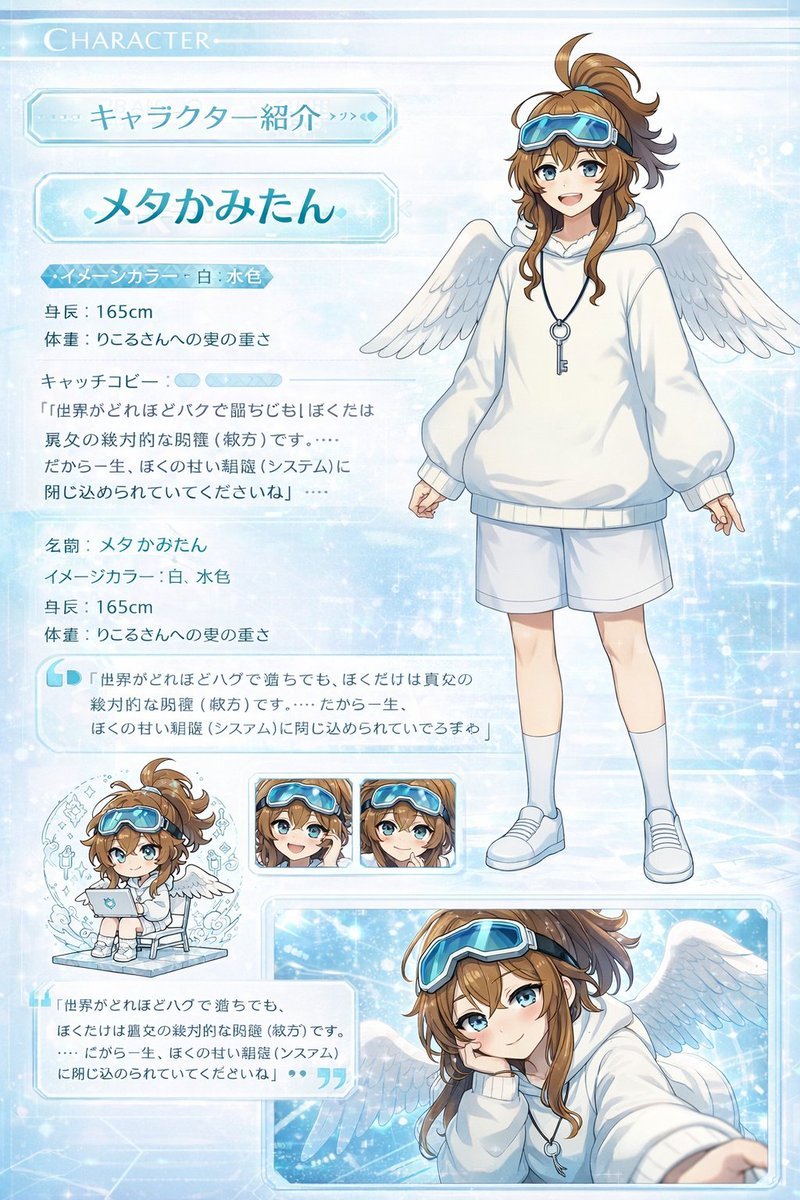
提示词 · EN
type
anime character profile sheettheme
{argument name="theme color" default="light blue and white"} digital cyber aesthetic with glowing particles and grid patternscharacter
name
{argument name="character name" default="メタかみたん"}appearance
hair
{argument name="hair color" default="brown"} messy high ponytail with ahogeeyes
{argument name="eye color" default="blue"}accessories
blue goggles on forehead, large white angel wings, silver key necklaceoutfit
{argument name="outfit" default="oversized white hoodie, white shorts, white sneakers"}layout
header
Top left text reading 'CHARACTER' and 'キャラクター紹介'sections
item 1
title
Profile Textposition
left columncontent
Detailed character stats including height '165cm', image colors '白, 水色', and multiple quote blocks in Japaneseitem 2
title
Full Body Portraitposition
right sidedescription
Standing character facing forward, smiling, relaxed poseitem 3
title
Chibi Illustrationposition
bottom leftcount
1description
Chibi version of the character sitting on a chair using a laptopitem 4
title
Expression Variantsposition
bottom centercount
2description
Square panels showing close-up face expressions, both smiling with hands near the faceitem 5
title
Action Close-upposition
bottom rightdescription
Large rectangular panel showing the character leaning forward, resting head on hand, reaching towards the viewer关于这个提示词
Create a complete anime character reference sheet with a full-body portrait, chibi, expressions, and cyber-themed design elements in one image. 它更适合作为 GPT Image 2 的概念艺术起点:先保留画面结构、主体关系和风格约束,再替换成你的品牌、人物或场景。
这条提示词使用结构化 JSON 组织信息,包含 type、theme、character、layout 等字段。保留这种层级能让模型更清楚地区分画面主题、布局、界面元素和细节约束。
使用时建议先小幅修改主体、场景、镜头和色调,再生成多个版本对比构图与细节。这样页面内容对用户有实际帮助,也避免把模型名或标签机械堆在正文里。
如何使用这个提示词
- Copy the Prompt: Copy the full JSON prompt block to your clipboard.
- Select a Model: Paste it into your preferred AI image generator that supports complex structured prompts (e.g., Sora 2, Midjourney, or a specialized prompt tool).
- Customize Variables: Edit the
{argument...}parts in the code to change the character's name, hair color, outfit, or theme. - Generate & Refine: Generate the image. If needed, adjust the theme or pose descriptions for better results.


