
GPT Image 2AI 提示词
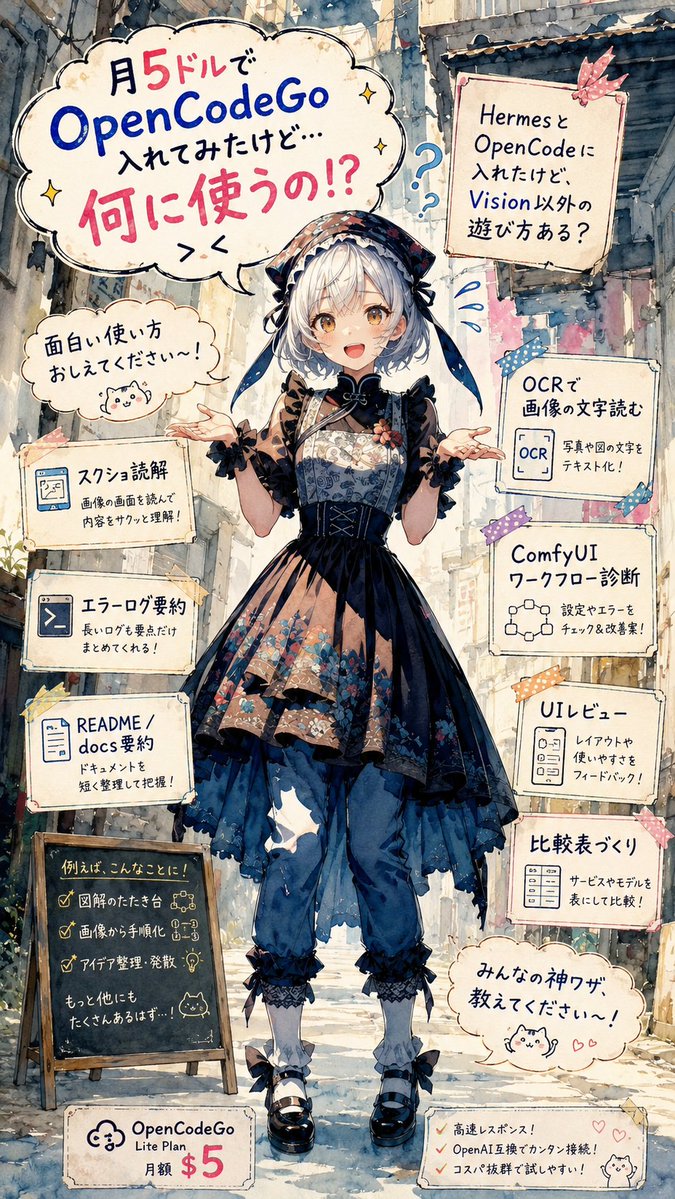
Anime OpenCodeGo Use-Case Infographic Poster — Sora 2 Prompt
Generate a charming, vertically-formatted anime watercolor poster that playfully lists creative ways to use OpenCodeGo, complete with whimsical speech bubbles and tutorial-style doodles.
提示词 · EN
type
vertical anime watercolor infographic posteraspect_ratio
9:16style
highly detailed Japanese anime illustration, soft watercolor and ink line art, paper texture, pastel but high-contrast colors, hand-drawn typography, whimsical tutorial flyer aestheticmain_subject
description
A full-body anime girl standing centered in a narrow old city alley, facing forward with both hands open in a questioning pose. Her face is intentionally covered by a plain beige square censor block.outfit
dark gothic lolita and wa-lolita inspired layered dress with navy and black tones, floral patterned bodice and skirt panels, lace trim, corset lacing, sheer brown sleeves, oversized bonnet or headscarf with ribbons, loose blue pants underneath, white socks, black Mary Jane shoes with bowshair
{argument name="hair color" default="silver-white"} short bob hair visible around the bonnetmood
curious, confused, playful, asking the viewer for ideassetting
background
sunlit narrow urban alley with old buildings, pipes, balconies, weathered walls, plants near the ground, soft perspective depthlighting
bright daylight filtering through the alley, gentle shadows, painterly atmospheric depthlayout
composition
single centered character surrounded by hand-drawn speech bubbles, taped note cards, small icons, doodles, and pricing labelstop_left_main_bubble
count
1text
月 5 ドルで OpenCodeGo 入れてみたけど… 何に使うの!? > <appearance
large cloud-shaped speech bubble with blue and pink emphasis text, small sparkle doodlesleft_side_elements
count
5items
item 1
type
small speech bubbletext
面白い使い方 おしえてください〜!icon
small cute cat doodleitem 2
type
note cardtitle
スクショ読解body
画像の画面を読んで 内容をサクッと理解!icon
browser or screenshot iconitem 3
type
note cardtitle
エラーログ要約body
長いログを要点だけ まとめてくれる!icon
terminal iconitem 4
type
note cardtitle
README / docs 要約body
ドキュメントを 短く整理して把握!icon
document iconitem 5
type
chalkboard signtitle
例えば、こんなことに!checklist_count
3checklist
item 1
図解のたたき台item 2
画像から手順化item 3
アイデア整理・発散footer
もっと他にも たくさんあるはず…!right_side_elements
count
6items
item 1
type
taped note cardtext
Hermes と OpenCode に 入れたけど, Vision 以外の 遊び方ある?decor
pink ribbon tape and blue question marksitem 2
type
note cardtitle
OCR で 画像の文字読むbody
写真や図の文字を テキスト化!icon
OCR document iconitem 3
type
note cardtitle
ComfyUI ワークフロー診断body
設定やエラーを チェック&改善案!icon
node graph iconitem 4
type
note cardtitle
UI レビューbody
レイアウトや 使いやすさを フィードバック!icon
UI panel iconitem 5
type
note cardtitle
比較表づくりbody
サービスやモデルを 表にして比較!icon
table iconitem 6
type
speech bubbletext
みんなの神ワザ 教えてください〜!icon
cute cat doodle with small heartsbottom_elements
count
2items
item 1
type
pricing tagtext
OpenCodeGo Lite Plan 月額 $5icon
cloud logoitem 2
type
benefit memochecklist_count
3checklist
item 1
高速レスポンス!item 2
OpenAI 互換でカンタン接続!item 3
コスパ抜群で試しやすい!icon
small cat doodle and heartstext_rendering
language
Japanesestyle
handwritten marker lettering with mixed blue, black, and hot pink emphasisheadline_product
{argument name="product name" default="OpenCodeGo"}monthly_price
{argument name="monthly price" default="$5"}main_question
{argument name="main question" default="何に使うの!?"}call_to_action
{argument name="call to action" default="面白い使い方 おしえてください〜!"}quality_instructions
Create a polished, readable, information-dense poster. Keep all visible note cards legible, preserve the exact counts of 1 main headline bubble, 5 left-side elements, 6 right-side elements, and 2 bottom elements. Use decorative tape, stars, question marks, hearts, and cat doodles to make the educational tech topic feel cute and approachable.关于这个提示词
Generate a charming, vertically-formatted anime watercolor poster that playfully lists creative ways to use OpenCodeGo, complete with whimsical speech bubbles and tutorial-style doodles. 它更适合作为 GPT Image 2 的概念艺术起点:先保留画面结构、主体关系和风格约束,再替换成你的品牌、人物或场景。
这条提示词使用结构化 JSON 组织信息,包含 type、aspect ratio、style、main subject、setting、layout、text rendering 等字段。保留这种层级能让模型更清楚地区分画面主题、布局、界面元素和细节约束。
使用时建议先小幅修改主体、场景、镜头和色调,再生成多个版本对比构图与细节。这样页面内容对用户有实际帮助,也避免把模型名或标签机械堆在正文里。
如何使用这个提示词
- Copy the entire prompt JSON into your AI video or image model (e.g. Sora 2, Runway, Pika).
- Select a 9:16 vertical aspect ratio to match the poster layout.
- Customize the
hair colorvariable or swap any outfit/text details to fit your brand. - Run generation and review the watercolor-style anime output.
- Use the final poster as a social-media graphic, tutorial flyer, or creative showcase.


