
GPT Image 2AI 提示词
Anime Streetwear Character — Customizable Fashion Prompt
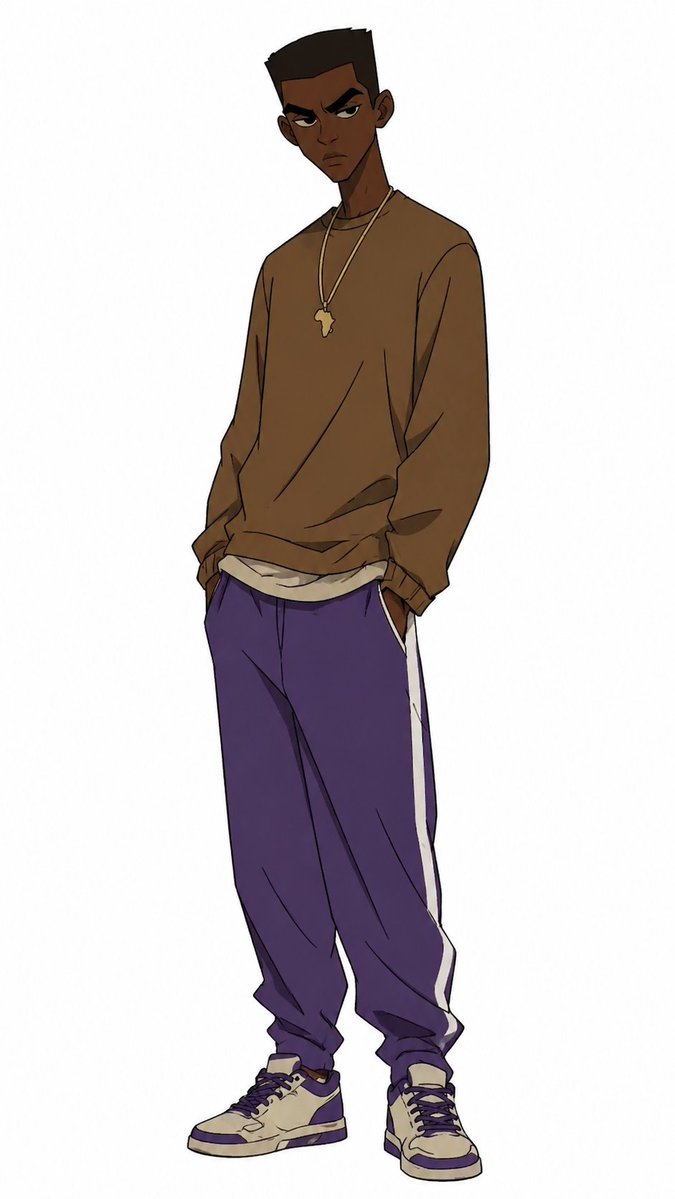
Generates a clean, full-body anime illustration of a stylish Black streetwear character with customizable colors and accessories for fashion or avatar use.
提示词 · EN
Create a full-body anime-style character illustration on a plain white background, showing a tall, slim young Black man with dark brown skin standing in a relaxed streetwear pose, head slightly tilted, shoulders loose, and both hands tucked into his pants pockets. His face is intentionally obscured by a centered square blur/censor block with a soft brown-to-white gradient, while short high-top black hair and one visible ear remain partly visible. He wears an oversized argsweatshirt color: warm brown crewneck sweatshirt with loose sleeves and wrinkled fabric, layered over a slightly visible off-white undershirt at the hem. Around his neck are two thin gold chains, one with a small argpendant shape: Africa-shaped pendant. He wears baggy argpants color: deep purple track pants with a single bold white side stripe on each leg, gathered at the ankles, plus cream and purple high-top sneakers with dark laces and chunky soles. Use clean manga/anime line art, muted colors, subtle cel shading, expressive clothing folds, long proportions, and a fashion character design feel, with the figure centered vertically and no props or background details.
关于这个提示词
Generates a clean, full-body anime illustration of a stylish Black streetwear character with customizable colors and accessories for fashion or avatar use. 它更适合作为 GPT Image 2 的概念艺术起点:先保留画面结构、主体关系和风格约束,再替换成你的品牌、人物或场景。
使用时优先替换 sweatshirt color、pendant shape、pants color 等占位符,并保持镜头、构图和材质描述的顺序不变。这样更容易获得稳定的画面结果,也方便继续做多版本对比。
如何使用这个提示词
- Copy the full prompt text into your preferred AI image generator (Sora, Midjourney, DALL·E, etc.).
- Replace the
{sweatshirt color}and{pants color}variables with your desired color names (e.g., "olive green", "black"). - Adjust the
{pendant shape}variable if you want a different necklace charm (e.g., "star pendant", "cross pendant"). - Select a model that supports anime or illustration styles for best results.
- Generate the image and iterate by tweaking color values or pose descriptions until satisfied.


