
GPT Image 2AI 提示词
Anime VTuber Shocked Reaction — YouTube Thumbnail Prompt
Create an edgy, neon-pink and black anime YouTube thumbnail with a shocked VTuber reacting to social media posts and live chat.
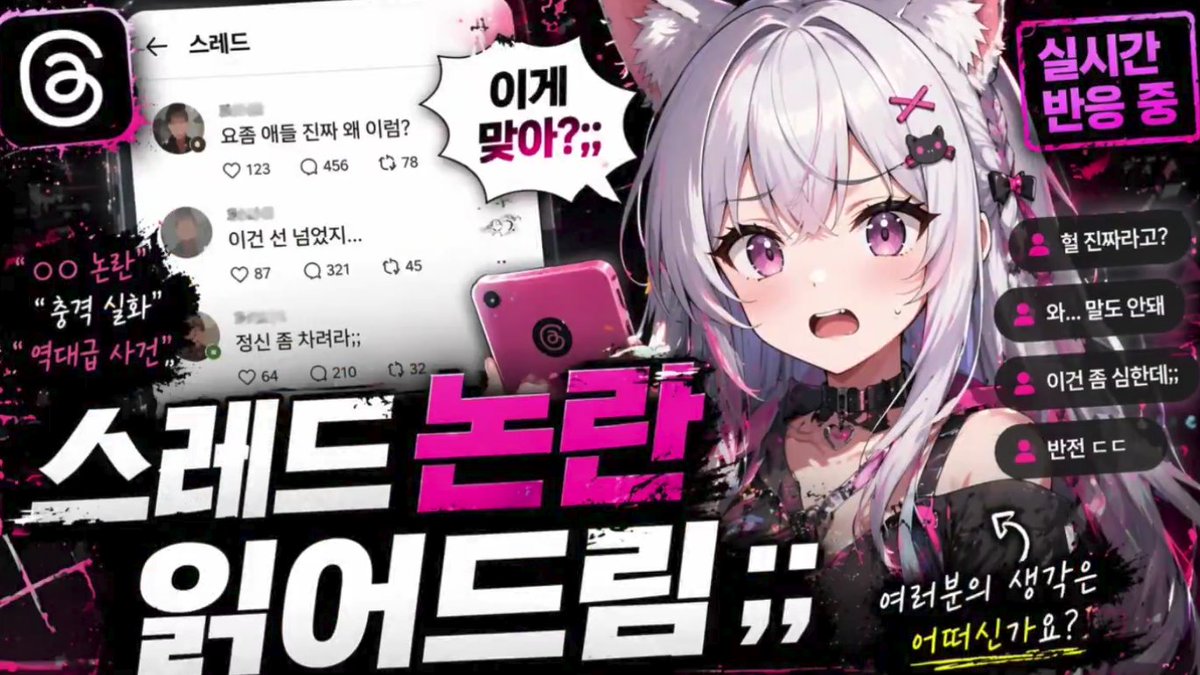
提示词 · EN
type
YouTube thumbnail graphicstyle
anime, edgy, neon pink and black color scheme, grunge and splatter accentscharacter
appearance
anime girl, {argument name="hair color" default="silver"} hair, cat ears, purple eyesexpression
{argument name="expression" default="shocked and sweating"}, mouth openaccessories
black cat hairclip with pink cross, black choker with heart ringaction
holding a pink smartphone with a swirl logolayout
main_title
position
bottom centerstyle
huge, bold, 3D typography, grunge texturelines
item 1
text
{argument name="main title top" default="스레드 논란"}color
neon pinkitem 2
text
{argument name="main title bottom" default="읽어드림 ;;"}color
whiteui_elements
item 1
type
social media feed mockupposition
mid-leftheader
← 스레드post_count
3details
avatars, Korean text, interaction icons for like, comment, repostitem 2
type
live chat mockupposition
right edgemessage_count
4details
pink user icons, Korean texttext_callouts
item 1
type
spiky speech bubbleposition
center toptext
{argument name="speech bubble text" default="이게 맞아?;;"}item 2
type
neon boxposition
top righttext
실시간 반응 중item 3
type
floating grunge textposition
far leftline_count
3text
item 1
OO 논란item 2
충격 실화item 3
역대급 사건item 4
type
handwritten text with arrowposition
bottom righttext
여러분의 생각은 어떠신가요?logos
item 1
type
app iconposition
top leftdescription
white swirl logo on black rounded square关于这个提示词
Create an edgy, neon-pink and black anime YouTube thumbnail with a shocked VTuber reacting to social media posts and live chat. 它更适合作为 GPT Image 2 的概念艺术起点:先保留画面结构、主体关系和风格约束,再替换成你的品牌、人物或场景。
这条提示词使用结构化 JSON 组织信息,包含 type、style、character、layout 等字段。保留这种层级能让模型更清楚地区分画面主题、布局、界面元素和细节约束。
使用时建议先小幅修改主体、场景、镜头和色调,再生成多个版本对比构图与细节。这样页面内容对用户有实际帮助,也避免把模型名或标签机械堆在正文里。
如何使用这个提示词
- Copy the entire prompt JSON into your AI image generator (like Sora 2, Midjourney, or DALL-E).
- Choose a model that supports complex, detailed prompts and understands layered layouts.
- Adjust the customizable variables in the curly braces
{}—like hair color, expression, or title text—to fit your video topic. - Generate the image, then upscale or adjust the composition for your 1280x720 YouTube thumbnail.


