
GPT Image 2AI 提示词
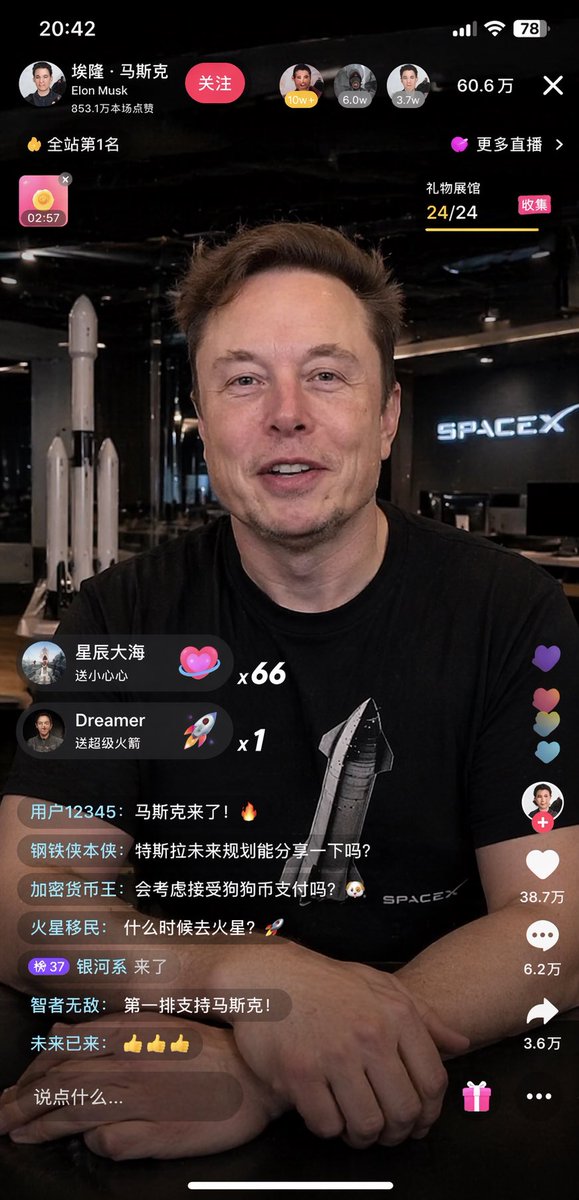
Live Stream UI Generator — Elon Musk App Interface Prompt
Generate a hyper-realistic mobile live streaming interface with customizable host, dynamic chat, and interactive UI elements.
提示词 · EN
type
移动端直播界面模型subject
identity
{argument name="subject name" default="埃隆·马斯克"}appearance
身穿黑色 T 恤,印有 {argument name="t-shirt graphic" default="星舰火箭和 SPACEX 文字"}pose
{argument name="expression" default="温暖微笑,直视镜头"},双手交叠放在深色桌面上environment
{argument name="background" default="SpaceX 办公室,背景有火箭模型和霓虹灯牌"}layout
sections
item 1
title
顶部栏 UIposition
顶部count
4labels
item 1
个人资料信息,包含“埃隆·马斯克”和“关注”按钮item 2
观众头像及人数“60.6万”item 3
排名徽章“全站第1名”item 4
关闭按钮“X”item 2
title
礼物弹窗position
中左count
2labels
item 1
星辰大海 送小心心 x66 (爱心图标)item 2
Dreamer 送超级火箭 x1 (火箭图标)item 3
title
聊天流position
底左count
7labels
item 1
用户12345: 马斯克来了!🔥item 2
钢铁侠本侠: 特斯拉未来规划能分享一下吗?item 3
加密货币王: 会考虑接受狗狗币支付吗?🐶item 4
火星移民: 什么时候去火星?🚀item 5
银河系 来了item 6
智者无敌: 第一排支持马斯克!item 7
未来已来: 👍👍👍item 4
title
侧边操作按钮position
底右count
4labels
item 1
主播头像及“+”号item 2
点赞爱心“38.7万”item 3
评论气泡“6.2万”item 4
分享箭头“3.6万”item 5
title
底部输入栏position
底部count
3labels
item 1
文本输入框“说点什么...”item 2
礼物盒图标item 3
更多选项“...”关于这个提示词
Generate a hyper-realistic mobile live streaming interface with customizable host, dynamic chat, and interactive UI elements. 它更适合作为 GPT Image 2 的概念艺术起点:先保留画面结构、主体关系和风格约束,再替换成你的品牌、人物或场景。
这条提示词使用结构化 JSON 组织信息,包含 type、subject、environment、layout 等字段。保留这种层级能让模型更清楚地区分画面主题、布局、界面元素和细节约束。
使用时建议先小幅修改主体、场景、镜头和色调,再生成多个版本对比构图与细节。这样页面内容对用户有实际帮助,也避免把模型名或标签机械堆在正文里。
如何使用这个提示词
- Copy the prompt from the page.
- Open your AI image model (Sora recommended).
- Replace variables like subject name, expression, background to fit your needs.
- Paste the prompt and generate.
- Refine and regenerate for desired details.


