
GPT Image 2AI 提示词
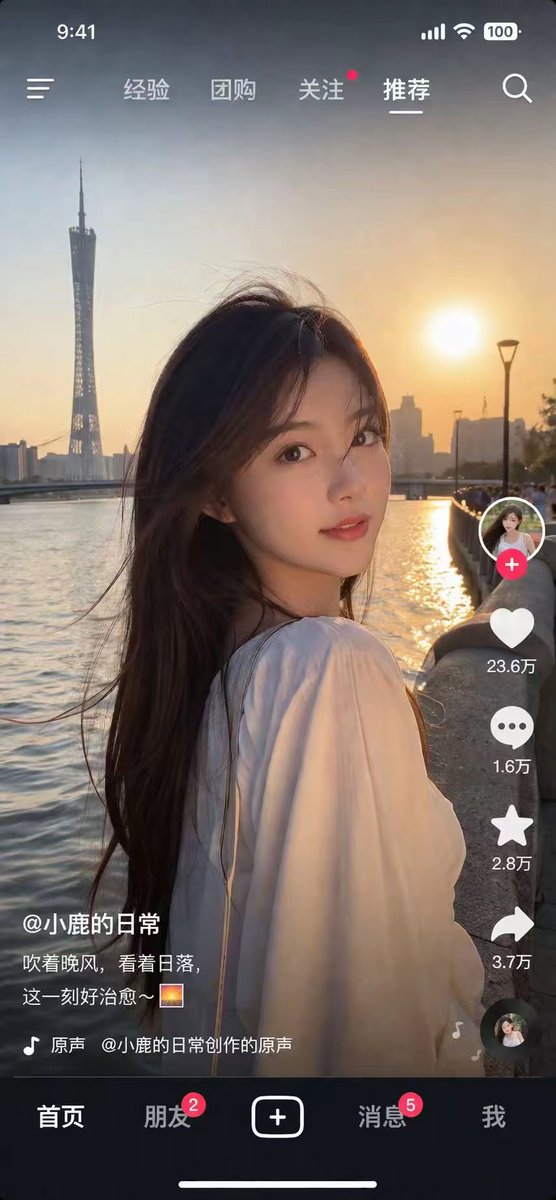
Photorealistic Mobile Short Video UI Screenshot Prompt
Generate hyper-realistic short video app screenshots featuring editable portraits, golden hour lighting, and full customizable UI overlays for marketing and mockups.
提示词 · EN
type
移动端短视频 App 截图style
照片级真实感,高度细节化main_image
subject
{argument name="subject description" default="一位留着深色长发、身穿白色上衣的年轻亚洲女性,回头看向镜头"}lighting
黄金时刻,日落逆光,温暖的柔光background
{argument name="background location" default="日落时分的河畔,背景为高耸的扭曲塔楼天际线"}ui_overlay
top_bar
left
时间 9:41,菜单图标center_tabs
item 1
经验item 2
团购item 3
关注item 4
推荐right
信号,WiFi,电池 100,搜索图标right_sidebar
count
6elements
item 1
带有红色加号按钮的头像item 2
心形图标,文字为 '{argument name="like count" default="23.6万"}'item 3
评论气泡图标,文字为 '1.6万'item 4
星标图标,文字为 '2.8万'item 5
分享箭头图标,文字为 '3.7万'item 6
旋转的唱片图标bottom_left_info
username
{argument name="username" default="@小鹿的日常"}caption
{argument name="caption" default="吹着晚风,看着日落,这一刻好治愈~ 🌅"}audio_track
🎵 原声 @小鹿的日常创作的原声bottom_nav
count
5tabs
item 1
首页item 2
朋友 (带红色角标 2)item 3
中央方形加号按钮item 4
消息 (带红色角标 5)item 5
我footer
白色主页指示条关于这个提示词
Generate hyper-realistic short video app screenshots featuring editable portraits, golden hour lighting, and full customizable UI overlays for marketing and mockups. 它更适合作为 GPT Image 2 的概念艺术起点:先保留画面结构、主体关系和风格约束,再替换成你的品牌、人物或场景。
这条提示词使用结构化 JSON 组织信息,包含 type、style、main image、ui overlay 等字段。保留这种层级能让模型更清楚地区分画面主题、布局、界面元素和细节约束。
使用时建议先小幅修改主体、场景、镜头和色调,再生成多个版本对比构图与细节。这样页面内容对用户有实际帮助,也避免把模型名或标签机械堆在正文里。
如何使用这个提示词
- Copy the prompt template from this page.
- Paste it into an AI image generator like Midjourney, DALL·E, or Stable Diffusion.
- Customize the variables in curly braces (e.g., subject, background, username) to fit your needs.
- Choose a photorealistic model and set high detail/resolution settings before generating.


