
GPT Image 2AI 提示词
Gamified Live Stream App Interface — Sora 2 Prompt
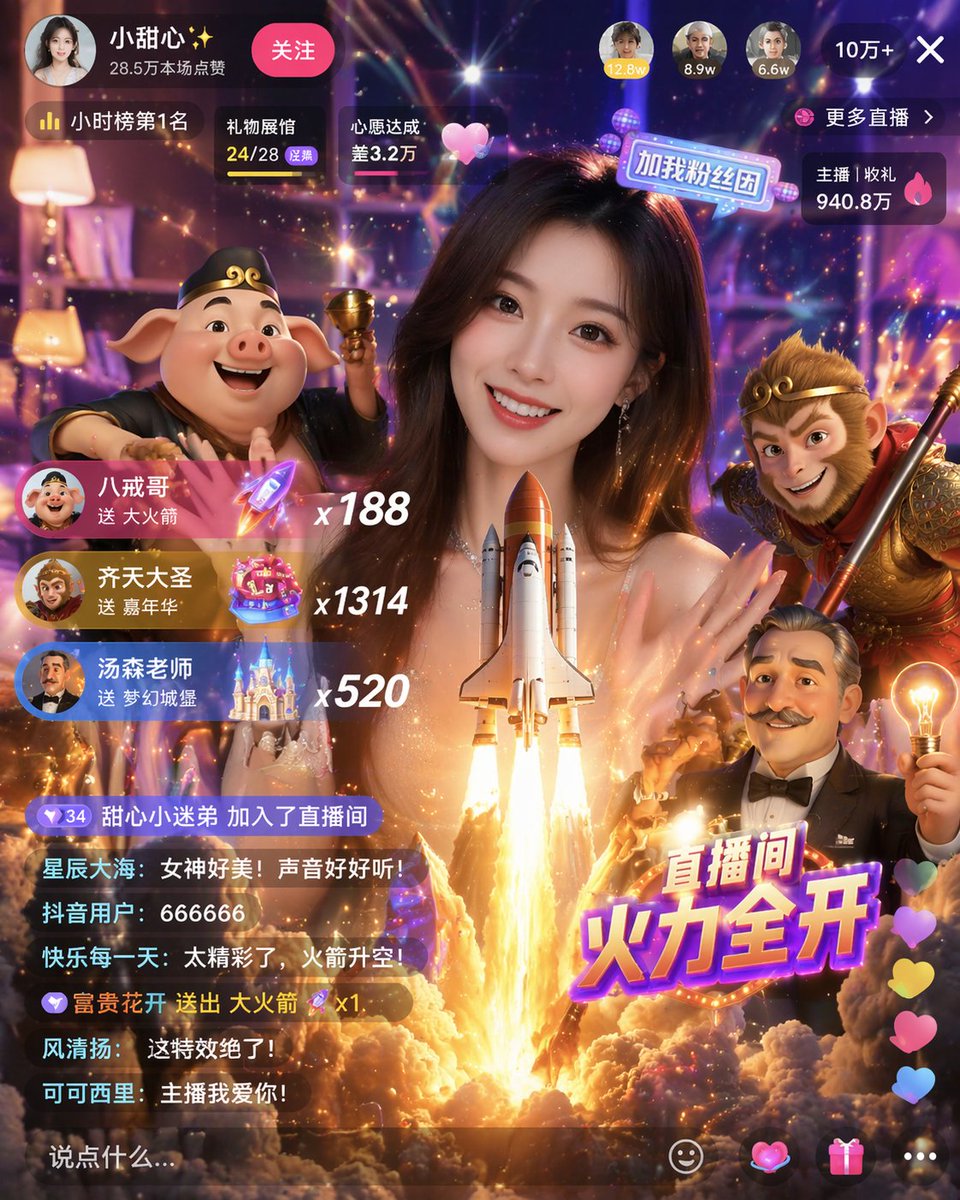
Generate a mobile live stream interface featuring a smiling host, 3D characters like Sun Wukong, rocket launch effect, gift notifications, and interactive chat.
提示词 · EN
type
移动端直播 App 界面模型main_subject
一位面带微笑的年轻亚洲女性,身穿闪亮上衣,直视镜头foreground_3d_characters
left
猪八戒,手持金钵right
孙悟空,手持金箍棒bottom_right
卡通风格的留胡子老者,手持发光的灯泡center_effect
巨大的航天飞机向上发射,伴随明亮的火焰和烟雾,位于女性胸前位置layout
top_bar
broadcaster_info
头像,名称 {argument name="broadcaster name" default="小甜心✨"},数据 '28.5万本场点赞',粉色 '关注' 按钮top_viewers
3 个头像,数据分别为 '12.8w'、'8.9w'、'6.6w',以及一个关闭按钮 '10万+ X'status_badges
标签 '小时榜第1名'、'礼物展馆 24/28'、'心愿达成 差3.2万'right_stats
标签 '更多直播 >'、'主播 | 收礼 940.8万'middle_left_gift_notifications
count
3items
item 1
头像,名称 {argument name="gift sender 1" default="八戒哥"},文本 '送 大火箭',火箭图标,倍数 'x188'item 2
头像,名称 {argument name="gift sender 2" default="齐天大圣"},文本 '送 嘉年华',嘉年华图标,倍数 'x1314'item 3
头像,名称 {argument name="gift sender 3" default="汤森老师"},文本 '送 梦幻城堡',城堡图标,倍数 'x520'bottom_left_chat
count
7messages
item 1
甜心小迷弟 加入了直播间item 2
星辰大海: 女神好美!声音好好听!item 3
抖音用户: 666666item 4
快乐每一天: 太精彩了,火箭升空!item 5
富贵花开 送出 大火箭 x1item 6
风清扬: 这特效绝了!item 7
可可西里: 主播我爱你!input_box
文本 '说点什么...'bottom_right_elements
large_graphic_text
{argument name="main title graphic" default="直播间 火力全开"}floating_reactions
一列彩色爱心action_icons
4 个图标:笑脸、爱心、礼物盒、三个点关于这个提示词
Generate a mobile live stream interface featuring a smiling host, 3D characters like Sun Wukong, rocket launch effect, gift notifications, and interactive chat. 它更适合作为 GPT Image 2 的概念艺术起点:先保留画面结构、主体关系和风格约束,再替换成你的品牌、人物或场景。
这条提示词使用结构化 JSON 组织信息,包含 type、main subject、foreground 3d characters、center effect、layout 等字段。保留这种层级能让模型更清楚地区分画面主题、布局、界面元素和细节约束。
使用时建议先小幅修改主体、场景、镜头和色调,再生成多个版本对比构图与细节。这样页面内容对用户有实际帮助,也避免把模型名或标签机械堆在正文里。
如何使用这个提示词
- Copy the prompt to your AI image or video generator (e.g., Sora, Midjourney, Runway).
- Paste it into the prompt field; select a model suited for UI or detailed scene generation.
- (Optional) Customize variables like broadcaster name or gift sender names within curly braces.
- Generate the output and, if needed, refine by tweaking keywords for style or composition.
- Use the result as a UI mockup, design inspiration, or animated clip.


