
GPT Image 2AI 提示词
Mobile Live Streaming UI Overlay — Sora 2 Prompt
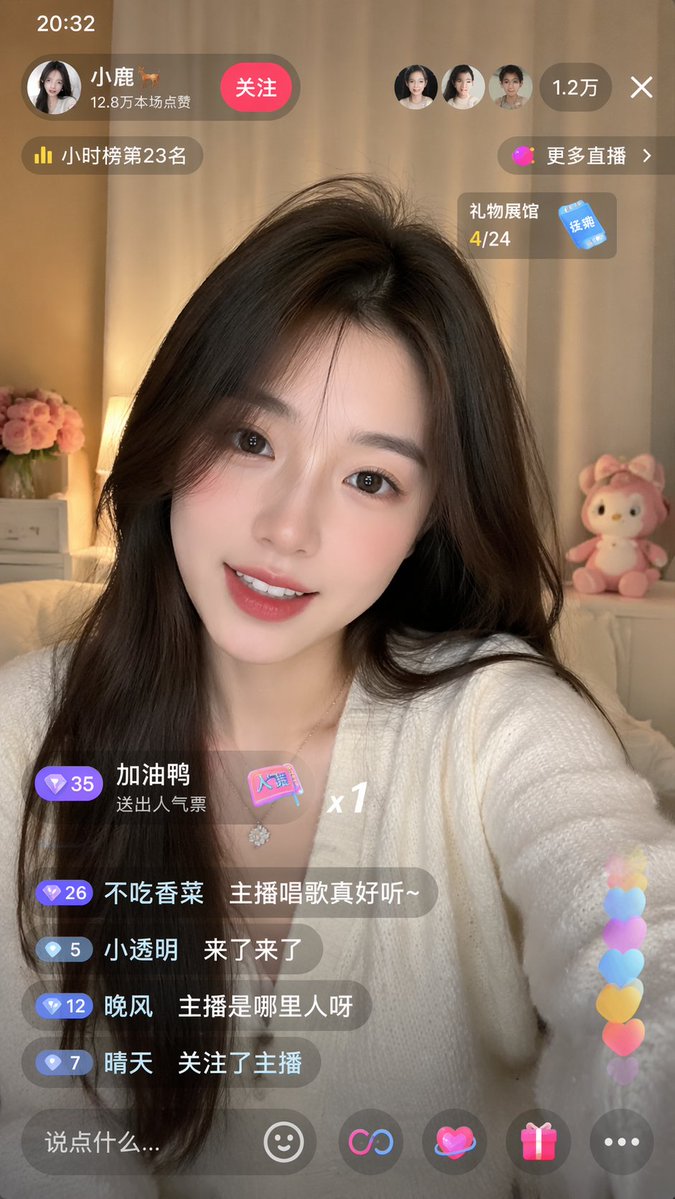
Create a realistic mobile live streaming UI with a smiling Asian broadcaster, interactive chat, and floating hearts. Customizable with arguments.
提示词 · EN
type
移动端直播 App 界面模型subject
description
年轻亚裔女性,留着黑色长发,对着镜头微笑outfit
{argument name="broadcaster outfit" default="白色 V 领开衫"}background
温馨的房间,暖色调灯光,粉色花朵,粉色毛绒玩具layout
top_bar
time
20:32broadcaster
name
{argument name="broadcaster name" default="小鹿 🦌"}stats
12.8 万本场点赞action_button
关注viewers
avatar_count
3total
{argument name="viewer count" default="1.2 万"}close_button
Xfloating_widgets
item 1
小时榜第 23 名item 2
更多直播 >item 3
礼物展馆 4/24chat_area
message_count
4gift_alert
加油鸭 送出人气票 x1messages
item 1
不吃香菜: {argument name="chat message 1" default="主播唱歌真好听~"}item 2
小透明: 来了来了item 3
晚风: 主播是哪里人呀item 4
晴天: 关注了主播bottom_bar
input_placeholder
{argument name="input placeholder" default="说点什么..."}icon_count
5icons
item 1
笑脸item 2
链接符号item 3
带光环的心形item 4
礼盒item 5
三个点overlay_effects
右下角有 6 个彩色心形垂直飘动特效关于这个提示词
Create a realistic mobile live streaming UI with a smiling Asian broadcaster, interactive chat, and floating hearts. Customizable with arguments. 它更适合作为 GPT Image 2 的概念艺术起点:先保留画面结构、主体关系和风格约束,再替换成你的品牌、人物或场景。
这条提示词使用结构化 JSON 组织信息,包含 type、subject、layout 等字段。保留这种层级能让模型更清楚地区分画面主题、布局、界面元素和细节约束。
使用时建议先小幅修改主体、场景、镜头和色调,再生成多个版本对比构图与细节。这样页面内容对用户有实际帮助,也避免把模型名或标签机械堆在正文里。
如何使用这个提示词
- Copy the prompt from sora2hub.com.
- Paste it into Sora 2 or a compatible AI image/video generator.
- Adjust the {arguments} such as broadcaster name, outfit, and viewer count to fit your needs.
- Generate the output to receive a ready-to-use app UI overlay.
- Fine-tune the result by modifying chat messages or visual effects for additional variations.


