
GPT Image 2AI 提示词
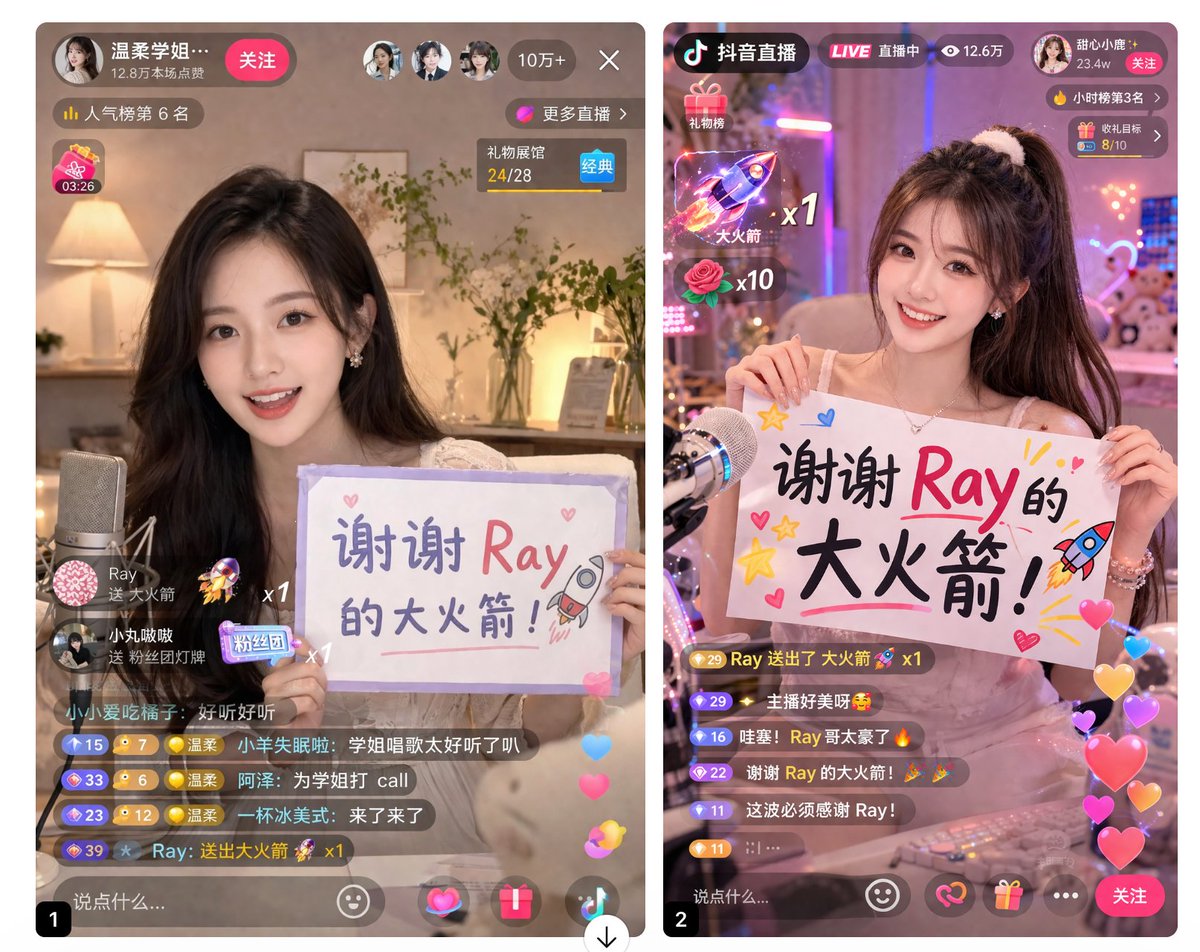
Mobile Live Stream UI Mockup — Dual Screen Thank-You Cards
Generate a side-by-side mobile UI comparison for a live streaming app, with a streamer holding customizable thank-you signs on each screen, complete with chat, gifts, and viewer stats.
提示词 · EN
type
并排移动端 UI 模型theme
{argument name="app style" default="中国移动直播 App"}panels
item 1
position
左侧subject
{argument name="streamer appearance" default="年轻亚裔女性,漂亮,微笑"},长波浪卷发,手持手写牌sign_content
{argument name="sign text" default="谢谢 Ray 的大火箭!"},带有小火箭和爱心涂鸦ui_elements
top_bar
个人资料信息、关注按钮、3 个观众头像、{argument name="viewer count" default="10万+"} 观众人数、关闭按钮overlays
人气排名徽章、礼物栏小组件、显示 {argument name="gift name" default="大火箭"} x1 的悬浮礼物动画chat_stream
7 条不同的聊天消息气泡bottom_bar
文本输入框、4 个操作图标、悬浮点赞爱心item 2
position
右侧subject
同一位主播,扎高马尾并配有发圈,手持手写牌sign_content
{argument name="sign text" default="谢谢 Ray 的大火箭!"},带有星星、爱心和火箭涂鸦ui_elements
top_bar
App Logo、LIVE 徽章、12.6 万观众人数、个人资料信息、关注按钮overlays
小时榜排名徽章、礼物目标小组件、2 个悬浮礼物动画(火箭 x1,玫瑰 x10)chat_stream
6 条不同的聊天消息气泡bottom_bar
文本输入框、4 个操作图标、关注按钮、悬浮点赞爱心关于这个提示词
Generate a side-by-side mobile UI comparison for a live streaming app, with a streamer holding customizable thank-you signs on each screen, complete with chat, gifts, and viewer stats. 它更适合作为 GPT Image 2 的概念艺术起点:先保留画面结构、主体关系和风格约束,再替换成你的品牌、人物或场景。
这条提示词使用结构化 JSON 组织信息,包含 type、theme、panels 等字段。保留这种层级能让模型更清楚地区分画面主题、布局、界面元素和细节约束。
使用时建议先小幅修改主体、场景、镜头和色调,再生成多个版本对比构图与细节。这样页面内容对用户有实际帮助,也避免把模型名或标签机械堆在正文里。
如何使用这个提示词
- Copy the prompt and paste it into your AI image generation tool.
- Choose a model capable of detailed UI rendering (e.g., Midjourney, DALL·E 3, or Stable Diffusion with a UI/UX fine-tune).
- Adjust the arguments to customize the streamer appearance, sign text, viewer count, and gift name.
- Run the generation to produce a side-by-side mobile screen mockup.
- Use the output for app prototyping, client presentations, or design inspiration.


