
GPT Image 2AI 提示词
Apple-Style iPhone Pro Product Page — Sora 2 Prompt
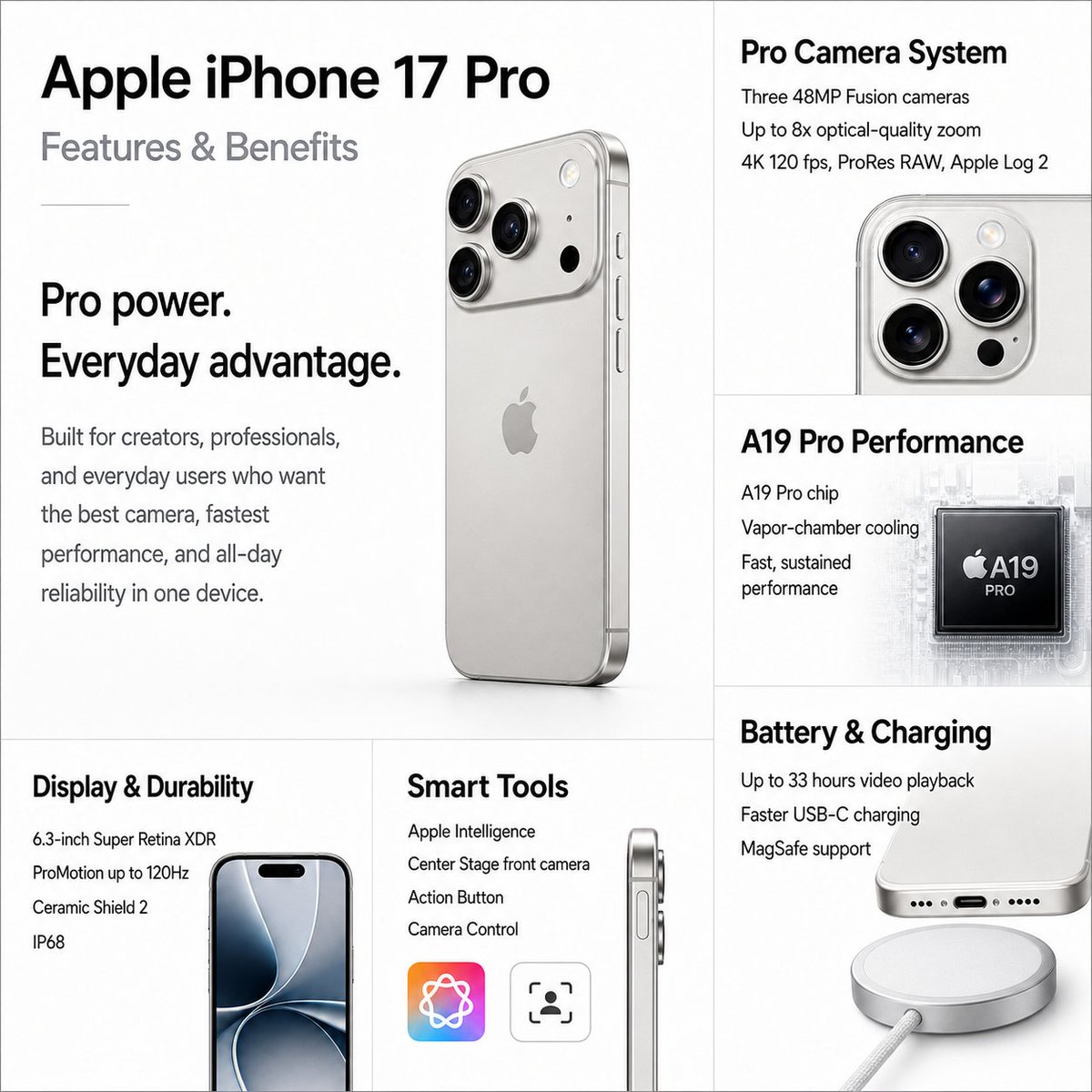
Generate a stunning Apple-inspired iPhone Pro marketing page with a photorealistic product render and five structured feature cards in a clean, minimalist layout.
提示词 · EN
type
适用于虚构智能手机的高级 Apple 风格产品营销项目canvas
aspect_ratio
1:1background
纯白至极浅灰色style
极简 Apple 发布会/产品页面美学,清晰的排版,微妙的网格线,柔和的阴影,照片级真实感产品渲染headline
text
{argument name="product name" default="Apple iPhone 17 Pro"}position
左上角subtitle
特性与优势typography
大型粗体黑色 San Francisco 风格无衬线标题,配以浅灰色副标题hero_section
position
左侧三分之二上方区域main_copy
headline
{argument name="main benefit headline" default="Pro 级性能,日常优势。"}body
专为创作者、专业人士及追求极致影像、最快性能和全天候可靠性的日常用户打造。product_render
银色钛金属 iPhone Pro 的大型悬浮后侧四分之三视角渲染图,具有圆角矩形机身、三摄模组、Apple Logo、侧边按钮及柔和的摄影棚阴影layout
grid
细浅灰色分割线形成 6 个可见内容区域:1 个大型主视觉区加 5 个特性卡片sections
item 1
title
Pro 级摄像头系统position
右上角count
3labels
item 1
三个 4800 万像素 Fusion 摄像头item 2
最高 8 倍光学品质变焦item 3
4K 120 fps,ProRes RAW,Apple Log 2visual
银色设备上摄像头模组的局部特写item 2
title
A19 Pro 性能position
中右侧count
3labels
item 1
A19 Pro 芯片item 2
均热板散热item 3
快速且持续的性能表现visual
黑色处理器芯片,上方标注 Apple A19 PRO,背景为淡淡的电路板纹理item 3
title
电池与充电position
右下角count
3labels
item 1
最长 33 小时视频播放item 2
更快的 USB-C 充电item 3
支持 MagSafevisual
iPhone 底部边缘局部,USB-C 接口上方配有圆形银色 MagSafe 充电器及线缆item 4
title
显示屏与耐用性position
左下角count
4labels
item 1
6.3 英寸超视网膜 XDR 显示屏item 2
ProMotion 自适应刷新率最高 120Hzitem 3
超瓷晶面板 2item 4
IP68 级防尘抗水visual
iPhone 正面局部视图,配有深蓝色抽象壁纸和灵动岛item 5
title
智能工具position
底部中心count
4labels
item 1
Apple Intelligenceitem 2
人物居中前置摄像头item 3
操作按钮item 4
相机控制visual
手机侧面轮廓,配有两个圆角方形图标,一个是多彩的 Apple Intelligence 循环图标,另一个是黑色对焦/人脸追踪图标design_notes
保持精准对齐,留白充裕,黑灰文字层级分明,微妙的摄影景深,精致的反射效果,产品规格信息图表的清晰度,以及高端发布活动的质感。保持所有文字锐利易读,除设备和芯片上的 Apple 标志外,不添加任何额外 Logo。关于这个提示词
Generate a stunning Apple-inspired iPhone Pro marketing page with a photorealistic product render and five structured feature cards in a clean, minimalist layout. 它更适合作为 GPT Image 2 的概念艺术起点:先保留画面结构、主体关系和风格约束,再替换成你的品牌、人物或场景。
这条提示词使用结构化 JSON 组织信息,包含 type、canvas、headline、hero section、layout、design notes 等字段。保留这种层级能让模型更清楚地区分画面主题、布局、界面元素和细节约束。
使用时建议先小幅修改主体、场景、镜头和色调,再生成多个版本对比构图与细节。这样页面内容对用户有实际帮助,也避免把模型名或标签机械堆在正文里。
如何使用这个提示词
- Copy the entire prompt object.
- Choose a compatible AI image generation model (e.g., Sora 2, Midjourney).
- Customize variables like
product nameormain benefit headlineto match your desired product. - Generate the image and review the output for layout consistency.
- Refine and iterate by adjusting specific fields if needed.


