
GPT Image 2AI 提示词
Architect Live Stream UI Mockup — Sora 2 Prompt
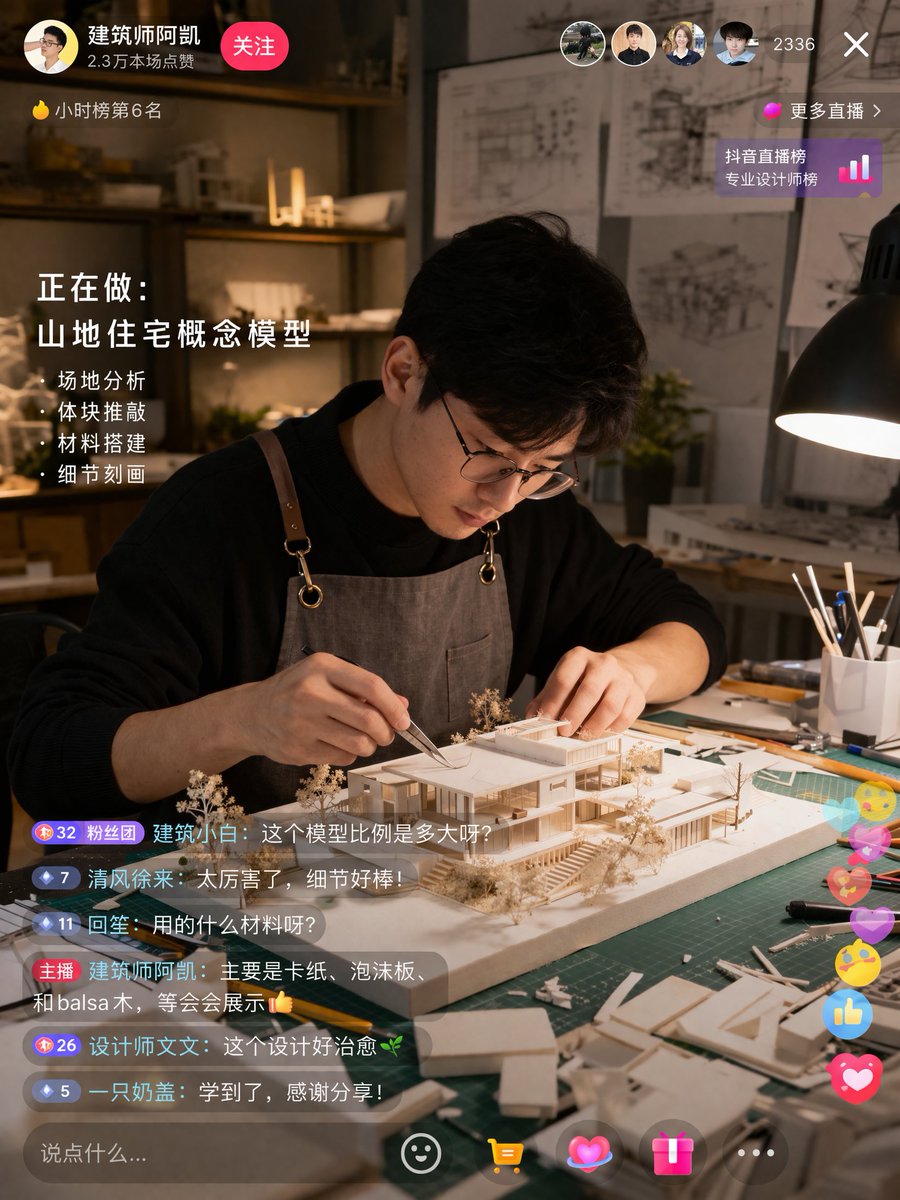
Generates a hyper-realistic live stream interface of an architect crafting a scale model, complete with customizable chat and task overlays.
提示词 · EN
type
live stream interface mockupscene
subject
{argument name="subject description" default="young Asian male architect wearing glasses and a brown canvas apron"}action
focused on building a detailed white architectural scale model of a modern house using tweezerssetting
dimly lit design studio, green cutting mat, desk lamp, architectural blueprints on the wall in the backgroundui_elements
top_left
profile
avatar, username '{argument name="username" default="建筑师阿凯"}', stats '2.3万本场点赞', pink '关注' buttonranking
yellow flame icon '小时榜第6名'top_right
viewers
4 user avatars, count '2336', 'X' close buttonranking_link
pink dot '更多直播 >', '抖音直播榜 专业设计师榜' with bar chart iconmid_left_overlay
title
正在做:subtitle
{argument name="current task" default="山地住宅概念模型"}bullet_points_count
4bullet_points
item 1
· 场地分析item 2
· 体块推敲item 3
· 材料搭建item 4
· 细节刻画bottom_left_chat
message_count
6messages
item 1
Badge 32 粉丝团 建筑小白: {argument name="chat message 1" default="这个模型比例是多大呀?"}item 2
Badge 7 清风徐来: 太厉害了,细节好棒!item 3
Badge 11 回笙: 用的什么材料呀?item 4
主播 {argument name="username" default="建筑师阿凯"}: {argument name="host reply" default="主要是卡纸、泡沫板、和balsa木,等会会展示👍"}item 5
Badge 26 设计师文文: 这个设计好治愈🌿item 6
Badge 5 一只奶盖: 学到了,感谢分享!bottom_right_interactions
floating colorful icons including hearts, thumbs up, and smiley facesbottom_bar
input field '说点什么...', smiley icon, yellow shopping cart icon, pink heart icon, pink gift box icon, '...' icon关于这个提示词
Generates a hyper-realistic live stream interface of an architect crafting a scale model, complete with customizable chat and task overlays. 它更适合作为 GPT Image 2 的概念艺术起点:先保留画面结构、主体关系和风格约束,再替换成你的品牌、人物或场景。
这条提示词使用结构化 JSON 组织信息,包含 type、scene、ui elements 等字段。保留这种层级能让模型更清楚地区分画面主题、布局、界面元素和细节约束。
使用时建议先小幅修改主体、场景、镜头和色调,再生成多个版本对比构图与细节。这样页面内容对用户有实际帮助,也避免把模型名或标签机械堆在正文里。
如何使用这个提示词
- Copy the entire prompt JSON.
- Choose your preferred AI image generator (e.g., Sora 2, Midjourney).
- Customize the
{argument}variables for subject, tasks, or messages. - Paste and generate to create your mockup.


