
GPT Image 2AI 提示词
Chinese Architectural Sign Blueprint Generator — Technical Drawings
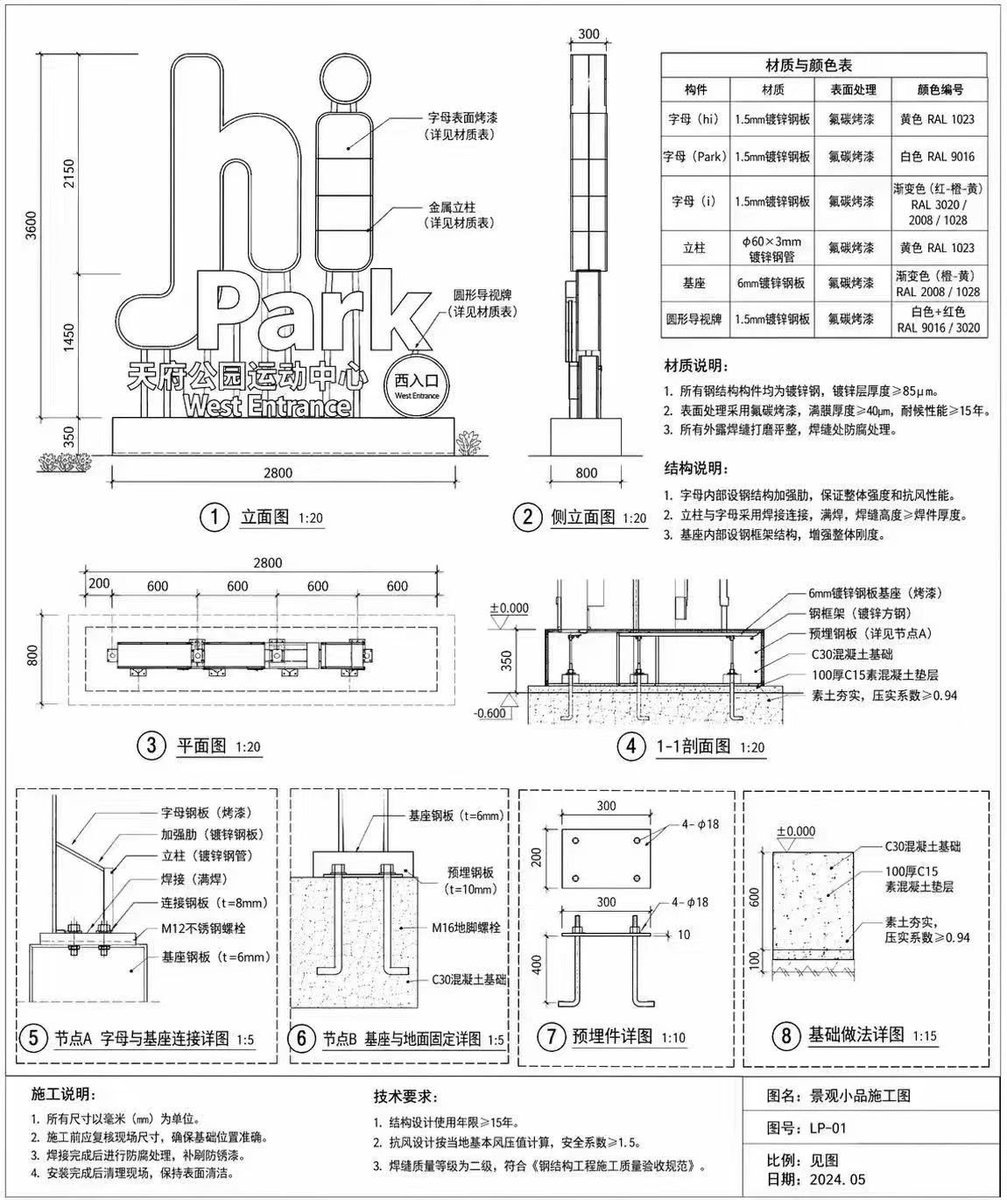
Create a complete, bilingual construction blueprint for an outdoor landscape sign, including elevations, sections, detail nodes, and material tables.
提示词 · EN
type
architectural construction drawingsubject
outdoor landscape signstyle
black and white technical line drawing, precise dimensions, engineering callouts, Chinese annotationssign_details
main_text
{argument name="main sign text" default="hi Park"}sub_text
{argument name="sub sign text" default="天府公园运动中心"}english_sub_text
West Entrancelayout
diagrams_count
8sections
item 1
position
top lefttitle
① 立面图 1:20description
Front elevation showing overall dimensions and callouts pointing to the letters and base.item 2
position
top middletitle
② 侧立面图 1:20description
Side elevation showing depth dimensions.item 3
position
top rightelements
item 1
type
tabletitle
材质与颜色表rows
6columns
4item 2
type
text_blocktitle
材质说明:points_count
3item 3
type
text_blocktitle
结构说明:points_count
3item 4
position
middle lefttitle
③ 平面图 1:20description
Top-down plan view with horizontal dimensions.item 5
position
middle righttitle
④ 1-1剖面图 1:20description
Cross-section view showing foundation and ground levels.item 6
position
bottom rowdescription
Four detailed node diagrams enclosed in dashed boxes.details
item 1
⑤ 节点A 字母与基座连接详图 1:5item 2
⑥ 节点B 基座与地面固定详图 1:5item 3
⑦ 预埋件详图 1:10item 4
⑧ 基础做法详图 1:15footer
position
bottom edgeblocks
item 1
title
施工说明:points_count
4item 2
title
技术要求:points_count
3item 3
title
title blockfields
item 1
图名: {argument name="project title" default="景观小品施工图"}item 2
图号: {argument name="drawing number" default="LP-01"}item 3
比例: 见图item 4
日期: {argument name="drawing date" default="2024.05"}关于这个提示词
Create a complete, bilingual construction blueprint for an outdoor landscape sign, including elevations, sections, detail nodes, and material tables. 它更适合作为 GPT Image 2 的概念艺术起点:先保留画面结构、主体关系和风格约束,再替换成你的品牌、人物或场景。
这条提示词使用结构化 JSON 组织信息,包含 type、subject、style、sign details、layout 等字段。保留这种层级能让模型更清楚地区分画面主题、布局、界面元素和细节约束。
使用时建议先小幅修改主体、场景、镜头和色调,再生成多个版本对比构图与细节。这样页面内容对用户有实际帮助,也避免把模型名或标签机械堆在正文里。
如何使用这个提示词
- Copy the full prompt into your preferred AI image generator (like Midjourney or Stable Diffusion).
- Select a model that excels at generating technical diagrams and architectural details.
- Customize the variables: change
main_sign_textandsub_sign_textto your desired sign content. - Generate the image. Review the output for precise linework, correct annotations, and structural clarity.
- Use the generated blueprint as a professional reference or inspiration for your design project.


