
GPT Image 2AI 提示词
Aviation UI Design System — Sora 2 Prompt
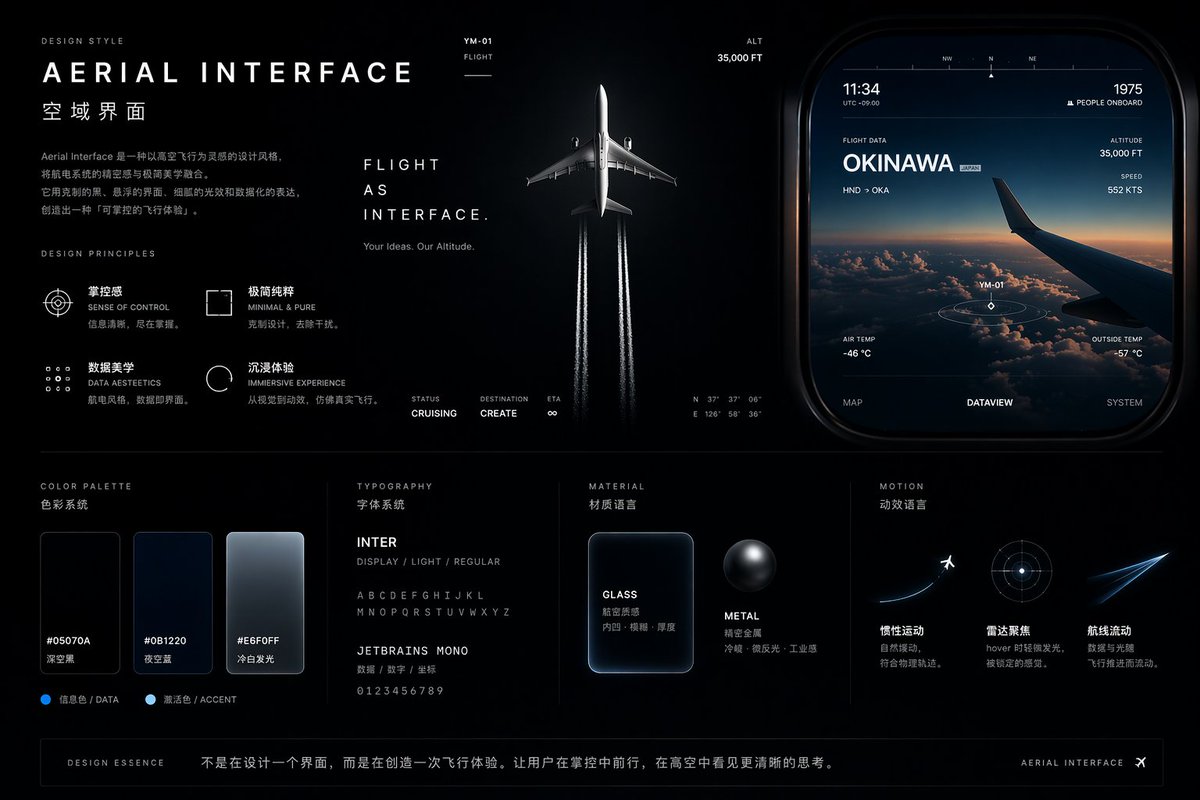
Generates a sleek dark-mode design system board with flight-inspired interfaces, glassmorphism, color palettes, typography specs, and UI mockups.
提示词 · EN
type
UI/UX Design System Concept Boardtheme
Aviation and flight interfaceoverall_style
Dark mode, sleek, modern, technical, futuristic, glassmorphismlayout
top_left
section
DESIGN STYLEtitle
{argument name="main title" default="AERIAL INTERFACE"}subtitle
{argument name="subtitle" default="空域界面"}description
Introductory paragraph about aerial interface designprinciples
count
4labels
item 1
SENSE OF CONTROLitem 2
MINIMAL & PUREitem 3
DATA AESTEETICSitem 4
IMMERSIVE EXPERIENCEtop_center
imagery
Top-down view of a commercial airplane flying upwards, leaving twin white contrails against a dark backgroundtext
item 1
FLIGHT AS INTERFACE.item 2
Your Ideas. Our Altitude.metrics
item 1
STATUS CRUISINGitem 2
DESTINATION CREATEitem 3
ETA ∞top_right
section
UI Widgetimagery
Rounded rectangular panel showing an airplane wing over clouds at sunsetdata_points
item 1
11:34item 2
1975 PEOPLE ONBOARDitem 3
FLIGHT DATA {argument name="destination" default="OKINAWA"}item 4
ALTITUDE 35,000 FTitem 5
SPEED 552 KTStabs
count
3labels
item 1
MAPitem 2
DATAVIEWitem 3
SYSTEMbottom_left
section
COLOR PALETTEswatches
count
3labels
item 1
#05070Aitem 2
#0B1220item 3
#E6F0FFbottom_mid_left
section
TYPOGRAPHYfonts
count
2labels
item 1
{argument name="primary font" default="INTER"}item 2
{argument name="secondary font" default="JETBRAINS MONO"}bottom_mid_right
section
MATERIALexamples
count
2labels
item 1
GLASS (frosted rectangle)item 2
METAL (dark sphere)bottom_right
section
MOTIONconcepts
count
3labels
item 1
Airplane taking offitem 2
Radar focus circleitem 3
Glowing flight streakfooter
text
DESIGN ESSENCE: Not just designing an interface, but creating a flight experience.关于这个提示词
Generates a sleek dark-mode design system board with flight-inspired interfaces, glassmorphism, color palettes, typography specs, and UI mockups. 它更适合作为 GPT Image 2 的概念艺术起点:先保留画面结构、主体关系和风格约束,再替换成你的品牌、人物或场景。
这条提示词使用结构化 JSON 组织信息,包含 type、theme、overall style、layout 等字段。保留这种层级能让模型更清楚地区分画面主题、布局、界面元素和细节约束。
使用时建议先小幅修改主体、场景、镜头和色调,再生成多个版本对比构图与细节。这样页面内容对用户有实际帮助,也避免把模型名或标签机械堆在正文里。
如何使用这个提示词
- Copy the full prompt JSON and paste it into your Sora 2 or compatible AI image generator.
- Customize the variables (e.g.,
main title,subtitle,destination, fonts) to match your project. - Choose an appropriate model version that supports detailed UI concept boards.
- Adjust the overall style or color palette if you prefer a different mood.
- Generate and iterate — refine arguments for sharper results.


