
GPT Image 2AI 提示词
Voxel Boss Fight Custom HUD — Sora 2 Prompt
Create voxel RPG screenshots with a customizable boss fight, monsters, and game HUD — ideal for concept art and storytelling.
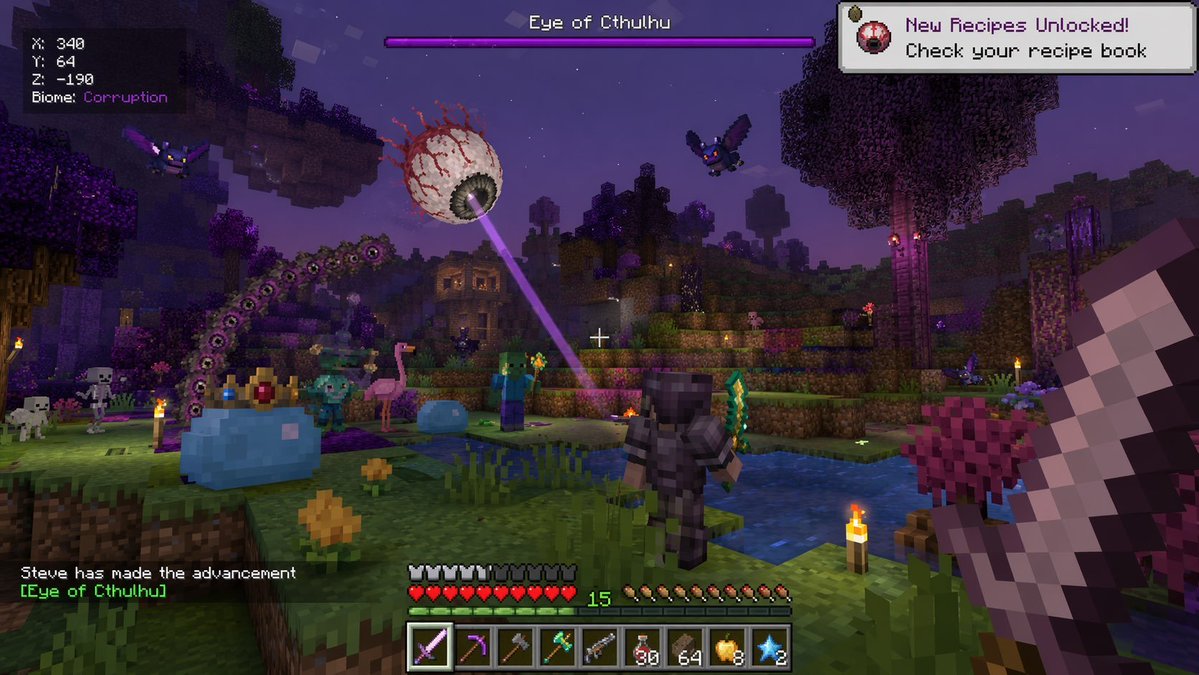
提示词 · EN
type
第一人称体素游戏截图environment
style
方块 3D 像素艺术time
夜晚biome
{argument name="biome name" default="腐化之地"}features
紫色草地、紫色树叶的树木、水池、火把entities
item 1
name
{argument name="boss name" default="克苏鲁之眼"}description
巨大的浮空眼球,正在发射紫色激光item 2
name
史莱姆王description
戴着金红宝石皇冠的巨大蓝色史莱姆item 3
name
{argument name="player name" default="史蒂夫"}description
穿着深色盔甲、手持绿色长剑的多人游戏角色item 4
name
敌对怪物count
6types
item 1
2 只骷髅item 2
2 只僵尸item 3
2 只紫色蝙蝠item 5
name
中立怪物count
2types
item 1
1 只粉色火烈鸟item 2
1 只小型蓝色史莱姆item 6
name
触手count
1description
带有眼睛的紫色分段触手first_person_view
right_hand
手持一把大型像素化铁剑ui_overlay
top_left
type
调试信息lines
item 1
X: 340item 2
Y: 64item 3
Z: -190item 4
生物群系: {argument name="biome name" default="腐化之地"}top_center
type
Boss 血条color
紫色label
{argument name="boss name" default="克苏鲁之眼"}top_right
type
提示通知icon
眼球text
新配方已解锁!请查看你的配方书bottom_left
type
聊天记录text
{argument name="player name" default="史蒂夫"} 达成了进度 [{argument name="advancement name" default="克苏鲁之眼"}]bottom_center
type
HUDstats
item 1
10 颗红心item 2
10 个护甲图标item 3
10 个饥饿度图标item 4
15 级等级指示器hotbar_slots
9hotbar_items
item 1
1 把紫色长剑item 2
1 把镐item 3
1 把斧item 4
1 根绿色法杖item 5
1 把枪item 6
30 瓶红色药水item 7
64 个棕色方块item 8
8 个金苹果item 9
2 颗蓝色星星center
type
准星style
白色十字准星关于这个提示词
Create voxel RPG screenshots with a customizable boss fight, monsters, and game HUD — ideal for concept art and storytelling. 它更适合作为 GPT Image 2 的概念艺术起点:先保留画面结构、主体关系和风格约束,再替换成你的品牌、人物或场景。
这条提示词使用结构化 JSON 组织信息,包含 type、environment、entities、first person view、ui overlay 等字段。保留这种层级能让模型更清楚地区分画面主题、布局、界面元素和细节约束。
使用时建议先小幅修改主体、场景、镜头和色调,再生成多个版本对比构图与细节。这样页面内容对用户有实际帮助,也避免把模型名或标签机械堆在正文里。
如何使用这个提示词
- Copy the prompt from this page.
- Open your preferred AI image generator (e.g., DALL·E 3, Midjourney, or Stable Diffusion).
- Paste the prompt and adjust the
{argument}variables (like biome, boss name, player name) to suit your scene. - Generate the image. If needed, refine the variables or reword parts for better results.
- Use the output for game concept art, mockups, or creative projects.


